web
You’re offline. This is a read only version of the page.
close
Skip to main content

Notifications

Announcements

No record found.

Community site session details

Community site session details

Session Id :
Microsoft Dynamics CRM (Archived)

COPY a link in CRM 2016 / D365

(0) ShareShare
ReportReport
Posted on by

How does one COPY a link in CRM 16/D365?  Email Link is all over the place in ribbon bars but what if you simply want to COPY the link and not HAVE to open a message dialog, then copy/paste (multiple steps - inefficient - doesn't help users who don't have email client installed)?

I've found an icon for COPY LINK that's showing up in some places in this version but none of them are actually FUNCTIONAL.   Cannot imagine what MS was thinking.

I've found this article which looked promising:

http://www.magnetismsolutions.com/blog/paulnieuwelaar/2014/07/23/the-return-of-copy-a-link-to-crm-2013-forms-as-bookmarklet

With this script:

javascript:$("iframe").filter(function () { return ($(this).css('visibility') =='visible') })[0].contentWindow.Mscrm.CommandBarActions.sendFormShortcut();

But it results in this error in Chrome.  Cannot test in IE due to some other problem we're having but don't want to use IE anyway.  This needs to work in Chrome. Other bookmarklets work fine in Chrome - only this one, that our users need doesn't work.
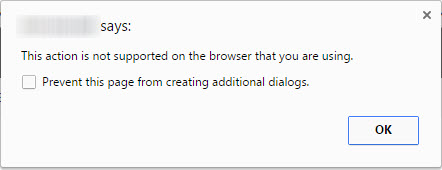
1_2D00_3_2D00_2017-1_2D00_26_2D00_48-PM.jpg

Also found this (managed) solution but it's from 2012 and there are zero comments so I'm reticent to test it without some feedback.

https://community.dynamics.com/crm/b/crmconsultinfo/archive/2012/03/23/direct-link-for-copy-address-to-clipboard-solution

*This post is locked for comments

I have the same question (0)
  • Verified answer
    NatrajY Profile Picture
    3,040 on at

    You can easily do this with my extension called Levelup -> https://chrome.google.com/webstore/detail/level-up-for-dynamics-crm/bjnkkhimoaclnddigpphpgkfgeggokam

    For help on the extension refer -> https://github.com/rajyraman/Levelup-for-Dynamics-CRM/blob/master/README.md

    The other option is to save the script below as a bookmarklet:

    javascript:(function(){var%20contentPanels=Array.from(document.querySelectorAll('iframe')).filter(function(d){return%20d.style.visibility!=='hidden'});if(contentPanels&&contentPanels.length>0){var%20Xrm=contentPanels[0].contentWindow.Xrm;var%20entityId=Xrm.Page.data.entity.getId();if(entityId){prompt('Ctrl+C%20to%20copy%20to%20clipboard',Xrm.Page.context.getClientUrl()+'/main.aspx?etn='+Xrm.Page.data.entity.getEntityName()+'&id='+entityId+'&newWindow=true&pagetype=entityrecord');}}})();void%200;
  • Daniel at VNS Profile Picture
    on at

    Great work Natraj (and great dog in your pic).  Thank you.

    I'm still in search of some script that would just copy to the clipboard, without the added step of CTRL-C and dealing with the dialog - the way things used to work in CRM 2011 and < but this is a good start and this Chrome extension will be a great addition to my toolset.  Thank you for your work on this!

  • Daniel at VNS Profile Picture
    on at

    BTW: do you know if it's possible to link this JS script to the COPY button that still exists in some parts of CRM?   I can't be certain where but i *do* know it's visible in the Service Activities record.  I haven't tried yet because I'm still learning how to use Ribbon Workbench but would it be possible to link this JS to the Copy a Link button in Ribbon Workbench?

    Thank you.

    1_2D00_3_2D00_2017-2_2D00_32_2D00_27-PM.jpg

  • NatrajY Profile Picture
    3,040 on at

    I have implemented the copy to clipboard feature already and will release it in the next version of the extension.

  • Daniel at VNS Profile Picture
    on at

    That is good news.

    Hey I wanted to let you know this tool is awesome - I just noticed you have a clone feature too.   Great work.  And thank you.

  • Suggested answer
    PS Profile Picture
    23,577 on at

    Hi Daniel,

    Javascript on a custom button is one way of doing it.

    The other way could be generating it via a workflow.

    for e.g. if you want to generate URL on Account entity, create two fields:

    Generate URL (Yes/No)

    URL: Text of type URL

    Now create a real time workflow

    Trigger on field change (Generate URL)

    If generate URL = Yes

    Update Account (URL)= Record Dynamic URL

    Now this can be copied anytime.

    Otherway of doing the same workflow, which might save you few steps:

    Create one field on Account- URL

    Trigger workflow on record creation

    Update Account (URL) = Record Dynamic URL

  • Daniel at VNS Profile Picture
    on at

    Natraj - how can an admin restrict end users from causing serious system damage with this tool?  Is that documented anywhere?

    I'm in a dilemma now because it's a matter of time before our users find this tool so I'd rather tell them about it if it'll make their jobs easier.   But it will make mine much harder if they unintentionally cause data corruption with God Mode, etc.

    Or will all existing user role permissions and field security settings still apply?

    Even then, could they cause any harm to data?  

    It seems even an admin could unintentionally cause problems.  I was just testing the Logical Names and Minimum Values buttons, and next thing i knew, audit history showed I changed a bunch of fields without intending to, I guess since auto-save is on.  I even hit Refresh + Autosave OFF but the record was still saved.

    Thank you.

  • NatrajY Profile Picture
    3,040 on at

    This tool does not override FLS and security roles. God Modes unhides/enables only what is already there on the form and it does not use any special API to do this. You could use a combination of FLS and Role based forms to block updates to fields that users should not update.

    Logical names function does not update fields but Minimum values does. Minimum field function is from www.magnetismsolutions.com/.../ahmed-anwar&;s-blog/2014/12/8/microsoft-dynamics-crm-2013-populating-required-fields-with-bookmarklets, so it does overwrite required fields with minimum values for the type and designed to use on a create form during testing.

    Refresh + Autosave Off probably didn't work, as autosave might have fired before. If you execute Refresh+Autosave off the first thing, right after you opened the form, it will prompt to save your changes when you navigate away from the form.

    Please log any issues you encounter in the GitHub repo -> github.com/.../Levelup-for-Dynamics-CRM

Under review

Thank you for your reply! To ensure a great experience for everyone, your content is awaiting approval by our Community Managers. Please check back later.

Helpful resources

Quick Links

Responsible AI policies

As AI tools become more common, we’re introducing a Responsible AI Use…

Neeraj Kumar – Community Spotlight

We are honored to recognize Neeraj Kumar as our Community Spotlight honoree for…

Leaderboard > 🔒一 Microsoft Dynamics CRM (Archived)

#1
SA-08121319-0 Profile Picture

SA-08121319-0 4

#1
Calum MacFarlane Profile Picture

Calum MacFarlane 4

#3
Alex Fun Wei Jie Profile Picture

Alex Fun Wei Jie 2

Last 30 days Overall leaderboard

Featured topics

Product updates

Dynamics 365 release plans



