web
You’re offline. This is a read only version of the page.
close
Skip to main content

Announcements

No record found.

News and Announcements icon
Community site session details

Community site session details

Session Id :
Microsoft Dynamics AX (Archived)

On Hand zero when Counting -> Trace Back Inventory Movement/On Hand

(0) ShareShare
ReportReport
Posted on by 2,075

Deer All,

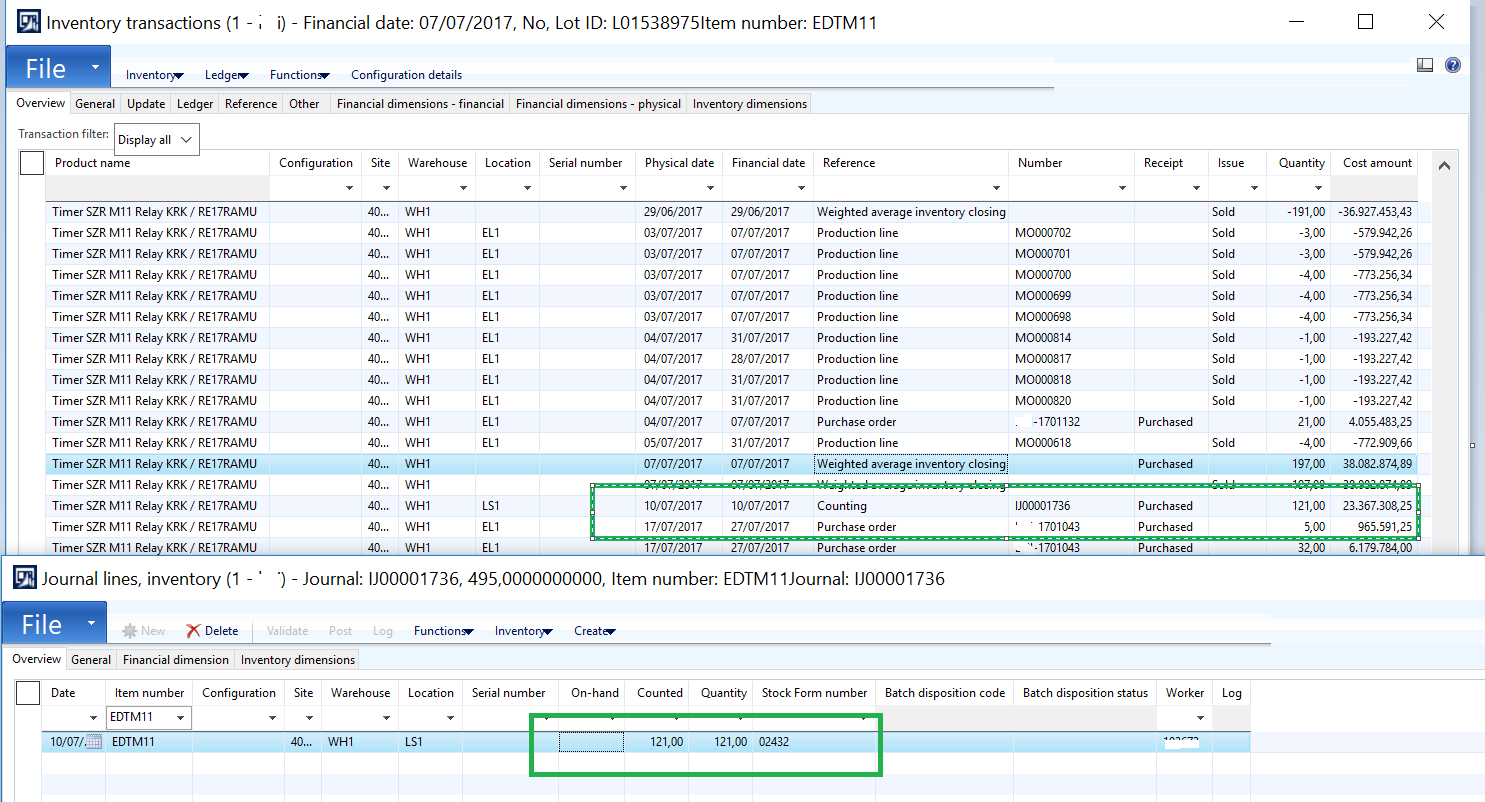
on july, my company did counting, right now we found something.

for item EDTM11, when we doing the counting, the on hand is zero.
Inventory-Transaction-Counting.png

How I can check/ trace back how much on hand I have, a moment before the counting begun.

I want to make wheather the on hand is zero, or there is something wrong when generate the counting header and line.

thank you, really appreciate your help.

*This post is locked for comments

I have the same question (0)
  • Verified answer
    Mahmoud Hakim Profile Picture
    17,887 on at

    you can use inventory by inventory dimension aging report, and select as on Date before counting direct to retrieve on hand inventory

  • benjamin84 Profile Picture
    2,075 on at

    Hi Mahmoud,

    another question pop up, when I generated report inventory dimension aging report, turn out that I have qty 191, but when I did counting on next day, in counting lines for those item, on hand stock is blank or zero, why the on hand zero, wasn't I have 192 prs ?

    Thanks

  • Mahmoud Hakim Profile Picture
    17,887 on at

    can you share more screen shoot from your reports and give me more details ?

  • benjamin84 Profile Picture
    2,075 on at

    Hi Mahmoud

    Yes, thanks in advance.

    here the attached picture 

    I inventory dimension aging I have on hand 191,

    I checked in inventory transaction and counting lines, when I did the counting, the on hand is blank or zero in counting lines for those item.

    I want to make sure if the counting lines was generated correctly. because the on hand in counting lines blank, but I have on hand 191.

    Thanks

    Inventory-Transaction-and-COunting-Lines.png

    Inventory-Transaction-and-COunting-Lines.png

  • Mahmoud Hakim Profile Picture
    17,887 on at

    can you show warehouse in the report?

    I think you miss some filtration

  • benjamin84 Profile Picture
    2,075 on at

    Hi Mahmoud

    I already did filtering for whse.

    do my filtering still not correct ?

    Thank you 

    Filtering.png

  • Suggested answer
    Mahmoud Hakim Profile Picture
    17,887 on at

    you must filter on wh1 in report as shown in on hand form

  • benjamin84 Profile Picture
    2,075 on at

    Yes Mahmoud,

    I filtered by wh1 or without whse,

    the qty is same 191.

    Thanks

    Inventory-By-Dimension.png

  • benjamin84 Profile Picture
    2,075 on at

    Hi Mahmoud,

    I still confuse with the result, when I generated inventory by dimension , I have on hand 191, but when I generated counting, my on hand is blank/zero.

    Really need your advice.

    Thanks

Under review

Thank you for your reply! To ensure a great experience for everyone, your content is awaiting approval by our Community Managers. Please check back later.

Helpful resources

Quick Links

Introducing the 2026 Season 1 community Super Users

Congratulations to our 2026 Super Stars!

Meet the Microsoft Dynamics 365 Contact Center Champions

We are thrilled to have these Champions in our Community!

Congratulations to the April Top 10 Community Leaders

These are the community rock stars!

Leaderboard > 🔒一 Microsoft Dynamics AX (Archived)

#1
CP04-islander Profile Picture

CP04-islander 24

#2
Michel ROY Profile Picture

Michel ROY 14

#3
Jagadabi Profile Picture

Jagadabi 6

Last 30 days Overall leaderboard

Featured topics

Product updates

Dynamics 365 release plans
