web
You’re offline. This is a read only version of the page.
close
Skip to main content

Notifications

Announcements

No record found.

Community site session details

Community site session details

Session Id :
Customer experience | Sales, Customer Insights,...
Answered

What are the Time zone references/values when doing Event (webinars, fairs, etc) Bulk import?

(0) ShareShare
ReportReport
Posted on by 86

Hi community,

We are importing events in Marketing 365 and one of the column for the Excel Template for Bulk import is Time Zone. The tooltip indicates values between -1500 to 1500 and I cannot find which timezones it corresponds to so my events in Sweden are set to Hawaii and Finnish one to Alaska.

Do you know where I can find  table with the correspondances?

I have the same question (0)
  • Verified answer
    ChadAlt Profile Picture
    367 User Group Leader on at

    Shoot, I thought this was an easy question, but it's not so simple. We can see that this column is a whole number type of "Time Zone" format. I also found there is a hidden table called timezonedefinitions, and it seems this is the key for you. 
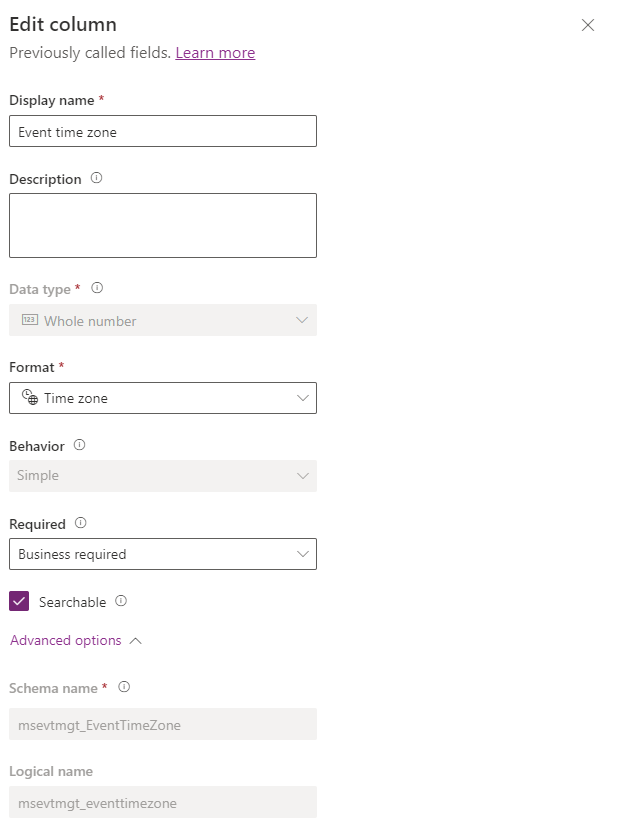
    pastedimage1661168594490v1.png

    By running the below query, you can get a JSON output of all the time zones and their timezonecode values.

    https://yourorg.crm.dynamics.com/api/data/v9.2/timezonedefinitions

    After parsing out the JSON response, I can see an example of timezonecode 5 for Pacific Standard Time, which aligns to an event I'm looking at. Perhaps there's an easier way to find this, but this should get you there!

    pastedimage1661169102098v2.png

  • Suggested answer
    Helene B. Profile Picture
    86 on at

    THANKS! Nice you took the time to look into it.

    After I posted this question I went back and kept trying to find a logic and a bit further research until I found a chart with the values which are not guessable easily.

    https://microsoft-business-applications.hcltech.com/crm-101/importing-values-time-zone-fields-dynamics-crm/

    According to your screenshot you have access to the portal power apps which sadly i don't but now I know i could have found it there too.

    Definitely not straightforward!

  • ChadAlt Profile Picture
    367 User Group Leader on at

    Ah, good find! Well now we know a couple of methods. The URL I showed above should work for you, as well, but that table looks to suffice.

    Glad you got it!

    If you wouldn't mind, would you mark my solution as helpful?

    Thanks! :)

Under review

Thank you for your reply! To ensure a great experience for everyone, your content is awaiting approval by our Community Managers. Please check back later.

Helpful resources

Quick Links

Responsible AI policies

As AI tools become more common, we’re introducing a Responsible AI Use…

Neeraj Kumar – Community Spotlight

We are honored to recognize Neeraj Kumar as our Community Spotlight honoree for…

Leaderboard > Customer experience | Sales, Customer Insights, CRM

#1
Tom_Gioielli Profile Picture

Tom_Gioielli 108 Super User 2025 Season 2

#2
Jimmy Passeti Profile Picture

Jimmy Passeti 50 Most Valuable Professional

#3
Gerardo Rentería García Profile Picture

Gerardo Rentería Ga... 49 Most Valuable Professional

Last 30 days Overall leaderboard

Product updates

Dynamics 365 release plans
