web
You’re offline. This is a read only version of the page.
close
Skip to main content

Notifications

Announcements

No record found.

Community site session details

Community site session details

Session Id :
Microsoft Dynamics CRM (Archived)

Dynamics 365 - Click to Call from Phone Number field

(0) ShareShare
ReportReport
Posted on by 50

Hi Community,

we have installed Dynamics CRM 365 - December Update (8.2.0.749).

Since migrating from CRM 2013 it is not possible anymore to click on the phonenumber field of a contact and execute directly a call.

When we do so, the "+" sign of the phone number is converted into "%2b" and the phone call cannot be executed within Cisco Jabber.
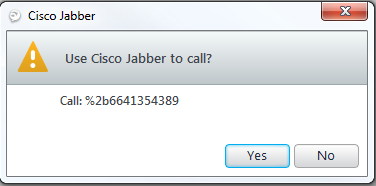
ClickToCall.png

We have set the telephony provider to "Skype for Business/Lync".

This behavior is also reproducible on a default organization of CRM without any customizations from our side.

Does anyone have same behavior and/or a solution for this?

Any information appreciated. :)

Thx and best regards,

Gerald Gut

*This post is locked for comments

I have the same question (0)
  • Glenn Turnbull Profile Picture
    on at

    Hi Gerald,

    Did you ever find a solution to this? I'm in the same situation.

    Cheers,

    Glenn

  • Gerald Gut Profile Picture
    50 on at

    Hi Glenn,

    we are in contact with Microsoft. So far, they are working on a JavaScript Snippet which can be used in our CRM JavaScript.

    Unfortunately, we do not have a prototype so far. Hopefully we receive one in near future and can begin to test.

    If you are interested, I can show you the test results as soon we got the snippet.

    Best regards,

    Gerald

  • Kinggotenks Profile Picture
    on at

    Hey, 

    do you have any new information? We are having the same problem since we updated to Dynamics 365. 

    Best regards,

    David 

  • Gerald Gut Profile Picture
    50 on at

    Hi David,

    unfortunately, no news so far. We did not receive the promised JavaScript snippet.

    I was hoping that with the new CRM Version 8.2.2 this issue was fixed.

    Also this dream crashed after installation of the new version.

    But maybe another one has further information?

    Best regards,

    Gerald Gut

    Additional Note:

    At least the Lookup issue on CRM forms has been fixed. :)

  • Kinggotenks Profile Picture
    on at

    I've tried a workaround by replacing the "+" with a "00", which worked quite well until I selected YES and really called someone. Jabber changed the "0049" to "+4949".

    Maybe it is some false setting with our Jabber Client. Can anyone else see the same behaviour?

  • Gerald Gut Profile Picture
    50 on at

    Hi David,

    I tried it in an default Organisation in CRM 365 (v 8.2.2.112 --> newest patch level) with the following results (0043 / +43 is the country code followed by phone number):

    --> 0043 resulted in %2b10043, when executing call it changed to 2210043

    --> +43 resulted in %2b43, when executing call it changed to 2243

    So also in the newest CRM version the issue is not gone.

    Best regards,

    Gerald

  • Kinggotenks Profile Picture
    on at

    75774.Capture.PNG 

    Do you have "Enable country/region code prefixing" on? Its in the System Settings under General. If yes, turn it off and try again.

  • Community Member Profile Picture
    on at

    Hi, Gerald Gut!

    Sorry for off-topic but: can you help me to clear how your CRM was integrated with Jabber as a telephony provider? I just unsuccessfuly googled that issue and only current post have some sign that it possible at all.

    Thanx for your time!

    Best regards from

    Eugene Fedorov

  • Gerald Gut Profile Picture
    50 on at

    Hi Evgeny Fedorov,

    I am not the expert for the telephone system, but I think it is working as follow:

    1. The phone field within CRM is of Type "Single Line of Text" and the Format is "Phone".

    2. Due to the Format "Phone", CRM recognize that it is a phone number and make it clickable in CRM

    3. When clicking on the phone number a "tel:" statement is executed which provides the phone number to the telephony tool.

    It depends now which tool you have defined to be executed as default for such calls.

    In my case cisco Jabber is set as default for the TEL protocol and therefore is used for the calls.

    Best regards,

    Gerald Gut

  • Suggested answer
    Kinggotenks Profile Picture
    on at

    I've found an unsupported workaround for the problem: In the form as an OnLoad function just add the following: 

    function suppress_C2D_Popout() {
      parent.Mscrm.ReadFormUtilities.openPhoneClient = function(phoneNumber) {
        if (!IsNull(phoneNumber)) {
     window.open("tel:"+phoneNumber,'_blank');
        }
      };
    }


    and in the views add the following code:

    scriptLoaded = false;
    function suppress_C2D_Popout()
    {
        if (!scriptLoaded)
        {
            scriptLoaded = true;
            Mscrm.Shortcuts.openPhoneWindow= function (phoneNumber, LOCID_COUNTRY_CODE,LOCID_USE_SKYPE_PROTOCOL){
             window.open("tel:" + phoneNumber, '_blank');
            }
        }
    }


    I have a ticket at microsoft for this, but they always redirect me to talk to cisco. But in my opinion it is not a problem on ciscos side, but on microsofts.

Under review

Thank you for your reply! To ensure a great experience for everyone, your content is awaiting approval by our Community Managers. Please check back later.

Helpful resources

Quick Links

Responsible AI policies

As AI tools become more common, we’re introducing a Responsible AI Use…

Neeraj Kumar – Community Spotlight

We are honored to recognize Neeraj Kumar as our Community Spotlight honoree for…

Leaderboard > 🔒一 Microsoft Dynamics CRM (Archived)

#1
SA-08121319-0 Profile Picture

SA-08121319-0 4

#1
Calum MacFarlane Profile Picture

Calum MacFarlane 4

#3
Alex Fun Wei Jie Profile Picture

Alex Fun Wei Jie 2

Last 30 days Overall leaderboard

Featured topics

Product updates

Dynamics 365 release plans



