web
You’re offline. This is a read only version of the page.
close
Skip to main content

Announcements

No record found.

News and Announcements icon
Community site session details

Community site session details

Session Id :
Finance | Project Operations, Human Resources, ...
Answered

Intrastat Commodity Codes Set-up

(0) ShareShare
ReportReport
Posted on by 215

Hi,

Under the Intrastat Category Hierarchy we can add a product to a specific node:

pastedimage1681718812046v1.png

If we do this, it means on the product record we only have only one option when we select Intrastat Commodity Code: 
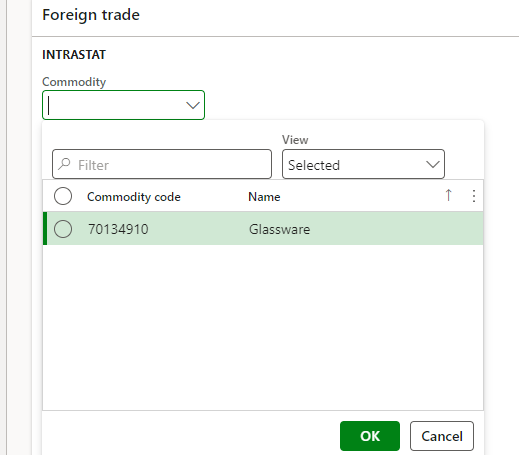
pastedimage1681718891936v2.png

However when we don't link the product to a specific node, we can select any commodity code from the drop down. 

Is there any advantage to linking the product to a specific node and thus limiting the selection? Struggling to see why this is part of the set-up, it just seems like more admin.

I have the same question (0)
  • Verified answer
    Hana Xue Profile Picture
    Microsoft Employee on at

    Hi James,

    You can add products in multiple intrastat category hierarchies, when selecting the intrastat commodity code for a product, the corresponding options will appear. Using this function helps us to link products and category hierarchies more conveniently. This functionality is similar to adding products in a purchasing category hierarchy.

    For you to find out the benefits of using category hierarchies and using products, you can check it as needed:

    pastedimage1681801069010v1.png

    pastedimage1681801082975v2.png

    pastedimage1681801112957v4.png

    Best Regards,

    Hana

  • James-Mc Profile Picture
    215 on at

    Thanks Hana - There doesn't appear to be any real advantage based on this but I suspect this is the best answer I'll get. Do you have a link to where you got those screenshots?

  • Hana Xue Profile Picture
    Microsoft Employee on at

    Hi James,

    The screenshots are found in the following link you can check it.

    About category hierarchies | Microsoft Learn

    Best Regards,

    Hana

Under review

Thank you for your reply! To ensure a great experience for everyone, your content is awaiting approval by our Community Managers. Please check back later.

Helpful resources

Quick Links

Introducing the 2026 Season 1 community Super Users

Congratulations to our 2026 Super Stars!

Congratulations to our 2025 Community Spotlights

Thanks to all of our 2025 Community Spotlight stars!

Leaderboard > Finance | Project Operations, Human Resources, AX, GP, SL

#1
Giorgio Bonacorsi Profile Picture

Giorgio Bonacorsi 613

#2
André Arnaud de Calavon Profile Picture

André Arnaud de Cal... 455 Super User 2026 Season 1

#3
Syed Haris Shah Profile Picture

Syed Haris Shah 292 Super User 2026 Season 1

Last 30 days Overall leaderboard

Product updates

Dynamics 365 release plans
