web
You’re offline. This is a read only version of the page.
close
Skip to main content

Announcements

No record found.

News and Announcements icon
Community site session details

Community site session details

Session Id :
Microsoft Dynamics AX (Archived)

Help installing AX 2012 R2 in test environment

(0) ShareShare
ReportReport
Posted on by 495

Hello Everyone,

Am doing a fresh installation of AX 2012 R2 in my test environment but each time I try it fails. Am installing the following components:

Application Object Server, Client, Business intelligence (Reporting Service extension and Analytic Services Configuration)

Apparently, AOS fail to start to finish the installation of the additional components. When I check the event log, its says"Object Server 01:  Fatal SQL condition during login. Error message: "The internal time zone version number stored in the database is higher than the version supported by the kernel (5/2). Use a newer Microsoft Dynamics AX kernel."

This is Fix by running the command

USE [Databasename]

Update SQLSYSTEMVARIABLES set value=2 where parm='SYSTIMEZONESVERSION'; 

After this was able to manually start AOS and install the addtional components.  But I think something is not right because my cubes are not appearing under AOS->System administration->BI-> Analyst Server-> OLAP database....

Can some please say why my installation is not going as smooth as it should without me having to do all of this? Please note I have copied the DB from my productive environment and have it in test.
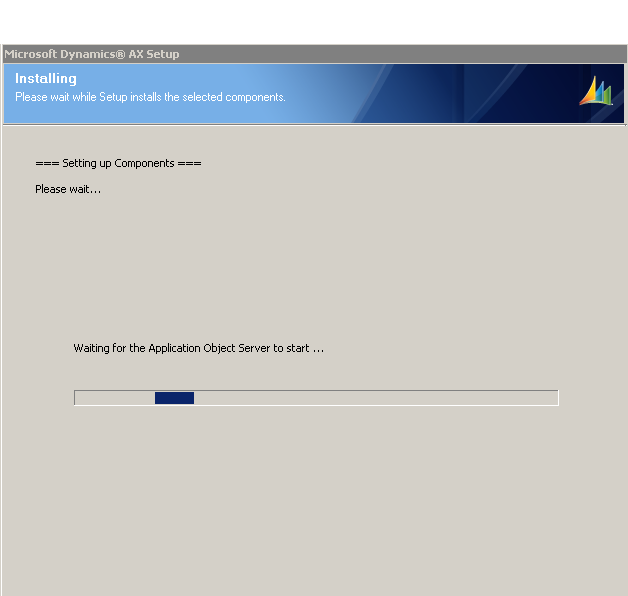
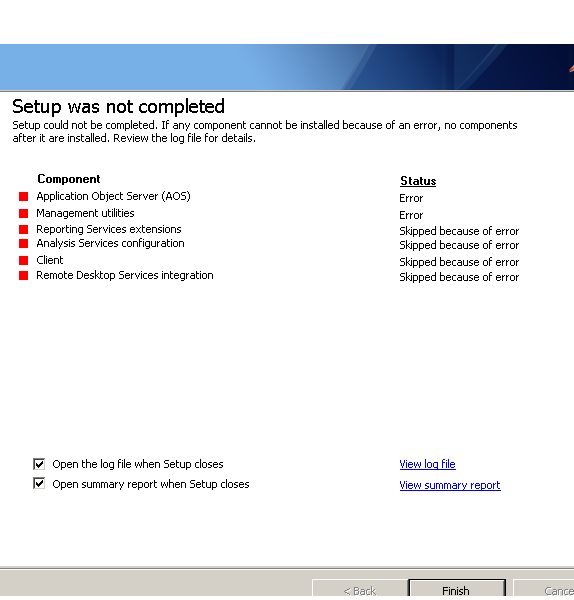
AX-installation-error1.pngAX-installation-error2.png

*This post is locked for comments

I have the same question (0)
  • Verified answer
    Martin Dráb Profile Picture
    239,385 Most Valuable Professional on at

    It sounds like the database was used by a newer build of AX than what you're installing. For example, you may have some cumulative updates in production that you haven't slipstreamed to the installer.

  • Lionel07 Profile Picture
    495 on at

    Hi Martin, what do you mean by Slipstreamed? I need to get it installed have a lot of work to do.... please help

  • Verified answer
    nmaenpaa Profile Picture
    101,172 Moderator on at

    Any AX updates that have been installed in your prod system should be placed in Updates folder under your AX install package. Then the installer will install AX with those hotfixes / updates. This is called slipstream update.

  • Suggested answer
    nmaenpaa Profile Picture
    101,172 Moderator on at

    For the cubes you need to install Analysis Services extensions, then run Analysis Services configuration in AX System administration module.

  • Lionel07 Profile Picture
    495 on at

    Thanks for this Nikolaos, what about if am using an image (ISO)for the installation?

  • Suggested answer
    nmaenpaa Profile Picture
    101,172 Moderator on at

    Just copy the files somewhere and add the updates.

  • Martin Dráb Profile Picture
    239,385 Most Valuable Professional on at

    You can also consult AX documentation: Include cumulative updates and hotfixes in a new installation (slipstreaming).

  • Lionel07 Profile Picture
    495 on at

    Thanks much guys really appreciate the help

Under review

Thank you for your reply! To ensure a great experience for everyone, your content is awaiting approval by our Community Managers. Please check back later.

Helpful resources

Quick Links

Introducing the 2026 Season 1 community Super Users

Congratulations to our 2026 Super Stars!

Meet the Microsoft Dynamics 365 Contact Center Champions

We are thrilled to have these Champions in our Community!

Congratulations to the March Top 10 Community Leaders

These are the community rock stars!

Leaderboard > 🔒一 Microsoft Dynamics AX (Archived)

#1
CP04-islander Profile Picture

CP04-islander 39

#2
Michel ROY Profile Picture

Michel ROY 14

#3
imran ul haq Profile Picture

imran ul haq 8

Last 30 days Overall leaderboard

Featured topics

Product updates

Dynamics 365 release plans
