web
You’re offline. This is a read only version of the page.
close
Skip to main content

Notifications

Announcements

No record found.

Community site session details

Community site session details

Session Id :
Microsoft Dynamics CRM (Archived)

Sub grid - Display a message if a row is not allow to be deleted from a sub grid

(0) ShareShare
ReportReport
Posted on by 1,532

Hi

I have a sub grid that I check to see if a row in the sub grid can be deleted. 

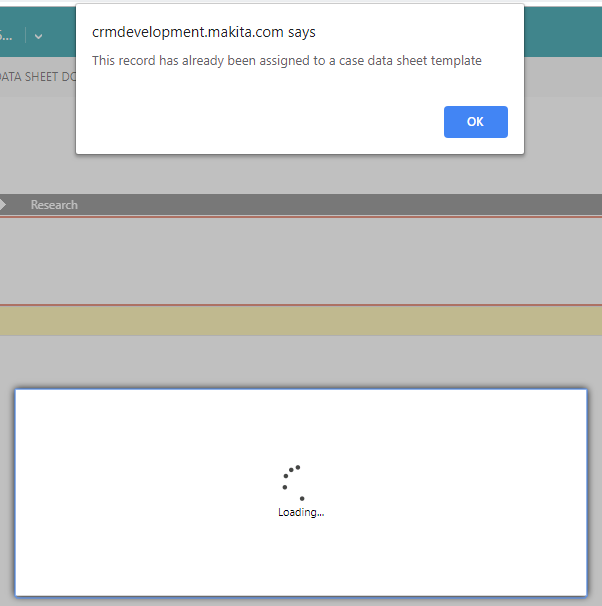
I made changes to the ribbon that would call a javascript function that will display the message.  I enable my rule on the DeleteSelectedRecord in the ribbon. That logic is working fine.

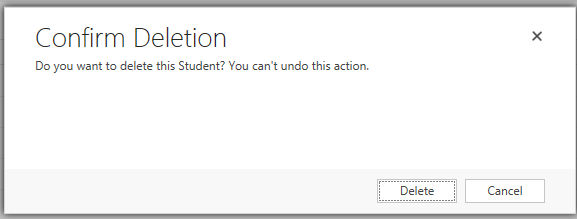
My problem that I am having is that the Delete Dialog is also appearing at the same time. 

I would like to know if there is a way to display the message without the delete dialog appearing.  However if the row can be deleted then show the Delete Dialog.
Delete-Sub-grid-row.PNG

0243.Dialog.PNG

*This post is locked for comments

I have the same question (0)
  • Suggested answer
    Mahadeo Matre Profile Picture
    17,021 on at

    Hi..

    You need to inject your code in button event and delete record only when your conditions are not fulfilled.

    Here is a sample code

    mahadeomatre.blogspot.com/.../inject-your-code-before-crm-button.html

  • rthompson Profile Picture
    1,532 on at

    Hi,

    This is somewhat working.  If I set the Function Name to "NaN" and remove the parameters then the Delete Dialog will no longer display.

    Is there a way to toggle between the two.   If deletion is allow display the original Delete Dialog.  If deletion is not allowed display my message.

    Standard-Delete.PNG

    How can I do this in a javascript.  Example (Mscrm.CommandBarActions.deactivate(CompanyId, entityName).

    Standard-Delete.PNG

    function ribbonSubgridDelete(entity_subgridtype) {
    
        var caseId = Xrm.Page.data.entity.getId().replace(/{/g, "").replace(/}/g, "");
    
        var entitysubgridtype = entity_subgridtype.split('_');
        var entityName = entitysubgridtype[0];
        var gridType = entitysubgridtype[1];
    
        var selectedEntityReferences = [];
        var selectedRows = Xrm.Page.getControl("NameOfGrid").getGrid().getSelectedRows();
        selectedRows.forEach(function (selectedRow, i) {
            selectedEntityReferences.push(selectedRow.getData().getEntity().getEntityReference());
        });
    
        var entityId = selectedEntityReferences[0].id.replace(/{/g, "").replace(/}/g, "");
        getCheckToSeeIfDataExist(caseId, selectId, "fileType");
    }
    
    function getCheckToSeeIfDataExist((caseId, selectId selectType) {
    
        var iselect = "$select=new_name";
        var ifilter = "&$filter=(new_selectid/Id eq guid'" + selectId + "' and new_CaseId/Id eq guid'" + caseId + "')";
        var options = iselect + ifilter;
    
        SDK.REST.retrieveMultipleRecords("new_table", options, tableCallBack, tableError, tableComplete);
    }
    
    function tableCallBack(results) {
    
        if (results.length > 0) {
            alert("This record has already been assigned");
            return false;
        } else {
            
           // How to call the Mscrm.DeleteRecord Function
    
    
            return true;
        }
    }
    
    function tableError(error) {
    }
    
    function tableComplete() {
    }
  • rthompson Profile Picture
    1,532 on at

    I believe I figure out how to use the Mscrm.DeleteRecord in javascript.

    The below changes seem to work.

    var selectedEntityReferences = [];
    var entityTypeCode = "10012"; //Capture the original Function Delete Record SubGrid var originalFunctionDeleteRecordSubgrid = null; function ribbonSubgridDelete(entity_subgrid) { var caseId = Xrm.Page.data.entity.getId().replace(/{/g, "").replace(/}/g, ""); var entitysubgridtype = entity_subgrid.split('_'); var entityName = entitysubgridtype[0]; var subGrid = entitysubgridtype[1]; var selectedRows = Xrm.Page.getControl(subGrid).getGrid().getSelectedRows(); selectedRows.forEach(function (selectedRow, i) { selectedEntityReferences.push(selectedRow.getData().getEntity().getEntityReference()); }); var selectId = selectedEntityReferences[0].id.replace(/{/g, "").replace(/}/g, ""); try { //to store the original function ones originalFunctionDeleteRecordSubgrid = Mscrm.GridCommandActions.deleteRecords; //add new standard subgrid var selectedControl = subGrid; var setTrue = true; Mscrm.GridCommandActions.deleteRecords = function (selectedControl, selectedEntityReferences, entityTypeCode) { getIfDataExist(caseId, selectId, subGrid); } } catch (e) { } } function getIfDataExist(caseId, selectId, subGrid) { var iselect = "$select=new_name"; var ifilter = "&$filter=(new_SelectId/Id eq guid'" + selectId, + "' and new_CaseId/Id eq guid'" + caseId + "')"; var options = iselect + ifilter; SDK.REST.retrieveMultipleRecords("entityName", options, CheckIfDataExistCallBack, CheckIfDataExistError, CheckIfDataExistComplete); } function CheckIfDataExistCallBack(results) { if (results.length > 0) { alert("This record has already been assigned to a case. Deletion is not allow!"); return false; } else { var selectedControl = subGrid; originalFunctionDeleteRecordSubgrid(selectedControl, selectedEntityReferences[0], entityTypeCode); return true; } } function CheckIfDataExistError(error) { } function CheckIfDataExistComplete() { }
  • Verified answer
    rthompson Profile Picture
    1,532 on at

    Please see this link for the complete resolved issue.

    community.dynamics.com/.../306346

Under review

Thank you for your reply! To ensure a great experience for everyone, your content is awaiting approval by our Community Managers. Please check back later.

Helpful resources

Quick Links

Responsible AI policies

As AI tools become more common, we’re introducing a Responsible AI Use…

Neeraj Kumar – Community Spotlight

We are honored to recognize Neeraj Kumar as our Community Spotlight honoree for…

Leaderboard > 🔒一 Microsoft Dynamics CRM (Archived)

#1
SA-08121319-0 Profile Picture

SA-08121319-0 4

#1
Calum MacFarlane Profile Picture

Calum MacFarlane 4

#3
Alex Fun Wei Jie Profile Picture

Alex Fun Wei Jie 2

Last 30 days Overall leaderboard

Featured topics

Product updates

Dynamics 365 release plans