Hello, i am trying to create a file to import new employees but also to update existing employees at the same time. I am using DMF entity "employee v2"
For the existing employee i am using their PERSONNELNUMBER, it will alow to modify the employee.
For the new employee i leave PERONNELNUMBER blank.!
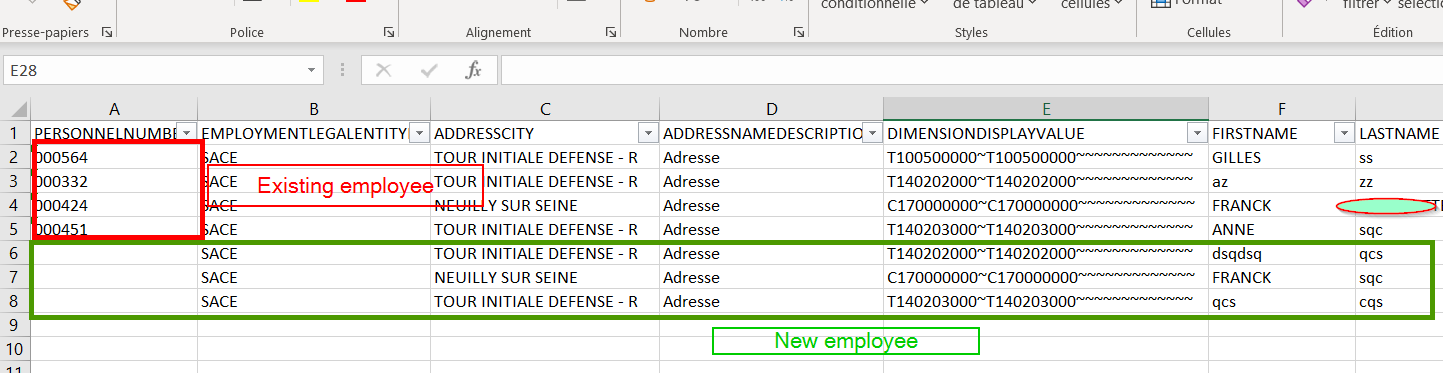
I have a error message for the new employee when importing:
SSIS Error Code DTS_E_OLEDBERROR. An OLE DB error has occurred. Error code: 0x80004005.
An OLE DB record is available. Source: "Microsoft SQL Server Native Client 11.0" Hresult: 0x80004005 Description: "The statement has been terminated.".
An OLE DB record is available. Source: "Microsoft SQL Server Native Client 11.0" Hresult: 0x80004005 Description: "Violation of PRIMARY KEY constraint 'I_23638STAGINGIDX'. Cannot insert duplicate key in object 'dbo.HCMEMPLOYEEV2STAGING'. The duplicate key value is (5637144576, test employé, test employé-2023-01-19T15:43:42-D09D825E98624FDABFE01539A8CF797A, , SACE, ).".
SSIS Error Code DTS_E_INDUCEDTRANSFORMFAILUREONERROR. The "OLE DB Destination.Inputs[OLE DB Destination Input]" failed because error code 0xC020907B occurred, and the error row disposition on "OLE DB Destination.Inputs[OLE DB Destination Input]" specifies failure on error. An error occurred on the specified object of the specified component. There may be error messages posted before this with more information about the failure.
SSIS Error Code DTS_E_PROCESSINPUTFAILED. The ProcessInput method on component "OLE DB Destination" (476) failed with error code 0xC0209029 while processing input "OLE DB Destination Input" (489). The identified component returned an error from the ProcessInput method. The error is specific to the component, but the error is fatal and will cause the Data Flow task to stop running. There may be error messages posted before this with more information about the failure.
Failed to insert record into staging table. The keys of the record are DEFINITIONGROUP, EMPLOYMENTID, EMPLOYMENTLEGALENTITYID, EXECUTIONID, PARTITION, PERSONNELNUMBER. Duplicate records must be removed from the file prior to import.-The duplicate key value is (5637144576, test employé, test employé-2023-01-19T15:43:42-D09D825E98624FDABFE01539A8CF797A, , SACE, )
'0' 'Employee V2' record(s) inserted in staging
Do you have any idea how to import new employee and modify employee at the same time ?







