web
You’re offline. This is a read only version of the page.
close
Skip to main content

Notifications

Announcements

No record found.

Community site session details

Community site session details

Session Id :
Microsoft Dynamics CRM (Archived)

Regarding.. bar in Outlook emails not displaying for some users

(0) ShareShare
ReportReport
Posted on by 40

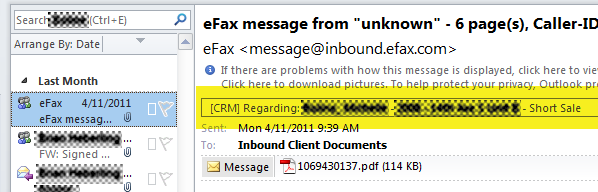
The bar below the email header in an Outlook email item  showing the "regarding" item displays for some of our users,but not for others. Unfortunately, the user  where it doesn't show is the CEO, and he relies on it to be sure an email got attached to the right Opportunity.

I didn't find any settings anywhere that controls this. All  users in the org  have Office 2010, and the CRM 2011 Outlook client.

Any ideas how to get this working? See snip below (PII obscured) for the user where it works. For the other user, just doesn't appear.
*This post is locked for comments

I have the same question (0)
  • Tim King Profile Picture
    75 on at

    Question ... For this user where it does not work ... When you "track" an email, do you see the CRM Regarding Pane at the bottom of the email, normally, where you see the people pane?

    For example ... If I create an email for an email address that I know does NOT exist, and track it, then send it....

    Then, go into SENT items, open the email, and look at the bottom you see the email is "red" ... indication, that although you tracked it, the system was not able to find a match ... therefore, the email address at the bottom changes to red... Allowing you to right click it and create a contact OR a lead out of it?

    Another question ... Did you "upgrade" this machine from a previous version? Which version?

    Tim King

  • Paul Dempsey Profile Picture
    40 on at

    We've just upgraded everything from CRM 4 (on premise). all users installed the Outlook client from the prompt in CRM web. I'll have to check specific build numbers later when everyone gets into the office.

    We can Set Regarding,  the "people" icon appears, but the Regarding pane doesn't show up.

    I'll follow up later after  the boss comes in and I can try your scenario. Our users typically use only Set Regarding (not Track), to ensure that the email gets attached to the correct entity instance. We've found that the automatic association just doesn't work well enough for our purposes.

Under review

Thank you for your reply! To ensure a great experience for everyone, your content is awaiting approval by our Community Managers. Please check back later.

Helpful resources

Quick Links

Responsible AI policies

As AI tools become more common, we’re introducing a Responsible AI Use…

Neeraj Kumar – Community Spotlight

We are honored to recognize Neeraj Kumar as our Community Spotlight honoree for…

Leaderboard > 🔒一 Microsoft Dynamics CRM (Archived)

#1
SA-08121319-0 Profile Picture

SA-08121319-0 4

#1
Calum MacFarlane Profile Picture

Calum MacFarlane 4

#3
Alex Fun Wei Jie Profile Picture

Alex Fun Wei Jie 2

Last 30 days Overall leaderboard

Featured topics

Product updates

Dynamics 365 release plans



