web
You’re offline. This is a read only version of the page.
close
Skip to main content

Notifications

Announcements

No record found.

Community site session details

Community site session details

Session Id :
Customer experience | Sales, Customer Insights,...
Answered

How to make a Marketing Email attached to a contact (to be visible in the Contact view)?

(0) ShareShare
ReportReport
Posted on by

Hi there!

Is it possible to connect the Marketing App with the Sales App? To be more specific - the activities from a customer journey (Email, phone call) are not shown in a contact´s view. Is there a trick, hack or advanced settings hidden gem that connects an activity with the contact? 

Many many thanks for your advice in advance!

Cheers

Simona

I have the same question (0)
  • Suggested answer
    Nya Profile Picture
    29,060 on at

    Hi Simona,

    It is recommended to use Dynamics 365 App for Outlook to track the emails from Outlook and set the regarding as the certain contact when tracking.

    Dynamics 365 App for Outlook Overview (Dynamics 365 apps) | Microsoft Docs

    Here is the configuration tutorial:

    How to deploy Dynamics 365 App for Outlook | Microsoft Docs


    If this helped you, I'd appreciate it if you'd mark this as a Verified Answer, which may in turn help others as well.

    Best Regards,

    Nya

  • Community Member Profile Picture
    on at

    Thank you Nya!

    We have Outlook connected with CRM, but that does not have an effect on the Customer Journey Marketing Emails - those are the ones that are not being tracked in the contact view.

    Is there any solution for that?

    Thank you again :)

  • Suggested answer
    Nya Profile Picture
    29,060 on at

    Hi Simona,

    Have you tried to configure the app for the sender of the marketing emails? Then you can track the emails from the sent box manually.

    pastedimage1623825551830v6.png

    pastedimage1623825501541v4.png

    If this helped you, I'd appreciate it if you'd mark this as a Verified Answer, which may in turn help others as well.

    Best Regards,

    Nya

  • Community Member Profile Picture
    on at

    Yes, this functionality is working, but all the marketing emails, that are being sent from a customer journey do not appear in Outlook in the first place.

    So in theory I would like to have the marketing email (see in red) pinned to all the 127 contacts that have received the email:

    pastedimage1623826354489v1.png

    When I look up the contacts, that are in the marketing list, there is no trace of the marketing email ("Lösung..") in their activity field:

    pastedimage1623826573539v2.png

  • Suggested answer
    Nya Profile Picture
    29,060 on at

    Hi Simona,

    First of all, Marketing email is not the same thing as Activity email as they are two different entities and only the email can be tracked.

    However, if you can find the Marketing emails sent to the contacts in your outlook, they are still able to be tracked. This is the equivalent of copying a Marketing Email into an Activity Email. You can set an email address which has been configured in Dynamics as the Reply-to Address in the Marketing email, so that if the contacts reply to the email, the replies can be tracked. Of course this is not a very ideal solution but there is no better solution at the moment.


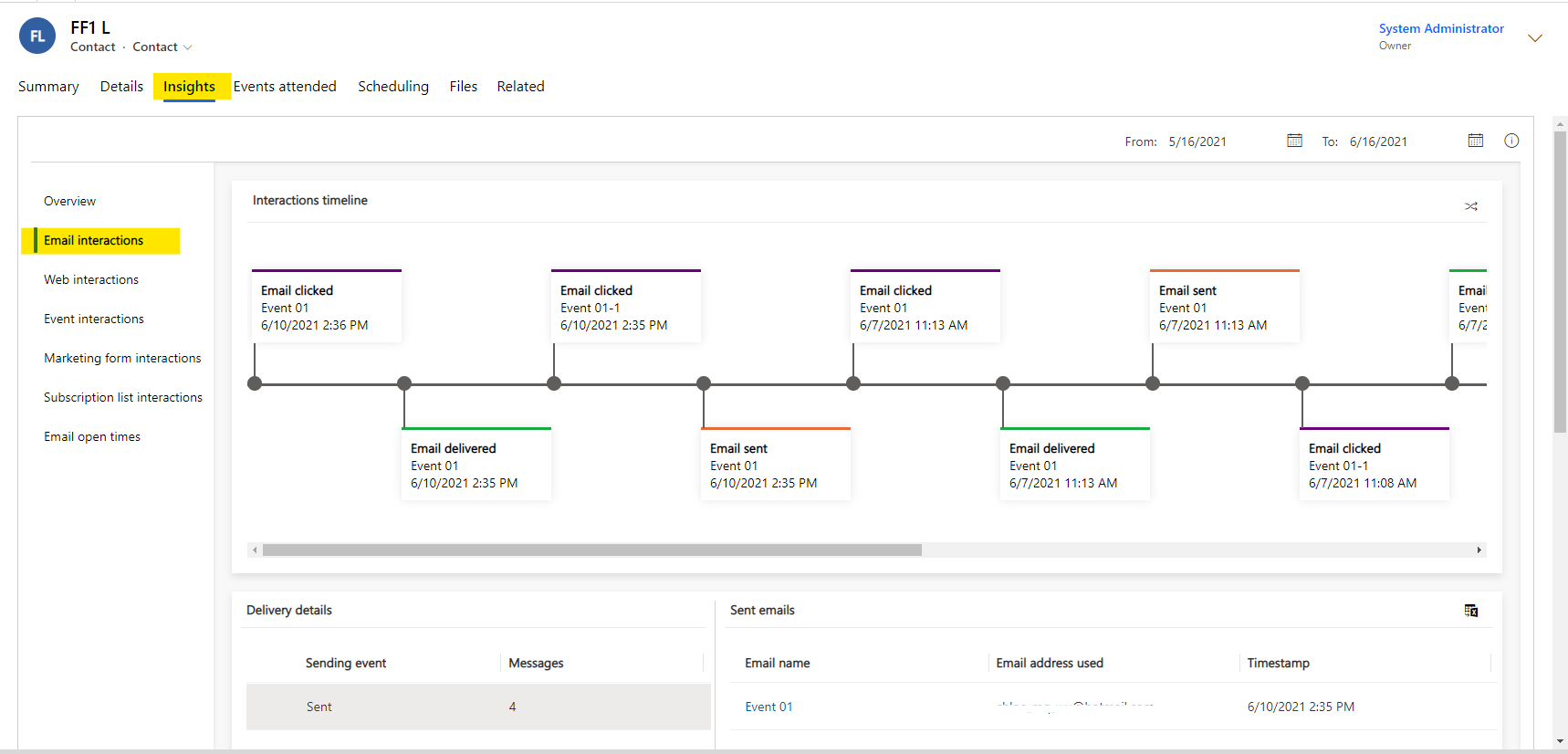
    In addition, although Marketing Emails are not automatically tracked, interactions about them are still associated with contacts and you can view the insights tab for each contact to get the Marketing Emails associated with that contact.
     pastedimage1623827776402v1.png

    If this helped you, I'd appreciate it if you'd mark this as a Verified Answer, which may in turn help others as well.

    Best Regards,

    Nya

  • Community Member Profile Picture
    on at

    Thank you so much Nya! This explains a lot :)

    One last question though - the insights tab is not visible for me. Is this an extra feature that does not come with the Sales or Marketing app?

  • Suggested answer
    Nya Profile Picture
    29,060 on at

    Hi Simona,

    The Insights tab comes with the system and cannot be modified.

    Please check if it is removed from the main form of the Contact entity accidentally. It can be added again by dragging it from the right-hand Field Explorer.

     pastedimage1623837614749v1.png

    Another way to access the Insights is to switch to the Insights form of the Contact.

     pastedimage1623837619357v2.png

    If this helped you, I'd appreciate it if you'd mark this as a Verified Answer, which may in turn help others as well.

    Best Regards,

    Nya

  • Community Member Profile Picture
    on at

    A rookie question form my side - in your first screenshot - where exactly can I find the Field Explorer?

  • Suggested answer
    Fubar Profile Picture
    2,761 on at

    Re Field explorer - this is a view of the Classic Interface (if in the make.powerapps.com interface there is a button on the Command Bar to switch to it - the button is not available in all pages in the new interface but if you are on a Form it is).

    Emails not showing on the Timeline is a pain, one workaround is to create a Marketing Activity Template and set it up so it indicates the type of Email sent etc, then in your Journey add it after the Send Email step - this will at least give an indication in the Timeline that an email was sent (but not the content of the email etc) - users can then use it as a prompt to go look in insights

  • Verified answer
    Nya Profile Picture
    29,060 on at

    Hi Simona,

    It can be found in the position of the red box.

     pastedimage1623893688136v1.png

    This interface itself can be accessed by navigating to Advanced Settings > Settings > Customization > Customize the system. Then expand the entities list and find the main form of Contact entity.

     pastedimage1623893703180v2.png

    pastedimage1623893708023v3.png

    If this helped you, I'd appreciate it if you'd mark this as a Verified Answer, which may in turn help others as well.

    Best Regards,

    Nya

Under review

Thank you for your reply! To ensure a great experience for everyone, your content is awaiting approval by our Community Managers. Please check back later.

Helpful resources

Quick Links

Responsible AI policies

As AI tools become more common, we’re introducing a Responsible AI Use…

Neeraj Kumar – Community Spotlight

We are honored to recognize Neeraj Kumar as our Community Spotlight honoree for…

Leaderboard > Customer experience | Sales, Customer Insights, CRM

#1
Tom_Gioielli Profile Picture

Tom_Gioielli 170 Super User 2025 Season 2

#2
#ManoVerse Profile Picture

#ManoVerse 61

#3
Gerardo Rentería García Profile Picture

Gerardo Rentería Ga... 52 Most Valuable Professional

Last 30 days Overall leaderboard

Product updates

Dynamics 365 release plans
