web
You’re offline. This is a read only version of the page.
close
Skip to main content

Notifications

Announcements

Community site session details

Community site session details

Session Id :
Finance | Project Operations, Human Resources, ...
Answered

How to fix a posting on a nonexistent financial dimension

(0) ShareShare
ReportReport
Posted on by

D365FO (on-prem)

Recently we discovered that in our PROD env there have been a small number of posting with a non existent financial Dimension.

All those posting occurred around 3 months ago,  and are all related to Purchase orders tied to a specific ProjId.

pastedimage1684922704468v5.png

We tried to replicate the issue without success, and I'm starting to think that it's due to some customization that now has already been fixed.

Usually we fix wrong (but existing) financial dimension posting with a general journal, but in this case we can't because the original one does not exist and it won't let me put that dimension in, throwing the following error.
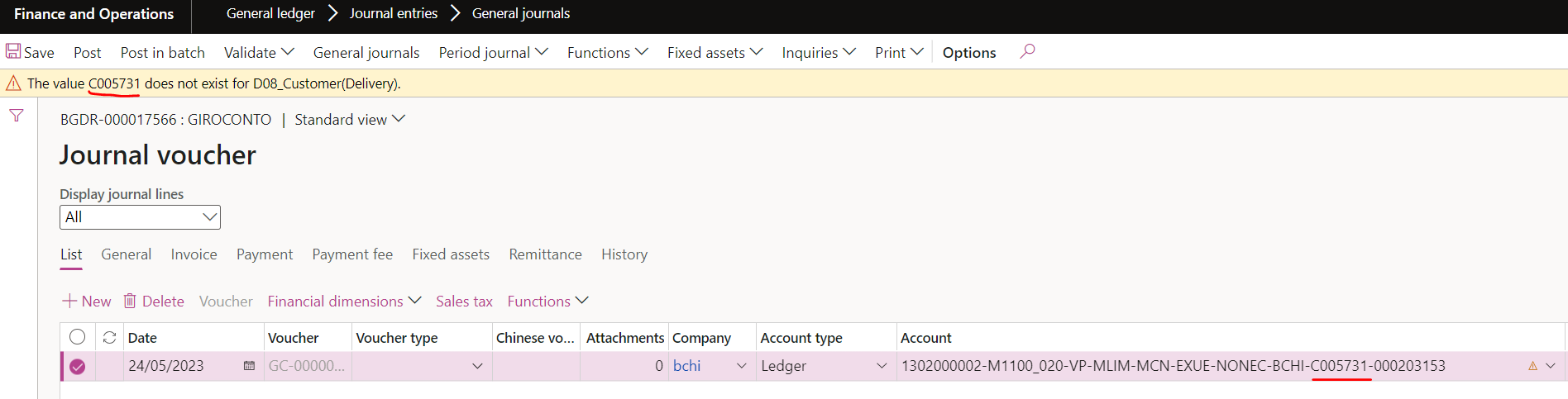
Is there a way to fix this situation?

Any hint on will be appreciated.

Thanks 

I have the same question (0)
  • Suggested answer
    BillurSamdancioglu Profile Picture
    20,111 Most Valuable Professional on at

    Hi,

    Unfortunately there is no way to do so.

    Is it possible that you create the dimension and then make it suspended?

  • Supp Profile Picture
    on at

    Hi,

    no, I've checked and it's not suspended, it really does not exists in that company

    But it does exists in another one.

    don't really know what to do at this point

  • Verified answer
    André Arnaud de Calavon Profile Picture
    301,704 Super User 2025 Season 2 on at

    Hi Supp,

    We don't have information what exactly happened. Are you able to create the same dimension value for this company and then post a reversal?

  • Supp Profile Picture
    on at

    just a follow up: we did as you suggested and everything is fine now

    After that we've disabled the dimension

    Thanks

    ps. Can't find the button to mark your reply as the correct answer

  • André Arnaud de Calavon Profile Picture
    301,704 Super User 2025 Season 2 on at

    Hi Supp,

    I checked the type of the question and switched it to a discussion and back to a question. I think the option to mark answers is back now.

Under review

Thank you for your reply! To ensure a great experience for everyone, your content is awaiting approval by our Community Managers. Please check back later.

Helpful resources

News and Announcements

Season of Giving Solutions is Here!

Quick Links

Responsible AI policies

As AI tools become more common, we’re introducing a Responsible AI Use…

Neeraj Kumar – Community Spotlight

We are honored to recognize Neeraj Kumar as our Community Spotlight honoree for…

Leaderboard > Finance | Project Operations, Human Resources, AX, GP, SL

#1
Abhilash Warrier Profile Picture

Abhilash Warrier 843 Super User 2025 Season 2

#2
André Arnaud de Calavon Profile Picture

André Arnaud de Cal... 428 Super User 2025 Season 2

#3
Martin Dráb Profile Picture

Martin Dráb 357 Most Valuable Professional

Last 30 days Overall leaderboard

Product updates

Dynamics 365 release plans
