web
You’re offline. This is a read only version of the page.
close
Skip to main content

Notifications

Announcements

No record found.

Community site session details

Community site session details

Session Id :
Microsoft Dynamics CRM (Archived)

This mailbox is disabled for email processing. For more information, see the alerts.

(0) ShareShare
ReportReport
Posted on by

Hi Dear:

I am setting up Email Router.

The Message I am seeing are below:

After configuring emails Router Settings, I have to face this message.
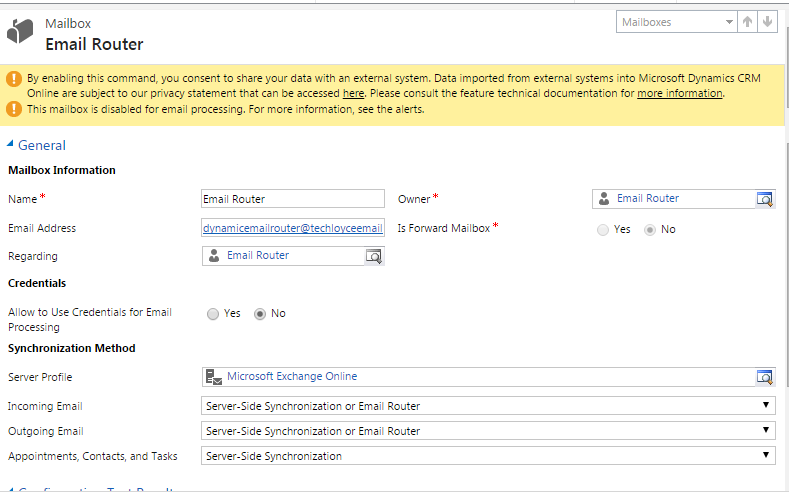
4201.Email1.PNG

While opening alerts, I am getting this message.
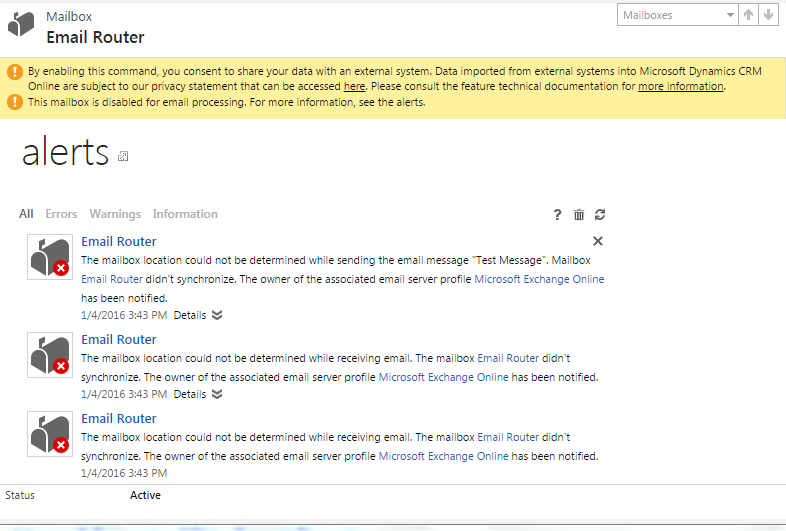
7824.Email2.PNG

Please provide guidelines, so that I can get proper solution for this problem.

I also posted for this question, but No suitable solution found.

*This post is locked for comments

I have the same question (0)
  • ChangeFrenzoId Profile Picture
    465 on at

    Hi Shakeel,

    Please Refer : https://community.dynamics.com/crm/f/117/t/178913

  • Community Member Profile Picture
    on at

    Thanks Dear... I tried so, but again have to face same error message in alerts.

  • Suggested answer
    flavia.takushi Profile Picture
    on at

    Hi M Shakeel,

    You only need to test and enable a mailbox if you’re using server-side synchronization as your synchronization method. You don’t need to test and enable a mailbox if you’re using CRM for Outlook or the Email Router for synchronization purposes.

    community.dynamics.com/.../test-and-enable-mailboxes-in-microsoft-dynamics-crm-2015

    This is the reason why you are getting errors in the alerts tab.

    Also, you don`t need to fill the field 'Email Server Profile' as you are using Email Router.

    In addition, make sure the Email Router is defined on synchronization method on Settings > Administration > Email tab.

    You can test the mailboxes from users and queues on Email Router Configuration Manager.

    For more information on Email Router configuration, please check:

    technet.microsoft.com/.../hh699786.aspx

Under review

Thank you for your reply! To ensure a great experience for everyone, your content is awaiting approval by our Community Managers. Please check back later.

Helpful resources

Quick Links

Responsible AI policies

As AI tools become more common, we’re introducing a Responsible AI Use…

Neeraj Kumar – Community Spotlight

We are honored to recognize Neeraj Kumar as our Community Spotlight honoree for…

Leaderboard > 🔒一 Microsoft Dynamics CRM (Archived)

#1
SA-08121319-0 Profile Picture

SA-08121319-0 4

#1
Calum MacFarlane Profile Picture

Calum MacFarlane 4

#3
Alex Fun Wei Jie Profile Picture

Alex Fun Wei Jie 2

Last 30 days Overall leaderboard

Featured topics

Product updates

Dynamics 365 release plans



