web
You’re offline. This is a read only version of the page.
close
Skip to main content

Announcements

No record found.

News and Announcements icon
Community site session details

Community site session details

Session Id :
Microsoft Dynamics AX (Archived)

Error after browsing products information in the online store

(0) ShareShare
ReportReport
Posted on by 312

Hi All,

When trying to browse online store in AX7, i get the below error. This is despite running the distribution jobs and publishing the channel and catalog. Any suggestions?
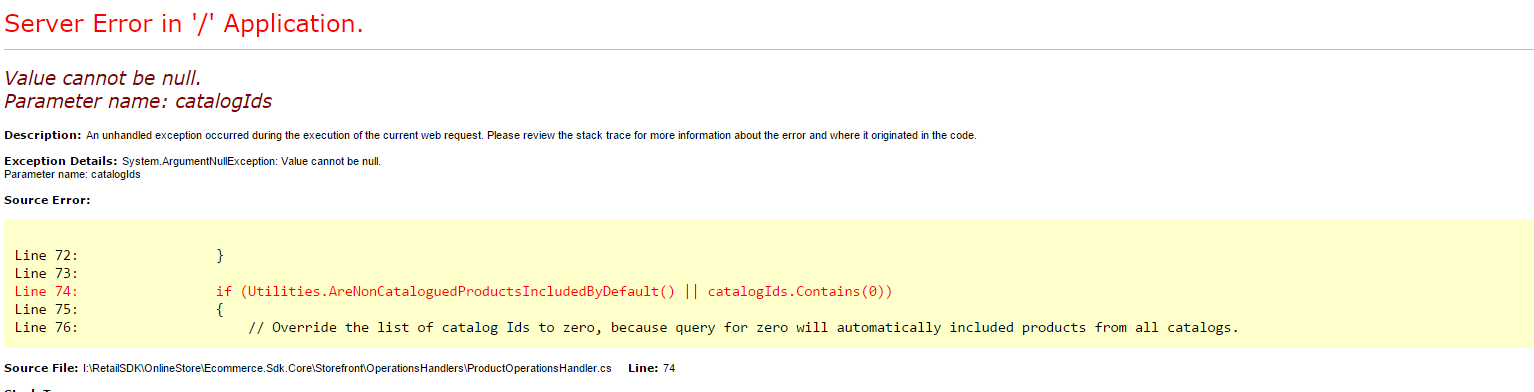
              Channel-Publish.png

Regards

Hitesh Manglani

*This post is locked for comments

I have the same question (0)
  • Hitesh Manglani Profile Picture
    312 on at

    I did a full sync and retried the steps of  running the distribution jobs and publishing the channel, catalog and got fixed however the issue recurs without any changes that I am aware of. Please let me know any suggestions.

  • Verified answer
    SergeyP Profile Picture
    2,928 on at

    This could take place in CTP8 (it was fixed in RTW) if your browser's preferred language doesn't match the language set on a catalog published to your channel. So, please compare those and if they are different change one of those so they match.

    To find out what the catalog language is you can do at least any of these:

    1. Via AX UI

    • Open Retail and commerce->Catalogs and assortments-> All catalogs 
    • Select your catalog and then click Edit
    • Click CATALOGS in the top bar
    • Look under Translations (in top right corner), there is a link Translate, click it and you will see a set of languages

    2. By querying your CRT DB:

    • Find out your channel ID (the column CHANNELID) by executing the following in SQL Server Management Studio:

    SELECT * FROM crt.STORAGELOOKUPVIEW

    • Execute (don't forget to provide the CHANNELID):

    SELECT * FROM crt.GETCATALOGSPUBLISHEDTOACTIVECHANNEL(YourChannelIdIsHere, 1)


             and look into LANGUAGE column.

    If your languages match but the problem still exists please share the result of the SQL statements above.

  • Hitesh Manglani Profile Picture
    312 on at

    Hello Sergey,

    Thanks for your reply. I checked the CRT DB and the browser language settings and they do seem to match. Please find attached the screenshots of the executed queries against the CRT DB and the browser settings

    ECommerce-Browser-Language-Settings.png

    IE 11 Browser language settings.

    ECommerce-Browser-Language-Settings.png

    Regards

    Hitesh

  • SergeyP Profile Picture
    2,928 on at

    Can you enable Informational messages for Retail Server and send here those which occur before and after the problematic call? Please also posts any warnings/errors you might see in the log.

  • Hitesh Manglani Profile Picture
    312 on at

    Hello Sergey,

    I have moved to RTW and so far havent seen this issue recurring

    Regards

    Hitesh

Under review

Thank you for your reply! To ensure a great experience for everyone, your content is awaiting approval by our Community Managers. Please check back later.

Helpful resources

Quick Links

Introducing the 2026 Season 1 community Super Users

Congratulations to our 2026 Super Stars!

Meet the Microsoft Dynamics 365 Contact Center Champions

We are thrilled to have these Champions in our Community!

Congratulations to the April Top 10 Community Leaders

These are the community rock stars!

Leaderboard > 🔒一 Microsoft Dynamics AX (Archived)

#1
CP04-islander Profile Picture

CP04-islander 24

#2
Michel ROY Profile Picture

Michel ROY 14

#3
Jagadabi Profile Picture

Jagadabi 6

Last 30 days Overall leaderboard

Featured topics

Product updates

Dynamics 365 release plans
