web
You’re offline. This is a read only version of the page.
close
Skip to main content

Notifications

Announcements

No record found.

Community site session details

Community site session details

Session Id :
Microsoft Dynamics CRM (Archived)

Problem refreshing webresource using setSrc and getSrc

(0) ShareShare
ReportReport
Posted on by 315

Hi all,

I have a webresource that I need to refresh in formOnload.

As a result setStatusProgressVisibility function is called(See the below code)

function setStatusProgressVisibility() {
    var wrControl = Xrm.Page.getControl("WebResource_StatusProgress");
    arrStatusProgress = ["100000024","100000044","100000026","100000028","100000091","100000092"];
    wrControl.setLabel("Investigation Status");
   wrControl.setVisible(true);

       var src = wrControl.getSrc()
        wrControl.setSrc(null);
        wrControl.setSrc(src);
      return;
}

this function refreshes the html Webresource and also set label on it and also set arrStatusProgress  variable on parent javascript which later is used inside the html webresource by using window.parent[arrStatusProgress ]

The problem that I have is that, this code used to work correctly on CRM2011 but not on CRM365 and it throws following error which it hits wrControl.setSrc(src)

Unable to get property 'location' of undefined or null reference.
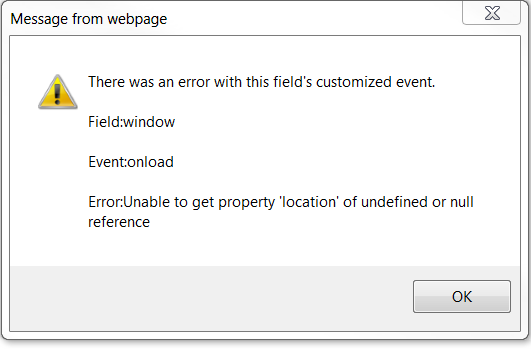
0121.error.PNG


Please note that : The legacy rendering is checked in system setting.

I really confused and not sure how to fix  the issue as getSrc and setSrc are valid functions in sdk!

Any help would be greatly appreciated.

*This post is locked for comments

I have the same question (0)
  • Maryam Profile Picture
    315 on at

    I figured out when I set the Use legacy form rendering to "No" then setSRC will start to work. Seems it is a Bug.

    But I can not change this setting to No . It has to be done later we are in the first stage of conversion from 2011 and 365 and we turned this on.

    My question now is how I can fix my issue keep the Legacy rendering Yes?

  • Suggested answer
    Community Member Profile Picture
    on at

    Hello Maryam,

    Can you share your "WebResource_StatusProgress" code?

    It looks this code is fine

  • Suggested answer
    RaviKashyap Profile Picture
    55,410 Moderator on at

    Hi Maryam,

    I don't think this error is coming from that web resource code you have shared. It is possible that some other code is faling (i think window.location) due to which this code is not working. And when you are turning off the legacy rendering, the other code started working and so does the refresh web resource.

    I would suggest you to debug your script. Or you verify the web resource code separately to confirm the issue.

    Hope this helps.

  • Suggested answer
    gdas Profile Picture
    50,091 Moderator on at

    Hello Maryam ,

    The error is related to attribute "location" you are looking for in the object  but its not found in the object.

    As Ravi mentioned that this error is not coming with the code which you have shared , please check where you have written "location" keywords  in your code  and share the code.

    As the  object where you are looking for the "location" , the object does not contain the "location" property and its popped up the error.

    Hope this helps you.

Under review

Thank you for your reply! To ensure a great experience for everyone, your content is awaiting approval by our Community Managers. Please check back later.

Helpful resources

Quick Links

Responsible AI policies

As AI tools become more common, we’re introducing a Responsible AI Use…

Neeraj Kumar – Community Spotlight

We are honored to recognize Neeraj Kumar as our Community Spotlight honoree for…

Leaderboard > 🔒一 Microsoft Dynamics CRM (Archived)

#1
SA-08121319-0 Profile Picture

SA-08121319-0 4

#1
Calum MacFarlane Profile Picture

Calum MacFarlane 4

#3
Alex Fun Wei Jie Profile Picture

Alex Fun Wei Jie 2

Last 30 days Overall leaderboard

Featured topics

Product updates

Dynamics 365 release plans
