web
You’re offline. This is a read only version of the page.
close
Skip to main content

Notifications

Announcements

No record found.

Community site session details

Community site session details

Session Id :
Microsoft Dynamics 365 | Integration, Dataverse...
Suggested Answer

Dynamics 365 - web api - D365 portal - CORS issue

(0) ShareShare
ReportReport
Posted on by

Hi All,

I am new to dynamics, need help!!

I am getting entity data from another separate dynamics instance using web api using JavaScript. Getting the the token first (login.microsoftonline.com/{{Tenant ID}}/oauth2/token) using client ID and client secrete (by created azure app and created application user in host dynamics instance ) and using this Bearer token getting the data from target CRM instance using web api inside a customer service portal.

Issue: When I am trying to hit the url ((login.microsoftonline.com/{{Tenant ID}}/oauth2/token) to get access token getting the error

Access to XMLHttpRequest at 'login.microsoftonline.com/.../token' from origin 'url.powerappsportals.com' has been blocked by CORS policy: No 'Access-Control-Allow-Origin' header is present on the requested resource.
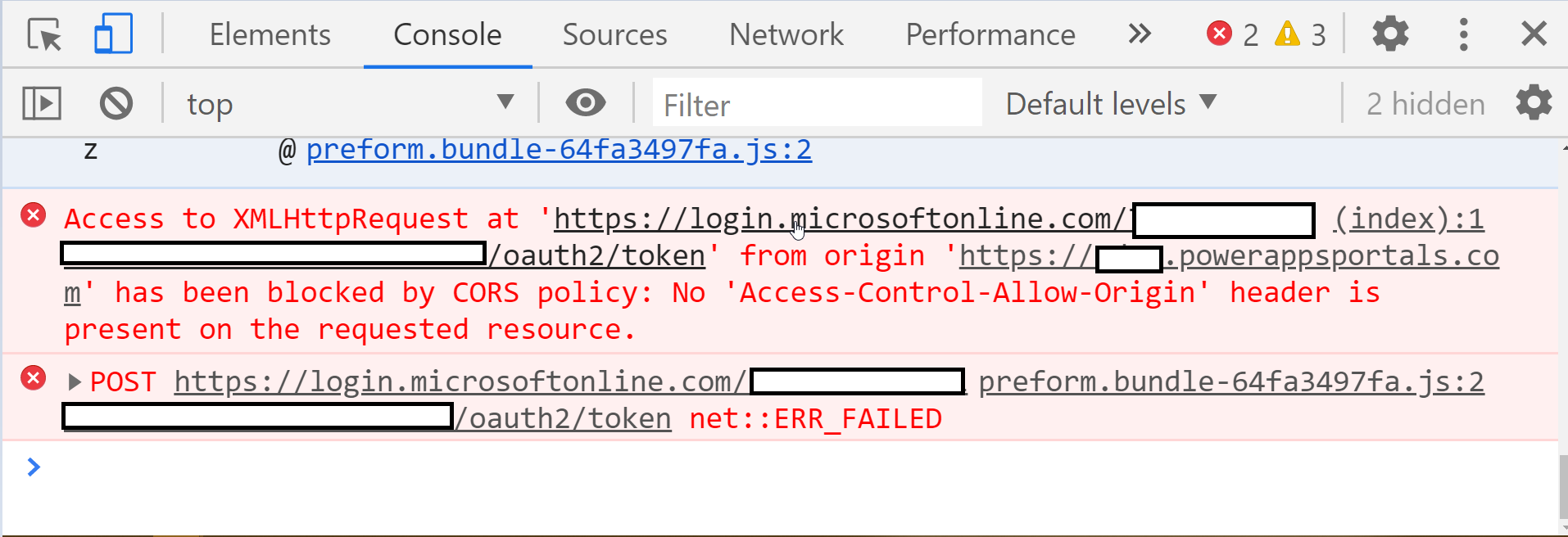
pastedimage1593339208854v1.png

Tried: Created a site setting inside the customer portal but same error.
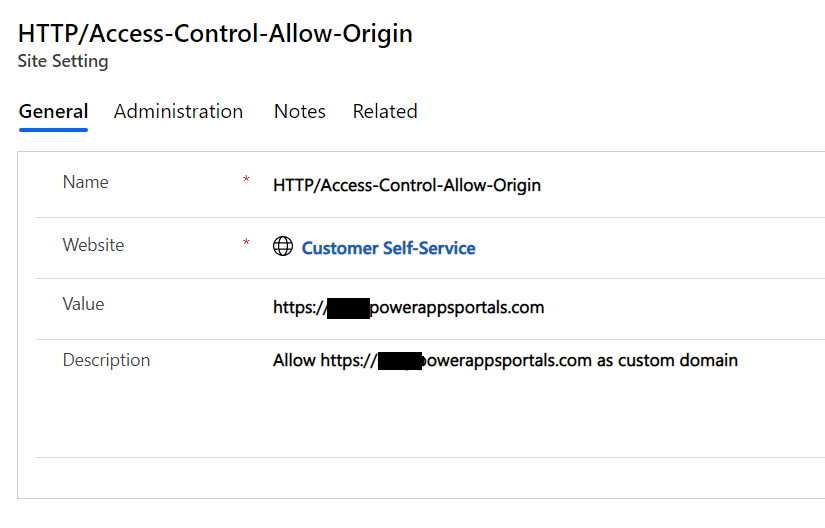
pastedimage1593338646287v2.png

Code:

 function Token() {
    var tenantID = "Tenant ID";
    var client_id = "Client ID";
    var client_secret = "Client Secret";
    var resource = "">target.crm.dynamics.com";

    $.ajax({
        async: true,
        crossDomain: true,
        //"dataType": "json",
        url: "">login.microsoftonline.com/" + tenantID +"/oauth2/token",     
        method: "POST",
        headers: {
            "content-type": "application/x-www-form-urlencoded",            
        },
        data: {
            "grant_type": "client_credentials",
            "client_id ": client_id, //Provide your app id    
            "client_secret": client_secret, //Provide your client secret genereated from your app
            "resource ": resource
        },
        success: function (response) {
            console.log(response);
            token = response.access_token;
            alert(token);
            
        },
       error: function(XMLHttpRequest, textStatus, errorThrown) {
        alert("Status: " + textStatus); alert("Error: " + errorThrown);
    }

    })
}

Please help me how to resolve this issue or I am executing the webapi in wrong manner.

Thanks!

I have the same question (0)
  • Suggested answer
    Nishant Rana Profile Picture
    11,325 Microsoft Employee on at
  • Community Member Profile Picture
    on at

    Hi Nishant,

    Thanks for your response.

    I was trying to implement the suggested solution, but both have the interactive way to get the access token.

    I am looking for silent way to get the access token and pass it to web api , so I can pull data from another dynamic instance.

    Scenario I am trying: From D365 customer portal page , trying to pull data from another dynamic instance using webapi.

    Please suggest !!

  • Suggested answer
    Nishant Rana Profile Picture
    11,325 Microsoft Employee on at

    In that case you could go with

    Grant type - client credentials or resource owner password credential (although not recommended)

    nishantrana.me/.../

    nishantrana.me/.../

  • Community Member Profile Picture
    on at

    Hi Nishant,

    I have gone through with the articles , you have shared. Those are for the server side.

    I am looking for client side - JavaScript.

    Need to get a access token from Azure AD using JavaScript, to query Dynamics entity using web-api from another instance.

    Thanks!!

    PRatik

  • Suggested answer
    Nishant Rana Profile Picture
    11,325 Microsoft Employee on at

    you just need to write a corresponding JavaScript code from the Csharp code there and also the postman screenshot has the details of the request to be formed.

Under review

Thank you for your reply! To ensure a great experience for everyone, your content is awaiting approval by our Community Managers. Please check back later.

Helpful resources

Quick Links

Responsible AI policies

As AI tools become more common, we’re introducing a Responsible AI Use…

Neeraj Kumar – Community Spotlight

We are honored to recognize Neeraj Kumar as our Community Spotlight honoree for…

Leaderboard > Microsoft Dynamics 365 | Integration, Dataverse, and general topics

#1
#ManoVerse Profile Picture

#ManoVerse 93

#1
Siv Sagar Profile Picture

Siv Sagar 93 Super User 2025 Season 2

#3
Martin Dráb Profile Picture

Martin Dráb 62 Most Valuable Professional

Last 30 days Overall leaderboard

Product updates

Dynamics 365 release plans



