web
You’re offline. This is a read only version of the page.
close
Skip to main content

Announcements

No record found.

News and Announcements icon
Community site session details

Community site session details

Session Id :
Microsoft Dynamics AX (Archived)

Delete records in batch for Fixed Locations Variants

(0) ShareShare
ReportReport
Posted on by

Hi

I would like to know if we have any way to delete records in batch for fixed locations variants
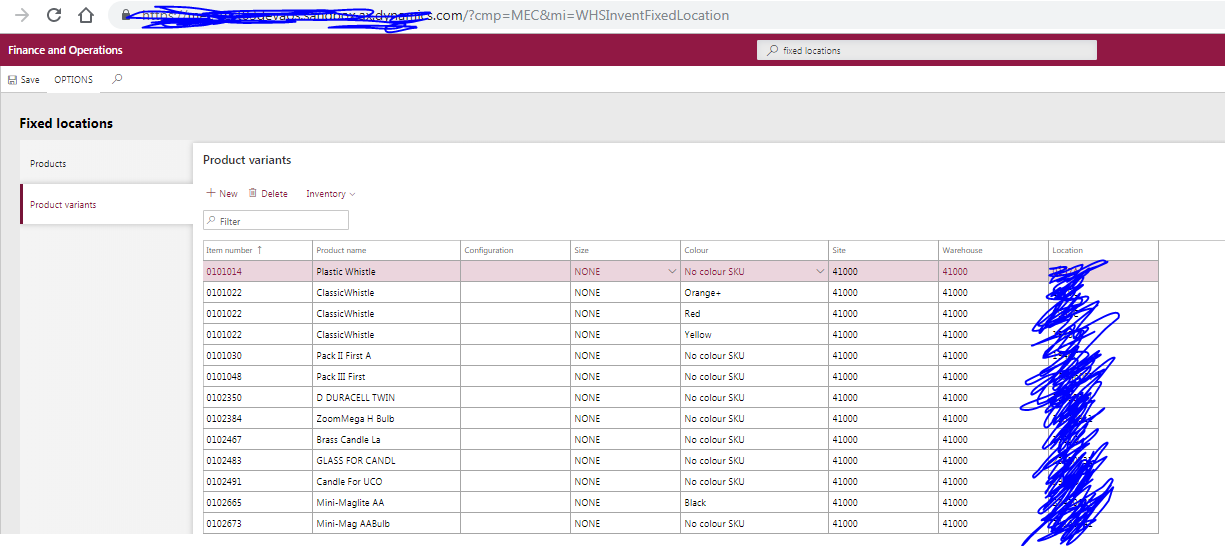
pastedimage1562696614604v1.png

I have this error:

Parallel tasks configured for Fixed product locations: 1, Staging records: 1
Cannot locate data source record of type InventDimCombination with RecId 5637144581. Entity name: WHSFixedProductWarehouseLocationEntity, RecId: 1010, Database operation: Delete.
Issue exist in generate staging data
'1' 'Fixed product locations' record(s) inserted in staging

or 

Results. update not allowed for field 'Variant number(RetailVariantId)'
Results. Validations failed

Thanks

Javier

*This post is locked for comments

I have the same question (0)
  • Suggested answer
    Satish Panwar Profile Picture
    14,673 Moderator on at

    Hi Javier,

    Unfortunately this form doesn't allow the mass deletion and we can't use excel add-in either. So option is to delete one by one.

    If you are familiar with flow, you can actually use it to delete the data. Flow can read from the excel, then use Data entity and delete action to get the job completed.

    Thanks,

    Satish Panwar

    Please help verify answer(s) if they guide you in right direction so other community members can also benefit from your question with verified answer.

  • Suggested answer
    Satish Panwar Profile Picture
    14,673 Moderator on at

    Hi Javier,

    Here is another options if you can use it:

    1. Export data from data entity WHSFixedProductWarehouseLocationEntity

    2. Save a copy of this file and delete everything that belongs to product variant, note - this will also have fixed locations for products, not just variants.

    3. Create a data import project, set truncate entity to "YES", import this file back, it will wipe out all records and only insert the product fixed locations back.

    Please try this in non-production environment first so you understand how this will actually work. if you are not comfortable with data entities, reach out to someone who does in your organization.

    Thanks,

    Satish Panwar

    Please help verify answer(s) if they guide you in right direction so other community members can also benefit from your question with verified answer.

  • Community Member Profile Picture
    on at

    Thanks so much for your help Satish

    Give me test and I'll let you know if work

  • Suggested answer
    Satish Panwar Profile Picture
    14,673 Moderator on at

    sure. I actually ran the truncate entity for the entity mentioned above and it worked as it should (deleted all records). Let us know if you run into any issues.

  • Community Member Profile Picture
    on at

    Hi Satish

    Could you please share some screen with the step because we have the same issue.

  • Community Member Profile Picture
    on at

    Hi Satish

    Could you please share some screen with the step because we have the same issue

  • Suggested answer
    Satish Panwar Profile Picture
    14,673 Moderator on at

    Hi Javier,

    Generate the template for this entity by Exporting data for this entity. Once the data / template is downloaded, follow these steps listed below to delete data from D365 Finance and Operations:

    1. Delete data from the file that we just downloaded. Just leave the header row.

    2. Under “Data Management workspace” create a data import project

    3. Make sure “Truncate Data Entity” is set to yes.

    6404.png

    4. Click import now.

    b. Wait for Data entity to Succeed. Once succeeded, go back to D365 form and verify the data.

    In this example, the data entity not only stored “Fixed locations” for product variants but also for “Products” so if you want to retain the data for products, make sure you don’t delete that data from excel.

    I tried to get you something so you can see screenshots, but having some issue. Try this and let us know if it works.

    Thanks,

    Satish Panwar

    Please help verify answer(s) if they guide you in right direction so other community members can also benefit from your question with verified answer.

Under review

Thank you for your reply! To ensure a great experience for everyone, your content is awaiting approval by our Community Managers. Please check back later.

Helpful resources

Quick Links

Introducing the 2026 Season 1 community Super Users

Congratulations to our 2026 Super Stars!

Meet the Microsoft Dynamics 365 Contact Center Champions

We are thrilled to have these Champions in our Community!

Congratulations to the March Top 10 Community Leaders

These are the community rock stars!

Leaderboard > 🔒一 Microsoft Dynamics AX (Archived)

#1
CP04-islander Profile Picture

CP04-islander 39

#2
Michel ROY Profile Picture

Michel ROY 14

#3
imran ul haq Profile Picture

imran ul haq 8

Last 30 days Overall leaderboard

Featured topics

Product updates

Dynamics 365 release plans
