web
You’re offline. This is a read only version of the page.
close
Skip to main content

Notifications

Announcements

No record found.

Community site session details

Community site session details

Session Id :
Small and medium business | Business Central, N...
Suggested Answer

Item inventory adding

(0) ShareShare
ReportReport
Posted on by

As M new to nav m facing an issue . if i add a item in the salesline  that item count should be shown in itemcard by creating a new field  . how many items where purchased  i need that count in item card . how i do that . can anyone tell please.

.

I have the same question (0)
  • jerome77 Profile Picture
    on at

    Hi

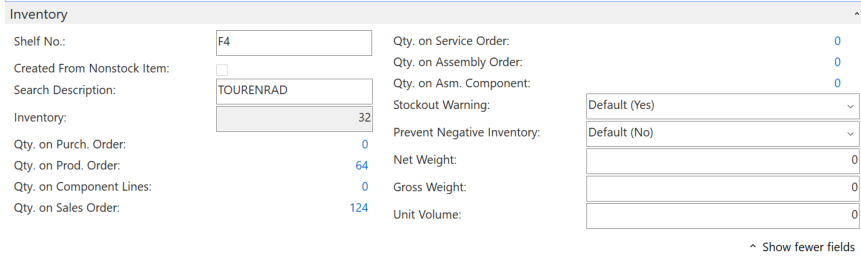
    I am not sure to understand what you mean here. No new field will be added if you use an item at sales line level. What you can see at item card level are qty in purch order, on prod order, on component etc etc

    You can also set stock warning to yes / no, this will inform you when you enter sales order line around item availability

    Is this helpful?

    Kind regards

    Jerome 
    pastedimage1573121390419v1.png

  • ChazKimRP Profile Picture
    380 on at

    Hi Priyankab,

    Are you talking about purchased as in history? Or on current purchase orders? If you are referring to on current purchase orders Jerome77 hit the nail on the head for the item card.

    Thanks,

    -Chaz

  • Community Member Profile Picture
    on at

    i want the purchase order count . each item purchased count in item card .

  • Suggested answer
    ChazKimRP Profile Picture
    380 on at

    If you want then count on purchase order that already exist. If you want the count that’s all ready been purchase you will need to add a lookup field to the item table. Reference the Purchase field on the stockkeeping units page. You’ll do a sum of the qty on the item ledger entries where the entry type is purchase.

Under review

Thank you for your reply! To ensure a great experience for everyone, your content is awaiting approval by our Community Managers. Please check back later.

Helpful resources

Quick Links

Responsible AI policies

As AI tools become more common, we’re introducing a Responsible AI Use…

Neeraj Kumar – Community Spotlight

We are honored to recognize Neeraj Kumar as our Community Spotlight honoree for…

Leaderboard > Small and medium business | Business Central, NAV, RMS

#1
OussamaSabbouh Profile Picture

OussamaSabbouh 3,229

#2
Jainam M. Kothari Profile Picture

Jainam M. Kothari 1,867 Super User 2025 Season 2

#3
YUN ZHU Profile Picture

YUN ZHU 1,153 Super User 2025 Season 2

Last 30 days Overall leaderboard

Featured topics

Product updates

Dynamics 365 release plans



