Hi,
Okay I will show you how to get it done easily :)
Send now is only restricted to 30 contacts so in your case its not the right solution.
Follow the steps Stage wise:
Stage 1 - Create a segment
1. Go to Segments - Create a new Dynamic segment
2. Give a name to the segment >>> Choose Query Block
3. Contact entity should be seen >> Select Email >> Contains Data (assuming that you want to send the email to all your contacts)
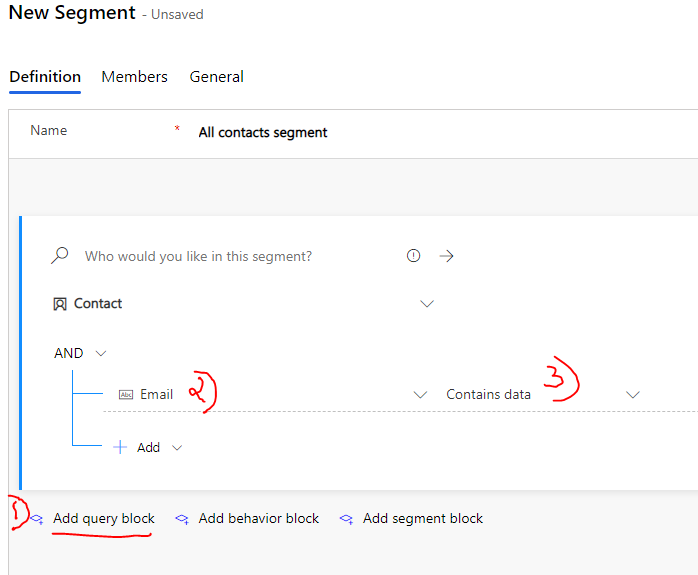
4. Click Save and Go live
Once the segment is live your contacts within the database must be populated (give it about 3-5 mins). View all the contacts within Members Tab in the segment.
Stage 2: Create a Customer Journey
1. Go Customer Journeys
2. Click on +New and select 'Announcement Template'
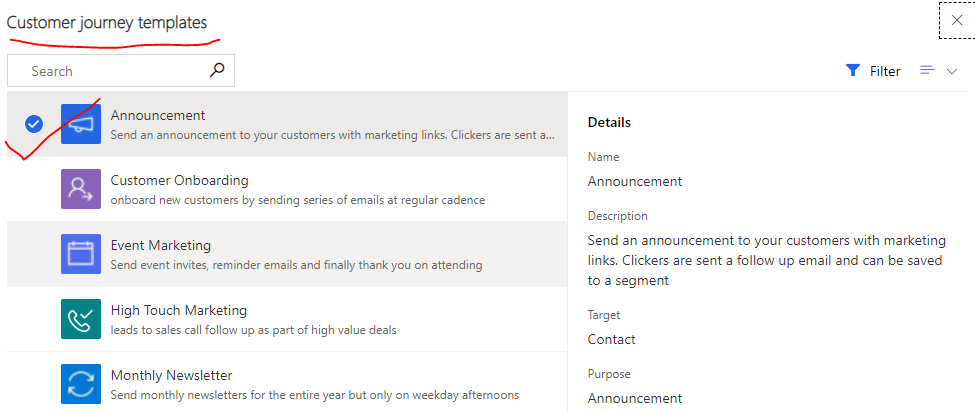
3. Once your inside the journey screen , Select 'Target audience' and Choose the Source Type Segment you just created (See the screenshot) - You may have to delete other tiles you do not need.

4. Next Choose the Email you want to send as announcement -Note the Email should be in Live state prior.
5. Go to General tab add all the required fields : Note: The Start time (better to start at a later date than today), Time Zone and Content settings are important fields.

6. After you filled all this , click Save and Go-Live and thats it...
7. Once the Journey is Live- all your contacts within the segment will receive the mails and you can also view all the Insights within the insight tab.
That's the the detailed step by step process. Good luck
*Please select yes to verify this answer* as solved


