web
You’re offline. This is a read only version of the page.
close
Skip to main content

Notifications

Announcements

No record found.

Community site session details

Community site session details

Session Id :
Small and medium business | Business Central, N...
Answered

Adding line breaks in email body in business central 2021 release wave 2

(0) ShareShare
ReportReport
Posted on by 241

Hi Experts,

I hope you're all doing well. 

Using following piece of code I get the attached output string as body of the email.

Body := 'Hi ' + Customer.Name + ',\\You are blocked.';
Message(Body);
"Email Message".Create(Customer."E-Mail", Subject, Body);
if Email.Send("Email Message", "Email Scenario"::Notification) then
Message('Email Sent.');
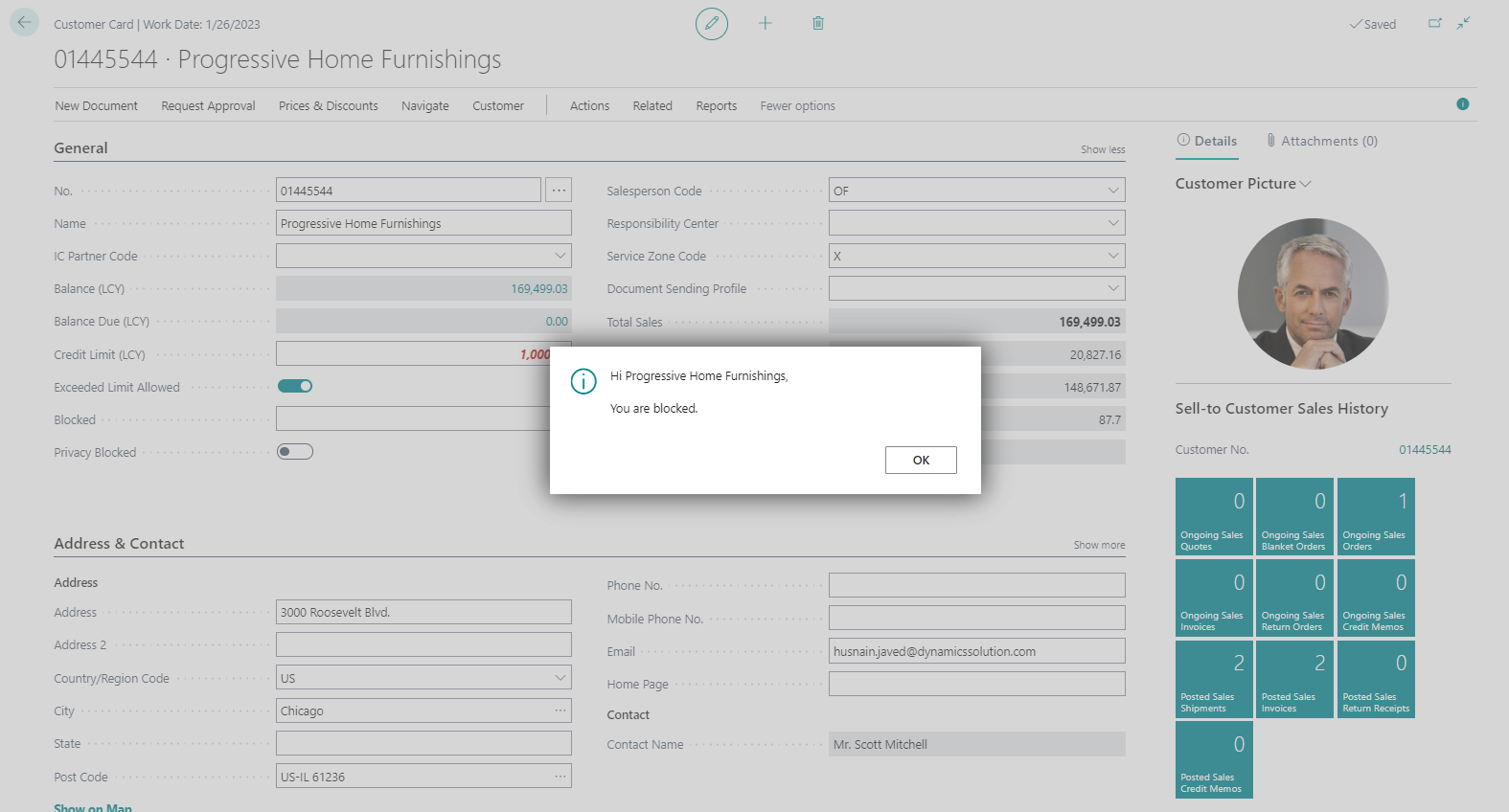
pastedimage1669820280412v1.png

I'm passing this 'Body' text variable as email body and when I receive the email then there is no line break in the email body. Please see following attached screenshot.
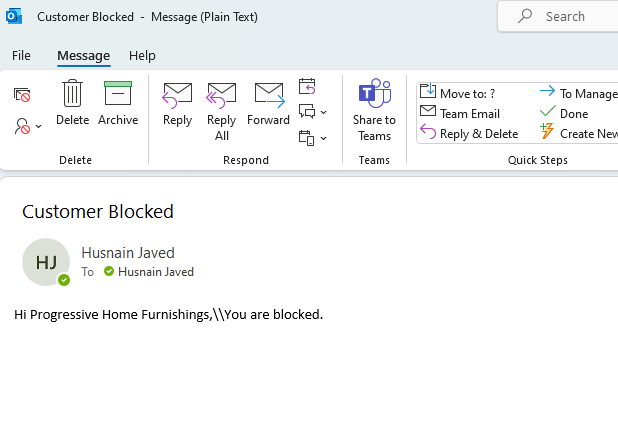
pastedimage1669820538791v2.png

I've also tried <br> but all in vain. Can anyone please tell me that how can I insert a line break in email body?  Answers will be highly appreciated.

Thanks for reading.

I have the same question (0)
  • Suggested answer
    DAnny3211 Profile Picture
    11,397 on at

    hi

    <br> is the solution

    try this

    Body := 'Hi ' + Customer.Name + ', </br></br>You are blocked.';

    DAniele

  • M Hussnain Javed Profile Picture
    241 on at

    I tried and got following output.

    pastedimage1669827375583v3.png

  • Suggested answer
    DAnny3211 Profile Picture
    11,397 on at

    hi

    look this

    www.youtube.com/watch

    community.dynamics.com/.../html-code-sent-in-emails

    DAniele

  • Verified answer
    YUN ZHU Profile Picture
    95,329 Super User 2025 Season 2 on at

    Hi, I checked my previous test code again, <br><br> should be valid.

    More details: https://yzhums.com/7485/

    codeunit 50101 SendEmailAuto
    {
        [EventSubscriber(ObjectType::Codeunit, Codeunit::"Sales-Post", 'OnAfterDeleteAfterPosting', '', false, false)]
        local procedure OnAfterDeleteAfterPosting(SalesHeader: Record "Sales Header"; SalesInvoiceHeader: Record "Sales Invoice Header"; SalesCrMemoHeader: Record "Sales Cr.Memo Header"; CommitIsSuppressed: Boolean)
        var
            //SmtpMailSetup: Record "SMTP Mail Setup";
            //Mail: Codeunit "SMTP Mail";
            EmailMessage: Codeunit "Email Message";
            Email: Codeunit Email;
            Recipients: List of [Text];
            Subject: Text;
            Body: Text;
            SalesPostedTitle: Label 'The Sales Document %2 of Customer %1 has been posted.';
            SalesPostedMsg: Label 'Dear Manager

    The Sales Document %2 of Customer %1 has been posted.
    The total amount is %3.
    The Posted Invoice Number is %4.
    User ID %5'; begin Recipients.Add('yzhums@outlook.jp'); Recipients.Add('admin@crmbc572567.onmicrosoft.com'); SalesInvoiceHeader.CalcFields("Amount Including VAT"); Subject := StrSubstNo(SalesPostedTitle, SalesHeader."Sell-to Customer Name", SalesHeader."No."); Body := StrSubstNo(SalesPostedMsg, SalesHeader."Sell-to Customer Name", SalesHeader."No.", SalesInvoiceHeader."Amount Including VAT", SalesInvoiceHeader."No.", UserId); EmailMessage.Create(Recipients, Subject, Body, true); Email.Send(EmailMessage, Enum::"Email Scenario"::Default); end; }

    pastedimage1669859347838v3.png

    Hope this helps.

    Thanks.
    ZHU

  • M Hussnain Javed Profile Picture
    241 on at

    Thanks ZHU,

    I found that using <br> only in a label variable inserts a line break.

Under review

Thank you for your reply! To ensure a great experience for everyone, your content is awaiting approval by our Community Managers. Please check back later.

Helpful resources

Quick Links

Responsible AI policies

As AI tools become more common, we’re introducing a Responsible AI Use…

Neeraj Kumar – Community Spotlight

We are honored to recognize Neeraj Kumar as our Community Spotlight honoree for…

Leaderboard > Small and medium business | Business Central, NAV, RMS

#1
OussamaSabbouh Profile Picture

OussamaSabbouh 3,229

#2
Jainam M. Kothari Profile Picture

Jainam M. Kothari 1,867 Super User 2025 Season 2

#3
YUN ZHU Profile Picture

YUN ZHU 1,153 Super User 2025 Season 2

Last 30 days Overall leaderboard

Featured topics

Product updates

Dynamics 365 release plans
