web
You’re offline. This is a read only version of the page.
close
Skip to main content

Notifications

Announcements

No record found.

Community site session details

Community site session details

Session Id :
Microsoft Dynamics 365 | Integration, Dataverse...
Suggested Answer

Hide value from lookup field on new form

(0) ShareShare
ReportReport
Posted on by 58

Hi everyone

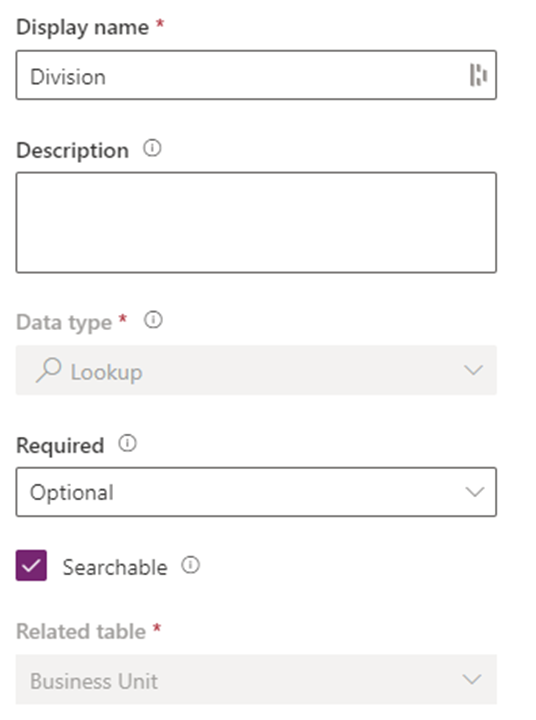
We have a lookup column called Division setup in the Opportunity table::

pastedimage1680602992116v1.png

This lookup column points to the Business Unit (BU) table:
pastedimage1680603056954v2.png

We now have a requirement where one of the BUs should no longer be used when creating new opportunities.  I don't want to delete the BU so thought I could hide this BU from the lookup column when a new form is opened for an opportunity.  However, I'm not sure how I hide values from a lookup column, is it possible along the same lines as hiding values form choice columns?

Thanks in advance for any help you could give.

I have the same question (0)
  • Suggested answer
    Guido Preite Profile Picture
    54,086 Moderator on at

    correct way will be to add some javascript in order to add a filter to don't show the BU.

    you can find an example of the javascript here: https://softchief.com/2022/04/26/filter-lookup-with-custom-condition-in-javascript-in-dynamics-365/

  • Suggested answer
    XM-22040801-0 Profile Picture
    11 on at

    Hello,

    If you want to hide some values of a lookup field you can do it with addPreSearch event and addCustomFilter.

    See learn.microsoft.com/.../addcustomfilter

    Edit: Guido Preite was quicker to reply.

  • gjayn84 Profile Picture
    58 on at

    Thanks for the quick replies.  I've used the link you sent over to tweak the code as per the below but it doesn't seem to be working:

    // A namespace defined for SDK sample code
    // You should define a unique namespace for your libraries
    var Sdk = window.Sdk || {};

    // set 'Sdk.setParentAccountIdFilter' in the Opportunity form onload event handler
    Sdk.setParentAccountIdFilter = function (executionContext) {

        // get the form context
        formContext = executionContext.getFormContext();
        formContext.getControl("abc_divisionid").addPreSearch(Sdk.filterBusinessUnits);
    }

    Sdk.filterBusinessUnits = function () {

        // Hide Finance BU
        var businessUnitFilter = "<filter type='and'><condition attribute='name' operator='ne' value='Finance'/></filter>";
        formContext.getControl("abc_divisionid").addCustomFilter(businessUnitFilter, "businessunit");
    }
    abc_divisionid is the name of the Division lookup field on my form that looks up the Business Unit table.  I've checked the console in my browser when the form loads and the updated JS runs and there are no errors.  However, when I look at the lookup field it still shows the Finance business unit.  Is there anything obvious you can see that could be causing the filter to not apply correctly?
    Thanks in advance for your help.
  • XM-22040801-0 Profile Picture
    11 on at

    This should work. Are you sure you added the onload event handler with Pass execution context as first parameter ?

    pastedimage1680694854431v1.png

  • gjayn84 Profile Picture
    58 on at

    Thanks so much, I had added the code to an existing library but not added the function to the OnLoad event.  I've done that now and all working perfectly.

Under review

Thank you for your reply! To ensure a great experience for everyone, your content is awaiting approval by our Community Managers. Please check back later.

Helpful resources

Quick Links

Responsible AI policies

As AI tools become more common, we’re introducing a Responsible AI Use…

Neeraj Kumar – Community Spotlight

We are honored to recognize Neeraj Kumar as our Community Spotlight honoree for…

Leaderboard > Microsoft Dynamics 365 | Integration, Dataverse, and general topics

#1
Siv Sagar Profile Picture

Siv Sagar 93 Super User 2025 Season 2

#2
#ManoVerse Profile Picture

#ManoVerse 80

#3
Martin Dráb Profile Picture

Martin Dráb 64 Most Valuable Professional

Last 30 days Overall leaderboard

Product updates

Dynamics 365 release plans



