web
You’re offline. This is a read only version of the page.
close
Skip to main content

Announcements

No record found.

News and Announcements icon
Community site session details

Community site session details

Session Id :
Dynamics 365 Community / Forums / Field Service forum / Resco Mobile CRM: Disa...
Field Service forum

Resco Mobile CRM: Disable 'Create new' button (+) on the subgrid

(0) ShareShare
ReportReport
Posted on by 25

Hi,

    I would like to disable the Create new button (+) on the entity sub-grid. We have a requirement that the user can only add one child record and would like to know if there is a way to disable/remove the button as soon as the user adds the first child record. 
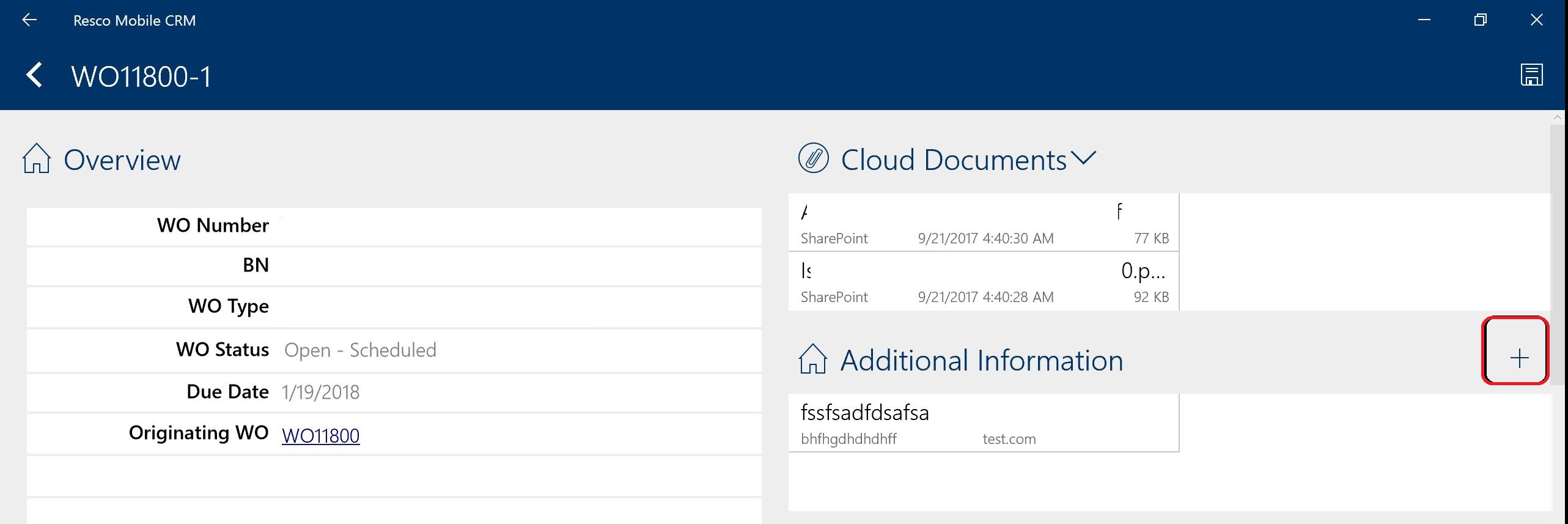
Resco_2D00_Capture.JPG

Thanks,

Sunil

I have the same question (0)
  • Thomas David Dayman Profile Picture
    11,323 on at

    Hi Sunil,

    Would you not have have the additional Information as a lookup instead of a subgrid if the user can only enter one?

    Apologies if I haven't taken certain exceptions into account.

  • PragmaticDevs Profile Picture
    239 on at

    I agree with Thomas. On another note consider security roles in D365, make sure the Users you dont want to show the (+) button dont have create permissions.

  • Sunil G Profile Picture
    25 on at

    Hi Thomas,

                    Thanks for your reply. Making the Additional Information as a lookup would allow the user to link existing additional information records which is something we don't want to do.

    Thanks,

    Sunil

  • Suggested answer
    Thomas David Dayman Profile Picture
    11,323 on at

    Either try this and see if it applies in Resco - community.dynamics.com/.../157283

    Or you could make the lookup filter a filter which is always false? So when a user tries to add an existing record it will return no results forcing the user to always create a new record?

  • Suggested answer
    nfernandezba Profile Picture
    210 on at

    1) Select the subgrid (list) and go to properties

    resco02.PNG

    2) on the properties popup go to properties

    3) Deselect "create new" under "actions"

    resco02.PNG

Under review

Thank you for your reply! To ensure a great experience for everyone, your content is awaiting approval by our Community Managers. Please check back later.

Helpful resources

Quick Links

November Spotlight Star - Khushbu Rajvi

Congratulations to a top community star!

Forum Structure Changes Coming on 11/8!

In our never-ending quest to help the Dynamics 365 Community members get answers faster …

Dynamics 365 Community Platform update – Oct 28

Welcome to the next edition of the Community Platform Update. This is a status …

Leaderboard > Field Service

Last 30 days Overall leaderboard

Featured topics

Product updates

Dynamics 365 release plans
