web
You’re offline. This is a read only version of the page.
close
Skip to main content

Notifications

Announcements

No record found.

Community site session details

Community site session details

Session Id :
Microsoft Dynamics GP (Archived)

Inventory receiving stuck in system

(0) ShareShare
ReportReport
Posted on by

using Dynamics GP 2010

While entering a receipt for material, a computer froze.  I need to know how to correct the following:

Rcpt# 123754 against PO0015643

Item #1 had  a qty of (100) but the vendor only shipped (30) - they entered the (30) items (with serial numbers).

Went to Item #2 on the PO and received a qty of (2).

Went to Item #3 - received (210) of (300) serialized numbers.

This is when the computer froze.

So now, they go to re-receive against the PO because nothing was posted - (30) Item #1 is not available to receive against nor is (2) Item #2 or Item #3.

Upon further research, the POP Document Inquiry screen does NOT show any receivings against the PO.

However you can see that (30) Item #1 serial numbers are showing in the inquiry but they are not in the system - if you go to Serial Trace you can see where the Receipt is locked in the system.

HOW do I get this cleared up and still enter them against the PO correctly even though the PO no longer shows them being able to receive?

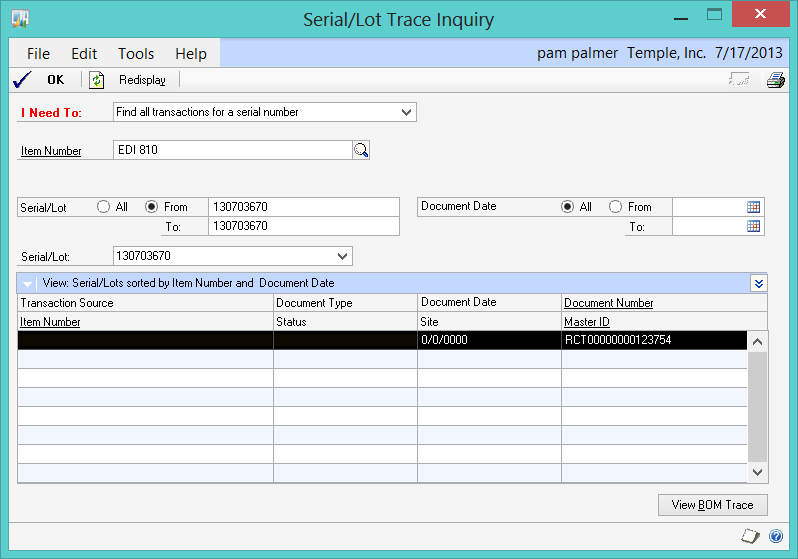
5670.Serial-Trace-INquiry.071713.png

*This post is locked for comments

I have the same question (0)
  • Frank Hamelly | MVP, MCP, CSA Profile Picture
    46,625 Super User 2025 Season 2 on at

    Pam, the first thing to try is running Checklinks on your Purchasing Transactions and Inventory Purchase Receipts.  Then run the Reconcile Purchasing Documents Utility on that specific PO and Inventory Reconcile Utility on those specific item numbers. See if that fixes things.  If not, let us know what the results are.

  • Verified answer
    Mahmoud Saadi Profile Picture
    32,738 on at

    In case the process was corrupted during the "data entry" process, then you are on the safe side, try to delete the receipt  #123754 first in order to release the quantities. In addition, run the reconcile and check links.

    If this is not the case, and the process was corrupted during "posting" then run the reconcile and check links and let us know what the report says before digging into further details.

  • Richard Whaley Profile Picture
    25,195 on at

    Simple thought... I assume that you posted the receipt after the computer was restarted?

  • baxter05 Profile Picture
    on at

    @ Richard, the receipt was not available to post after the computer was restarted

    @Frank, Mahmoud

    I ran check links against Purchase Transactions and it mentioned my Receipt number as being incomplete and it was removing a line - however, the windows I posted above are still the same in the system.

    I have (30) s/n of item #1 showing in a 'holding pattern' as well as (209) s/n of Item # 3.  Item #2 was a qty of (2) without serial numbers.

    I also ran PO reconcile against the PO in question to no avail.

    HOW would I go about deleting a receipt that is not reachable?

    I used SSMS to locate all instances of RCT00000000123754 and it is in the following tables (with the appropriate information):

    POP10300

    POP10310

    POP10330

    POP10500

    IF I were to delete this receipt from all these tables, Will the PO revert back to the original quantities needed to be received or will it think I am receiving additional items.  Right now Item #1 only shows (70) needing to be received instead of the original (100).

    Item  #2 - nothing to receive

    Item #3 shows (300) s/n needing to be received but yet it is "holding" (209) s/n hostage.

    Suggestions?

  • Suggested answer
    Mahmoud Saadi Profile Picture
    32,738 on at

    It is clear that the transaction is saved incorrectly and incompletely into the work tables, which means that it is reserving quantities. Could you please run the following scripts and provide us the details;

    SELECT * FROM POP10100 WHERE PONUMBER

    =(SELECT DISTINCT PONUMBER FROM POP10500 WHERE POPRCTNM = '#RCTNumber' )

    SELECT * FROM POP10110 WHERE PONUMBER

    =(SELECT DISTINCT PONUMBER FROM POP10500 WHERE POPRCTNM = '#RCTNumber' )

    SELECT * FROM POP10300 WHERE POPRCTNM = '#RCTNumber'

    SELECT * FROM POP10310 WHERE POPRCTNM = '#RCTNumber'

    SELECT * FROM POP10500 WHERE POPRCTNM = '#RCTNumber'

    You mentioned that the transaction is unreachable, could you please tell me what is it preceisily that preventing you from reaching the transaction from "Receving Transaction Entry" ? What is it that pops up when you type in the receipt number in the receiving transaction entry ?   I would prefer reaching the transaction and deleting it from the winow which is completely safe as Dynamics GP will ensure that all the associated tables are cleared.

    What I am thinking of initially is to evaluate the records retrieved above, and might need to do some updates on the tables in order to be able to delete the transaction from the receiving transaction widnow.

    Looking forward to hearing from you

  • baxter05 Profile Picture
    on at

    Mahmoud,

    I was able to pull up the transaction - here is a screen shot (i neglected to update my info last night):

    I ran the scripts you gave me - here are the results:

    POP10110 shows all the line items on the PO0015643 

    POP10300 shows the receipt POPType =0 VNDDOCNM is empty BACHNUMB(empty) VENDORID (empty) VENDNAME (empty)

    POP10310 shows the two line items on the receipt as shown above

    POP10500 shows the QTYSHIP as shown above....

    However, Item #3 was for (210) EDI 510 which was removed from the receipt above through checklinks - the printout stated "seial or lot number records on receipt RCT 123754 were missing a line item: the records were removed" However all (210) s/n for that item are shown in the Inquiry>Item>Track s/n expansion box.... but they are not in any of the tables listed above.

    If we delete RCT123754 will it clear up those s/n as well?

  • baxter05 Profile Picture
    on at

    Mahmoud,

    The problem has been resolved.  My VAR happened to call and I told him all the steps I had been taking (THANK YOU SO MUCH for your scripts above) and he was impressed.

    My panic lead me to believe the s/n were being held hostage when they weren't - they were simply the last Serial/Lot Number MASK entered - they weren't "THERE" they were just the last ones entered into the mask.

    Deleting the Receipt RESOLVED all the issues with this entry.

    Again, my panic caused me to not think with a clear head.

    THANK YOU ALL for your assistance.

  • manolo Profile Picture
    97 on at

    Hi guys, in my case I have many transactions that reside on the work tables but I'm not able to see in GP

    (by the way we have GP2013 R2 running on virtual servers both the database and the 3 application servers, all above Microsoft requirements/specs for the amount of users ) We also have 3 party applications (Binary Stream MultiEntity Management and Material Management).

    So after much search I realized that for many reasons the users come up with; session got disconnected, posting interruption, user not letting the transaction complete, etc. in other words the process was corrupted so a lot of my Receipts are just getting stuck or disappearing from GP. What I am looking forward to is some kind of and answer, maybe a script, that i am able to see how many are hang and perhaps a way to correct them.

    here is a sample:

    PO I2022884 not showing any receipt number:

    Users says her receiving number was RCT0063605. Well it would be ok to just receive it again, but the main problem is that the PO is not available anymore in the Select Purchase Order items

    Running Mahmoud M. AlSaadi   script from this post I can see the transaction on the SQL tables:

    So where do we go from here, have a few of them like that along with allocation issues also, but that's another subject.

    Hope somebody can help!

  • manolo Profile Picture
    97 on at

    sorry, a few print screens missing

    PO I2022884 not showing any receipt number

    0647.Capture2.PNG

    Running Mahmoud M. AlSaadi   script from this post I can see the transaction on the SQL tables:

    0647.Capture2.PNG

Under review

Thank you for your reply! To ensure a great experience for everyone, your content is awaiting approval by our Community Managers. Please check back later.

Helpful resources

Quick Links

Responsible AI policies

As AI tools become more common, we’re introducing a Responsible AI Use…

Neeraj Kumar – Community Spotlight

We are honored to recognize Neeraj Kumar as our Community Spotlight honoree for…

Leaderboard > 🔒一 Microsoft Dynamics GP (Archived)

#1
Community Member Profile Picture

Community Member 2

#2
mtabor Profile Picture

mtabor 1

#2
Victoria Yudin Profile Picture

Victoria Yudin 1

Last 30 days Overall leaderboard

Featured topics

Product updates

Dynamics 365 release plans



