web
You’re offline. This is a read only version of the page.
close
Skip to main content

Announcements

No record found.

News and Announcements icon
Community site session details

Community site session details

Session Id :
Customer experience | Sales, Customer Insights,...
Suggested Answer

pre validation, pre operation and Post operation

(0) ShareShare
ReportReport
Posted on by

can you please provide   Pre validation and  Pre operation and post operation examples list or sites

I have the same question (0)
  • a33ik Profile Picture
    84,331 Most Valuable Professional on at
  • Community Member Profile Picture
    on at

    I need only programs coding with enttitys examples.

    I am confusing when will use pre validation , pre operation and post operation

    i know only theritically but need programitically

  • a33ik Profile Picture
    84,331 Most Valuable Professional on at

    Ok. Good luck.

  • Suggested answer
    LeoAlt Profile Picture
    16,331 Moderator on at

    Hi partner,

    As you konw, these three Pipleline stages means different order to trigger the plugin. 

    Which Pipleline stage you choose has nothing to do with the code, for example I created a plug-in to calculate the account age based on birthday and here is my code.

    using System;
    using System.Collections.Generic;
    using System.Linq;
    using System.Text;
    using System.Threading.Tasks;
    using Microsoft.Xrm.Sdk;
    using Microsoft.Xrm.Sdk.Client;
    using Microsoft.Xrm.Sdk.Query;
    using Microsoft.Xrm.Sdk.Discovery;
    namespace plugin2._0
    {
        public class UpdateFax : IPlugin
        {
            public void Execute(IServiceProvider serviceProvider)
            {
                //Extract the tracing service for use in debugging sandboxed plug-ins.
                ITracingService tracingService =
                    (ITracingService)serviceProvider.GetService(typeof(ITracingService));
                // Obtain the execution context from the service provider.
                IPluginExecutionContext context = (IPluginExecutionContext)
                    serviceProvider.GetService(typeof(IPluginExecutionContext));
                // Get a reference to the Organization service.
                IOrganizationServiceFactory factory =
                    (IOrganizationServiceFactory)serviceProvider.GetService(typeof(IOrganizationServiceFactory));

                IOrganizationServiceFactory servicefactory =
                    (IOrganizationServiceFactory)serviceProvider.GetService(typeof(IOrganizationServiceFactory));
                IOrganizationService client = servicefactory.CreateOrganizationService(context.UserId);

                // The InputParameters collection contains all the data passed in the message request.
                if (context.InputParameters.Contains("Target") && context.InputParameters["Target"] is Entity)
                {
                    // Obtain the target entity from the input parameters.
                    Entity entity = (Entity)context.InputParameters["Target"];
                    // Verify that the target entity represents an account.
                    // If not, this plug-in was not registered correctly.
                    if (context.Depth > 1) return;
                    if (entity.LogicalName == "account")
                    {
                        try
                        {
                            string birthday = string.Empty;
                            if (entity.Attributes.Contains("new_birthday1"))
                            {
                                birthday = entity.GetAttributeValue<DateTime>("new_birthday1").ToString();
                            }
                            var dateBirthday = Convert.ToDateTime(birthday);
                            var now = DateTime.Now;
                            int age = now.Year - dateBirthday.Year;
                            entity["new_age"] = age;
                        }
                        catch (Exception e)
                        {
                            tracingService.Trace("accountPlugin: {0}", e.ToString());
                            throw new InvalidPluginExecutionException(e.Message);
                        }
                    }
                    else
                        return;
                }

            }
        }
    }

    We could understand the code in this way, the code is only used to execute the action to calculate the age, and I could rigisiter this plug-in both in Pre-validation, Pre-operation and Post-operation without any issue.

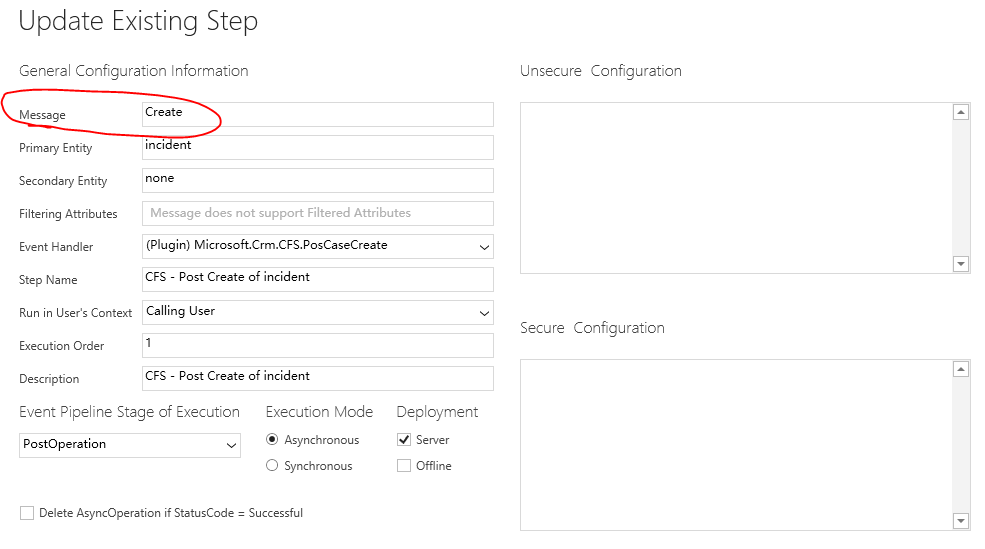
    The only thing we need to pay attention to is that different Pipleline stage support different message.
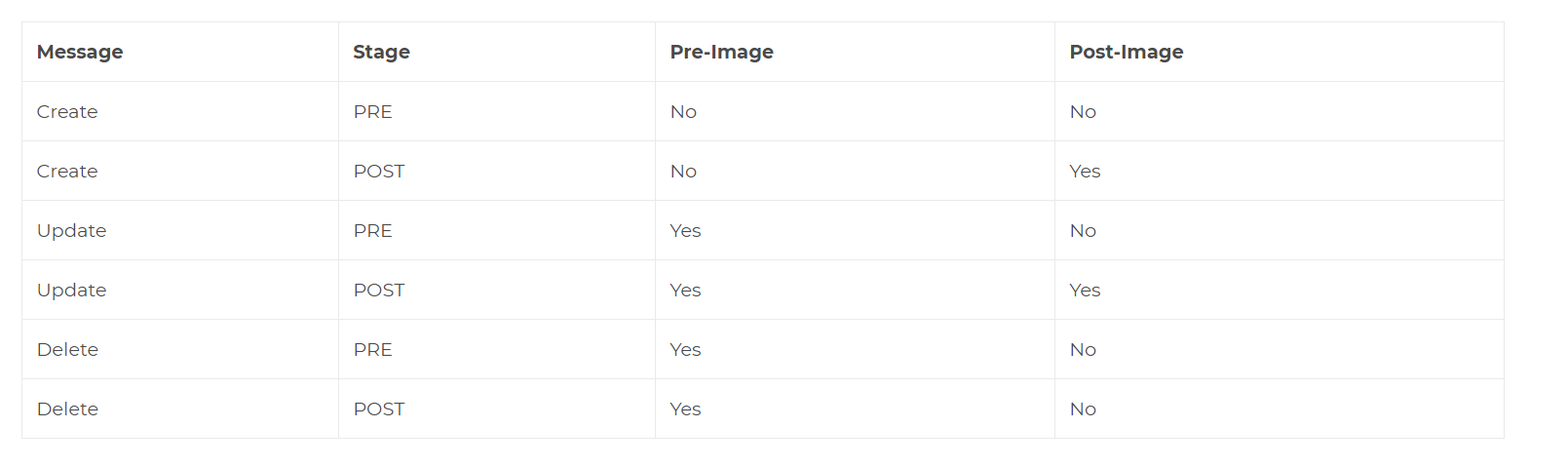
    pastedimage1577415985083v1.png

    pastedimage1577416053336v2.png

    Hope it helps.

    Best Regards,

    Leo

Under review

Thank you for your reply! To ensure a great experience for everyone, your content is awaiting approval by our Community Managers. Please check back later.

Helpful resources

Quick Links

Introducing the 2026 Season 1 community Super Users

Congratulations to our 2026 Super Stars!

Meet the Microsoft Dynamics 365 Contact Center Champions

We are thrilled to have these Champions in our Community!

Congratulations to the March Top 10 Community Leaders

These are the community rock stars!

Leaderboard > Customer experience | Sales, Customer Insights, CRM

#1
ManoVerse Profile Picture

ManoVerse 193 Super User 2026 Season 1

#2
11manish Profile Picture

11manish 128

#3
CU11031447-0 Profile Picture

CU11031447-0 100

Last 30 days Overall leaderboard

Product updates

Dynamics 365 release plans
