web
You’re offline. This is a read only version of the page.
close
Skip to main content

Announcements

No record found.

News and Announcements icon
Community site session details

Community site session details

Session Id :
Microsoft Dynamics GP (Archived)

Accrued and Purchase distribution amount is incorrect.

(0) ShareShare
ReportReport
Posted on by 2,845

Hi, 

I am getting below error in a PO return entry.

As per my analysis, 

1. This multicurrecncy transaction and the document amount is different from the distribution amount.

2. Default distribution tried but not fixed the issue. 

Can anyone add the details if any other reason?
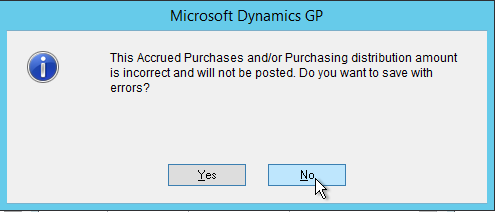
Distribution-mismatch.png

*This post is locked for comments

I have the same question (0)
  • Suggested answer
    soma Profile Picture
    24,410 on at

    Have you clicked the default or delete button from distribution window? Better delete the distribution and recreate.

    Hope this helps!!!

  • Manikandan Profile Picture
    2,845 on at

    Default and delete I used. Not working Soma.

  • Verified answer
    Manikandan Profile Picture
    2,845 on at

    I fixed this issue.

    Cause: The Subtotal in Purchase receipt table is wrong.

    Solution: Updated the table with correct subtotal and did the default distribution by clicking default button in distribution window. Issue gone.

    Thanks for your help.

  • Community Member Profile Picture
    on at

    Hi,

    I am also getting the same message with a shipment/invoice type transaction. I tried clicking the default and delete button from distribution window still not working.

  • Jeff Grant Profile Picture
    Microsoft Employee on at

    Hi Luken,

    If you are still getting error use SQL to check the Purchasing Distribution Work (POP10390) content for the transaction when the message is generated to see if it will outline the issue.

    Although not posted, the POP10390 should fill once the distribution tab is selected.

    Example SQL scripting would be:

    select sum(CRDTAMNT), sum(DEBITAMT),

    sum(ORCRDAMT), sum(ORDBTAMT)

    from POP10390

    where POPRCTNM='XXX'

    Best Regards,

    Jeff

  • Community Member Profile Picture
    on at

    Manikandan, did you ever figure this one out ?

    I have a similar issue but have no records in the POP390 table

Under review

Thank you for your reply! To ensure a great experience for everyone, your content is awaiting approval by our Community Managers. Please check back later.

Helpful resources

Quick Links

Introducing the 2026 Season 1 community Super Users

Congratulations to our 2026 Super Stars!

Meet the Microsoft Dynamics 365 Contact Center Champions

We are thrilled to have these Champions in our Community!

Congratulations to the April Top 10 Community Leaders

These are the community rock stars!

Leaderboard > 🔒一 Microsoft Dynamics GP (Archived)

#1
Shravan Attelli Profile Picture

Shravan Attelli 1

Last 30 days Overall leaderboard

Featured topics

Product updates

Dynamics 365 release plans
