web
You’re offline. This is a read only version of the page.
close
Skip to main content

Notifications

Announcements

No record found.

Community site session details

Community site session details

Session Id :
Microsoft Dynamics CRM (Archived)

Custom Report with custom entity

(1) ShareShare
ReportReport
Posted on by

Hi All,

I am creating a customs report, and having problem at the almost success moment, hope to get some help from experts.

Here is the full story, https://community.dynamics.com/crm/f/117/t/157802

I created a "SQL-based Reporting Services report" using "Microsoft SQL Server Report Builder".

This is not the first report I have been done using SQL queries, all the other reports works prefect in MS Dynamics CRM 2013.

The only different is that this time I created a new entity to record the change log of cases (e.g. Case status change, Case Owner change, Case resolve time...etc...), and I use these records to prepare the new report.

I am quite sure the SQL query is a normal one, since the report can be run directly in Microsoft SQL Server Report Builder, with expected result.
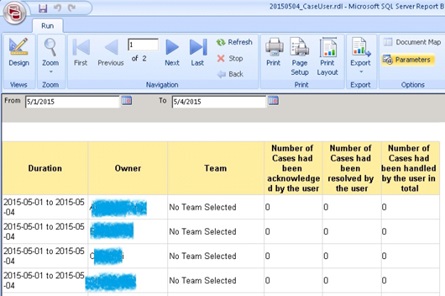
2514.001.jpg

Then, I upload the report to Dynamics CRM 2013 and try to run it, I got the following error:
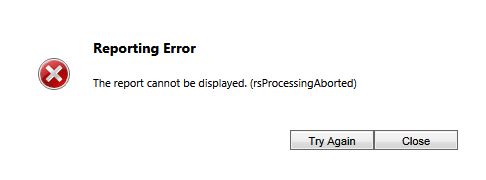
5228.002.JPG

I though it could be permissions settings problem of the new entity, if I removed join to the new entity in my SQL query, the report could be run in Dynamics CRM 2013. 

This is the privilege of the new entity:

003.jpg

I already grant the "READ" permission for this entity.

Even I try to run the report with Administrator account, I still got the same error message.

Hope someone can give me advice.

Thank you!

*This post is locked for comments

I have the same question (0)
  • Suggested answer
    Hamzeh Zawahreh Profile Picture
    3,674 on at

    1. Connect to your Reporting Service Configuration on server.

    2. Make sure your reporting service database credential on Database Tab have an access to your SQL Server.

    3. uncheck "Specify an Execution Account " at Execution Account Tab.

    And

    also open the report rdl and check if there are extra characters after the end tag(</report)

    and see this link : http://cognettacloud.com/?p=97

    regards

    please verify if this help you.

  • Verified answer
    Hamzeh Zawahreh Profile Picture
    3,674 on at

    hi, and this is a very helpful blog:

    blog.simpletrees.com/.../mscrm-and-dreaded-rsprocessingaborted.html

  • Community Member Profile Picture
    on at

    hello Hamzeh Zawahreh,


    Thank you for your prompt reply.


    1) I checked the Data Sources in Reporting Services, which is normal.

    005.JPG


    2) I am sure I am not using shared datasets


    3) And I am not using a child/parent folder structure for parent/sub reports, my report is a single report.


    4) I would like to check for the LogFiles in Report Server. But I am not able to locate the file....

        C:\Program Files\Microsoft SQL Server\MSRS11.MSSQLSERVER\Reporting Services\LogFiles

    I don't find folder similar to "MSRS11.MSSQLSERVER", and there is no hidden folder under "Microsoft SQL Server" too...

     005.JPG

    Any help?


  • Suggested answer
    Hamzeh Zawahreh Profile Picture
    3,674 on at

    hi,

    you can see it in this path

    \Microsoft SQL Server\<SQL Server Instance>\Reporting Services\LogFiles

    or you can login to the ReportServer database and execute

    select * from executionlog

    see this link for more specification:

    www.mssqltips.com/.../sql-server-reporting-services-ssrs-log-files-for-troubleshooting

  • Community Member Profile Picture
    on at

    I've got new findings :

    Besides select data from the new entity, I join view "SystemUser" for getting user list in CRM. So I test the table/view separately, when I select data only from the new entity, the report works. But when I select data from "SystemUser", I got the error message.

    I am still looking for a solution to select data from view "SystemUser" at this moment.

  • Community Member Profile Picture
    on at

    Problem solved!!

    Instead of select from "SystemUser", I now select from "FilteredSystemUser".

    The error gone!~!

    Thank you for your help, Hamzeh Zawahreh!!

Under review

Thank you for your reply! To ensure a great experience for everyone, your content is awaiting approval by our Community Managers. Please check back later.

Helpful resources

Quick Links

Responsible AI policies

As AI tools become more common, we’re introducing a Responsible AI Use…

Neeraj Kumar – Community Spotlight

We are honored to recognize Neeraj Kumar as our Community Spotlight honoree for…

Leaderboard > 🔒一 Microsoft Dynamics CRM (Archived)

#1
SA-08121319-0 Profile Picture

SA-08121319-0 4

#1
Calum MacFarlane Profile Picture

Calum MacFarlane 4

#3
Alex Fun Wei Jie Profile Picture

Alex Fun Wei Jie 2

Last 30 days Overall leaderboard

Featured topics

Product updates

Dynamics 365 release plans
