web
You’re offline. This is a read only version of the page.
close
Skip to main content

Announcements

News and Announcements icon
Community site session details

Community site session details

Session Id :
Finance | Project Operations, Human Resources, ...
Answered

Adding a custom method to the 'Data Method' property of a form

(0) ShareShare
ReportReport
Posted on by

Hi,

I am new to the AOT world of methods etc. so apologies if the question is basic or I am going about this in a completely incorrect way..

The scenario

I have created a form extension in AOT on SalesLinesOpenOrders to add a couple of fields.

I need to create a custom field which is the result of Price * Unit. 

I don't want to create a view and a calculated column I hoped I could do it quickly in the form.

I add a field to the GRID called Price * Unit Calc as a REAL (I am aware that it may not be best practice to do this on the form)

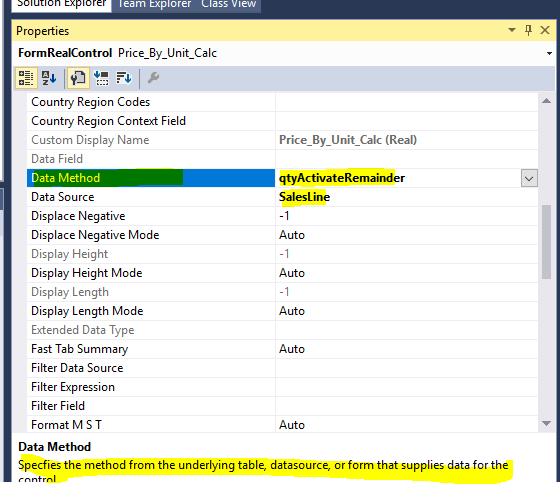
I now wanted to use the Data Method Property to call a method that calculates P * U and returns the result to the GRID

When I use the dropdown on Data Method I see methods that I can use these are prebuilt for the table, as below 'qtyActivateRemainder'

My Question;

How can I create a custom method 'PriceUnitCalc' that becomes available in that drop down?
pastedimage1607099897006v1.png

Any help appreciated.

Regards

D

I have the same question (0)
  • Verified answer
    Gunjan Bhattachayya Profile Picture
    35,429 on at

    Hi,

    You can create a new display method and can use that on the form. Please check this post for an example of how you can create the display method.

  • Verified answer
    Blue Wang Profile Picture
    Microsoft Employee on at

    Hi D,

    About Data method property, you can read this Doc: docs.microsoft.com/.../form-control-properties

    As mentioned, you can create form extension and class to add a display method , then use  YourClass::method in prperty.

    Check this: rahulmsdax.blogspot.com/.../extension-of-classes-tables-and-forms.html

  • Community Member Profile Picture
    on at

    Thanks so much for your help. I am looking at this to see if I can use it to implement what I want to do. Many thanks.

  • Community Member Profile Picture
    on at

    All works great been able to create a nice quick calculation in the class and push it back out to the grid. Once again thank you.

  • Suggested answer
    Community Member Profile Picture
    on at

    Thanks for your help, all works fine after a bit of tinkering around - really good thing to know for simple class method calculations directly updating back to the grid.

  • Gunjan Bhattachayya Profile Picture
    35,429 on at

    Great that you were able to get this working. Please mark the helpful answer(s) as Verified.

Under review

Thank you for your reply! To ensure a great experience for everyone, your content is awaiting approval by our Community Managers. Please check back later.

Helpful resources

Quick Links

Season of Sharing Community Challenge Winners!

Congratulations to our community stars!

Women in Power Builds Momentum

Expanding mentorship, skilling, and AI innovation

Congratulations to the July Top 10 Community Leaders

These are the community rock stars!

Leaderboard > Finance | Project Operations, Human Resources, AX, GP, SL

#1
SajeedMullaji Profile Picture

SajeedMullaji 760

#2
Martin Dráb Profile Picture

Martin Dráb 330 Most Valuable Professional

#3
CU10121822-0 Profile Picture

CU10121822-0 310

Last 30 days Overall leaderboard

Product updates

Dynamics 365 release plans
