web
You’re offline. This is a read only version of the page.
close
Skip to main content

Announcements

No record found.

News and Announcements icon
Community site session details

Community site session details

Session Id :
Customer experience | Sales, Customer Insights,...
Answered

Having trouble installing solution in "Default" environment

(0) ShareShare
ReportReport
Posted on by

Hello,

I am trying to install the latest Project Service in my "Default" environment.  In other environments, I have the option to click "Solutions" and then upgrade any solution.  However, "Solutions" does not appear in the default environment (See screenshot below).
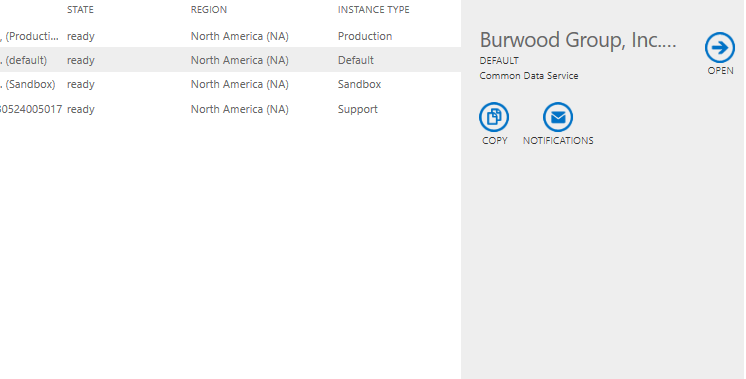
Environments.PNG

How can I fix this so I can install/upgrade solutions for the "Default" environment?

Thanks!

I have the same question (0)
  • Suggested answer
    Yiming Profile Picture
    Microsoft Employee on at

    Hi,

    You can try Power Platform Admin Center (admin.powerplatform.microsoft.com) and click 'Manage Solutions‘, then it will go to the solution page, you can install/upgrade solution here.

    6330.png

    4137.png

    Hope it helps!

  • Verified answer
    Thijs van der Klei Profile Picture
    780 on at

    Hi,

    Why do you want to use the default environment?

    The documentation says:

    "The default environment should not be used to host production solutions. It’s designed to be an open environment that allows users to extend Office 365 and trusted applications or to build personal productivity applications that don’t affect many people. You can restrict to this usage by adding a DLP policy that only allows data flow between trusted first party connectors."

    docs.microsoft.com/.../wp-environments

    Regards,

    Thijs van der Klei

  • Community Member Profile Picture
    on at

    Thanks! I didn't realize the default environment isn't designed to host solutions.

Under review

Thank you for your reply! To ensure a great experience for everyone, your content is awaiting approval by our Community Managers. Please check back later.

Helpful resources

Quick Links

Introducing the 2026 Season 1 community Super Users

Congratulations to our 2026 Super Stars!

Meet the Microsoft Dynamics 365 Contact Center Champions

We are thrilled to have these Champions in our Community!

Congratulations to the March Top 10 Community Leaders

These are the community rock stars!

Leaderboard > Customer experience | Sales, Customer Insights, CRM

#1
ManoVerse Profile Picture

ManoVerse 192 Super User 2026 Season 1

#2
11manish Profile Picture

11manish 129

#3
CU11031447-0 Profile Picture

CU11031447-0 100

Last 30 days Overall leaderboard

Product updates

Dynamics 365 release plans
