web
You’re offline. This is a read only version of the page.
close
Skip to main content

Notifications

Announcements

No record found.

Community site session details

Community site session details

Session Id :
Finance | Project Operations, Human Resources, ...
Suggested Answer

Build Error on D365Fo

(0) ShareShare
ReportReport
Posted on by 570

Hi All,

 While am trying  to build my module its showing blow error ,and I have more space on all drives I restart IIS service also but no luck.
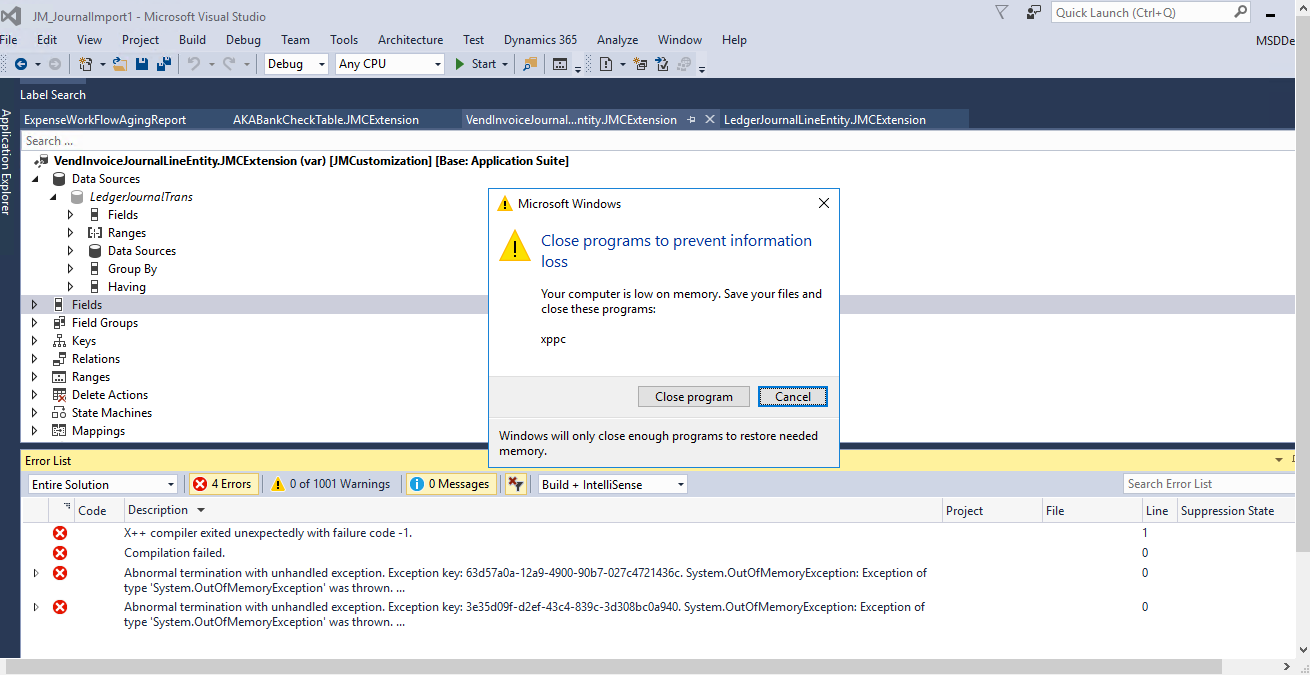
07873.Capture.PNG

error 1: :Severity Code Description Project File Line Suppression State
Error  X++ compiler exited unexpectedly with failure code -1.   1

error2 :Severity Code Description Project File Line Suppression State
Error  Abnormal termination with unhandled exception. Exception key: 63d57a0a-12a9-4900-90b7-027c4721436c. System.OutOfMemoryException: Exception of type 'System.OutOfMemoryException' was thrown.
   at IKVM.Reflection.Reader.TypeDefImpl.__GetDeclaredMethods()
   at IKVM.Reflection.Type.GetMembers[T]()
   at IKVM.Reflection.Type.GetMemberByName[T](String name, BindingFlags flags, Predicate`1 filter)
   at Microsoft.Dynamics.AX.Framework.Xlnt.ILGenerator.MethodGenerator.GenerateChainOfCommandNextCall(TypeBuilder cocHeperClassBuilder, XppBaseInfo xppBaseInfo, Method method, Type delegateType, FieldBuilder delegateList, Type delegateReplacementType, FieldBuilder delegateReplacement, FieldBuilder extensionTypeList, MemberInfo stackField, MethodInfo getStaticStateStackFieldMethod, Type returnType)
   at Microsoft.Dynamics.AX.Framework.Xlnt.ILGenerator.MethodGenerator.GenerateChainOfCommandCodeForElementMethods(String elementFullName, IDictionary`2 methods, XppBaseInfo xppBaseInfo, TypeBuilder parentBuilder, TypeBuilder cocHeperClassBuilder, Boolean isFormType)
   at Microsoft.Dynamics.AX.Framework.Xlnt.ILGenerator.MethodGenerator.GenerateChainOfCommandHelper(XppBaseInfo xppBaseInfo, String typeName, String elementFullName, IDictionary`2 methods, TypeBuilder parentBuilder, Boolean isFormType)
   at Microsoft.Dynamics.AX.Framework.Xlnt.ILGenerator.ClassMethodGenerator.GenerateChainOfCommandStubMethodsFromClass(Class classType, XppClassInfo classInfo, Boolean emitPrePostEvents)
   at Microsoft.Dynamics.AX.Framework.Xlnt.ILGenerator.ClassMethodGenerator.GenerateMethods(XppBaseInfo objectInfo, Boolean emitPrePostEvents, Boolean emitChainOfCommands)
   at Microsoft.Dynamics.AX.Framework.Xlnt.ILGenerator.ILGeneratorPass2Worker.<>c__DisplayClass3_0.<GenerateMethods>b__0(ConcurrentQueue`1 typeNames)
   at Microsoft.Dynamics.AX.Metadata.XppCompiler.ParallelCrashDumpUtil.<>c__DisplayClass1_0`1.<ForEach>b__2(T t)
   at System.Threading.Tasks.Parallel.<>c__DisplayClass17_0`1.<ForWorker>b__1()
   at System.Threading.Tasks.Task.InnerInvokeWithArg(Task childTask)
   at System.Threading.Tasks.Task.<>c__DisplayClass176_0.<ExecuteSelfReplicating>b__0(Object ).   0 
 

I have the same question (0)
  • Suggested answer
    A.Prasanna Profile Picture
    8,223 on at

    The massage says "System.OutOfMemoryException"

    https://docs.microsoft.com/en-us/dotnet/api/system.outofmemoryexception?view=netframework-4.8

    Debugging 

    https://blog.elmah.io/debugging-system-outofmemoryexception-using-net-tools/

    Hope this will help.

    Thanks & Regards,

    M D Amith Prasanna

  • Ludwig Reinhard Profile Picture
    Microsoft Employee on at

    moved to the d365 community forum

  • Suggested answer
    Sukrut Parab Profile Picture
    71,710 Moderator on at

    Whats the configuration of your VM?  I have seen this error while doing build log time ago. Consider upgrading your dev VM with better configuration.

  • Mea_ Profile Picture
    60,284 on at

    As Sukrut mentioned, you probably do not have enough RAM allocated for the VM, so you need to review the configuration and increase RAM.

  • Suggested answer
    nmaenpaa Profile Picture
    101,160 Moderator on at

    How much RAM do you have in the devbox? You should have at least 16 GB.

  • Suggested answer
    Mansour Yahya Mohamad Profile Picture
    on at

    To avoid the high memory consumption when running the build from Visual Studio:

    You don’t need to compile standard Microsoft packages, only custom packages are needed.

    You can run compiler command using the (xppc.exe) from PowerShell or Command prompt like the below

    (parameters can be changed accordingly):

    C:\Packages\bin\xppc.exe  -metadata="C:\Packages" -compilermetadata="C:\Packages" -xref -xrefSqlServer="localhost" -xrefDbName="DYNAMICSXREFDB" -incremental -output="C:\Packages\ApplicationSuite\bin" -modelmodule="ApplicationSuite" -xmllog="C:\Packages\ApplicationSuite\BuildProjectResult.xml" -log="C:\Packages\ApplicationSuite\BuildProjectResult.log" -appBase="C:\Packages\bin" -refPath="C:\Packages\ApplicationSuite\bin" -referenceFolder="C:\Packages"

Under review

Thank you for your reply! To ensure a great experience for everyone, your content is awaiting approval by our Community Managers. Please check back later.

Helpful resources

Quick Links

Responsible AI policies

As AI tools become more common, we’re introducing a Responsible AI Use…

Neeraj Kumar – Community Spotlight

We are honored to recognize Neeraj Kumar as our Community Spotlight honoree for…

Leaderboard > Finance | Project Operations, Human Resources, AX, GP, SL

#1
Martin Dráb Profile Picture

Martin Dráb 660 Most Valuable Professional

#2
André Arnaud de Calavon Profile Picture

André Arnaud de Cal... 549 Super User 2025 Season 2

#3
Sohaib Cheema Profile Picture

Sohaib Cheema 307 User Group Leader

Last 30 days Overall leaderboard

Product updates

Dynamics 365 release plans
