web
You’re offline. This is a read only version of the page.
close
Skip to main content

Notifications

Announcements

No record found.

Community site session details

Community site session details

Session Id :
Microsoft Dynamics AX (Archived)

Unable To Create the Continuous Build using VSTS and lifecycle services

(0) ShareShare
ReportReport
Posted on by 480

Hi,

docs.microsoft.com/.../continuous-build-test-automation

I have followed the same steps as specified in the above link to create the build and development environment using life cycle services and also mapped my VSTS project in life cycle services to create the build definition.

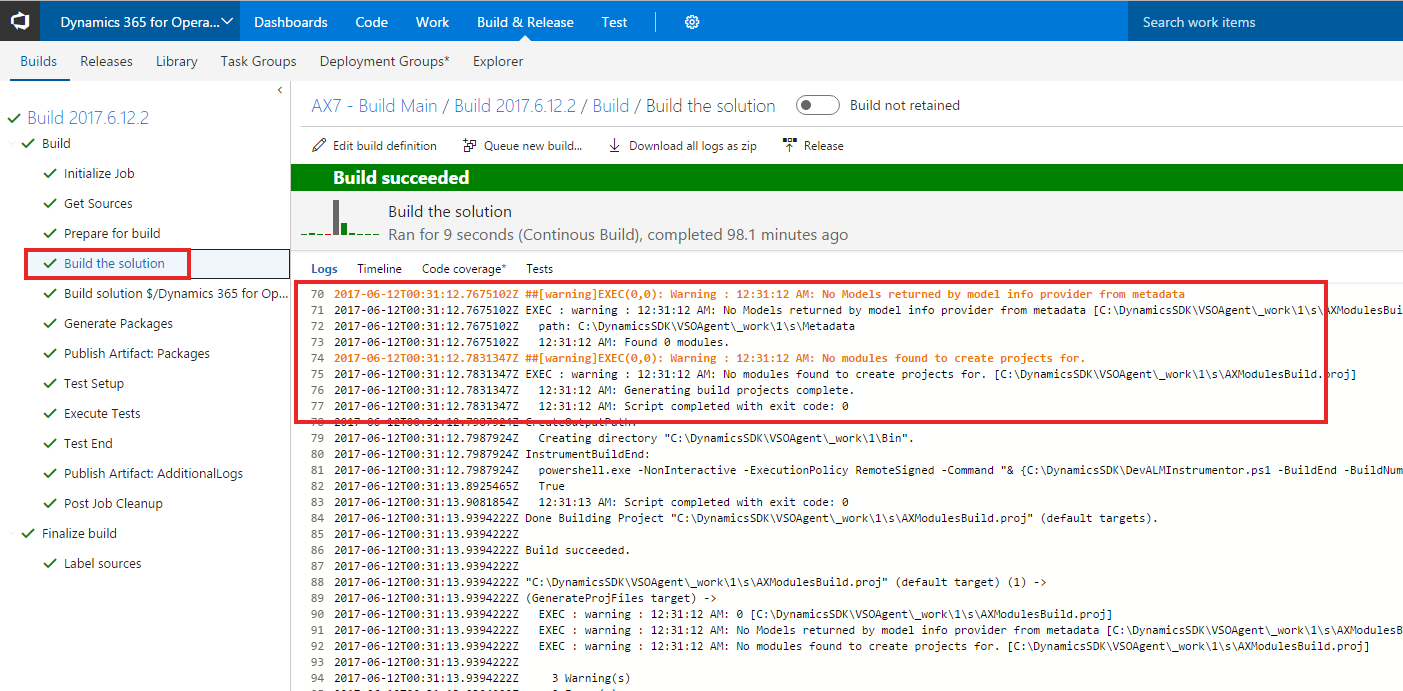
After that My build and dev environment were successfully deployed in azure and my build definition was also created in VSTS but the issue is when i checkin my wrong code the build was successfully created and i was expecting it to be fail as the code was containing some syntax errors.

I just checked the console messages On MS build Step of my build and found out one warning message i.e

"Warning : 12:31:12 AM: No Models returned by model info provider from metadata"
 

buildissues.png


I am unable to resolve the above issue can anyone please help me to fix this issue.

*This post is locked for comments

I have the same question (0)
  • Verified answer
    Martin Dráb Profile Picture
    237,965 Most Valuable Professional on at

    It seems that you didn't add any model to version control. It didn't find any model, so it had nothing to compile and it couldn't fail on your compilation error.

    When adding a model to VSTS, you have to add and check in both the model folder and its descriptor file.

  • Muhammad Zahid Profile Picture
    480 on at

    Thanks a lot Martin for your valuable answer :) actually my model and project folder were already added in the repository folder but my model descriptor file was not in the version control.

    failedbuild.png

    after adding the model descriptor file in version control.I am now able to see that my automated build is stopping the code to checked in that contains the syntax errors. 

    failedbuild.png

    One more quick question is there any documentation provided from Microsoft to create the Release definition (Continuous Deployment) for test environment using Life Cycle Services in VSTS same as what we did for Build Definition or do we have to manually create the steps for release definition?

    Thanks,

    Muhammad Zahid.

  • Martin Dráb Profile Picture
    237,965 Most Valuable Professional on at

    The process for deployment supported by Microsoft is using the Apply button on LCS. They have no template for Release Management, AFAIK.

Under review

Thank you for your reply! To ensure a great experience for everyone, your content is awaiting approval by our Community Managers. Please check back later.

Helpful resources

Quick Links

Responsible AI policies

As AI tools become more common, we’re introducing a Responsible AI Use…

Neeraj Kumar – Community Spotlight

We are honored to recognize Neeraj Kumar as our Community Spotlight honoree for…

Leaderboard > 🔒一 Microsoft Dynamics AX (Archived)

#1
Martin Dráb Profile Picture

Martin Dráb 4 Most Valuable Professional

#1
Priya_K Profile Picture

Priya_K 4

#3
MyDynamicsNAV Profile Picture

MyDynamicsNAV 2

Last 30 days Overall leaderboard

Featured topics

Product updates

Dynamics 365 release plans
