web
You’re offline. This is a read only version of the page.
close
Skip to main content

Announcements

News and Announcements icon
Community site session details

Community site session details

Session Id :
Business Central forum

Amount Excl. VAT in Sales Journal

(0) ShareShare
ReportReport
Posted on by

Dears,

While creating an invoice in Salels journal, we select the customer, enter the amount and the balance account information. The VAT being calculated by the system is inside the invoice amount. For example we are creating an invoice for 1000 AED with 5% VAT. The VAT should be-50 AED whereas the VAT being calculated in Bal. VAT Amount columns is -47.62 which is if price was including tax. How can we fix this as I am unable to locate the setup that governs this. Kindly help.

Categories:
I have the same question (0)
  • Heather Roggeveen Profile Picture
    9,150 on at

    Hi

    Mine is working fine (GST rather than VAT - but setup probably the same).

    This is my setup if that helps:
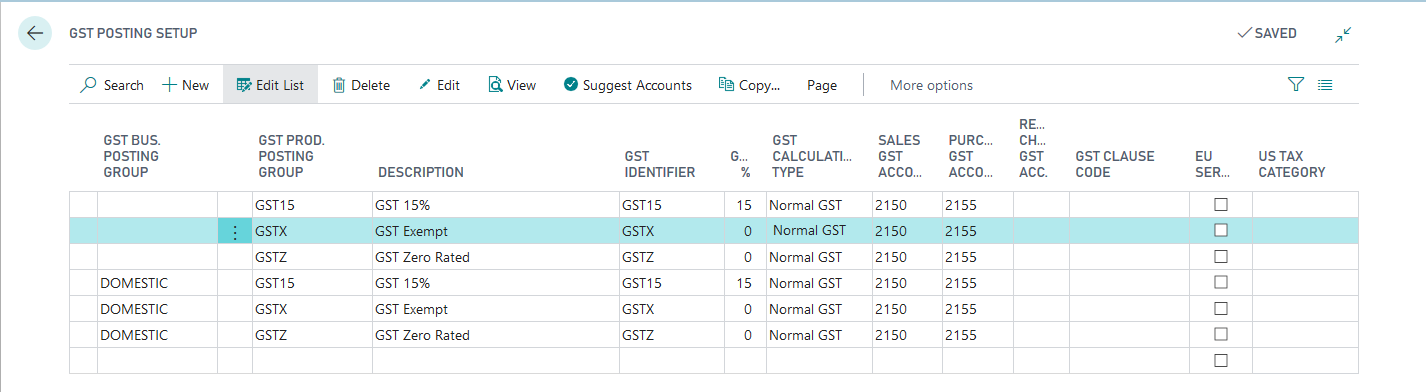
    GSTPostingSetup.png

    If using Items, you have the option on the item as to whether price includes GST:
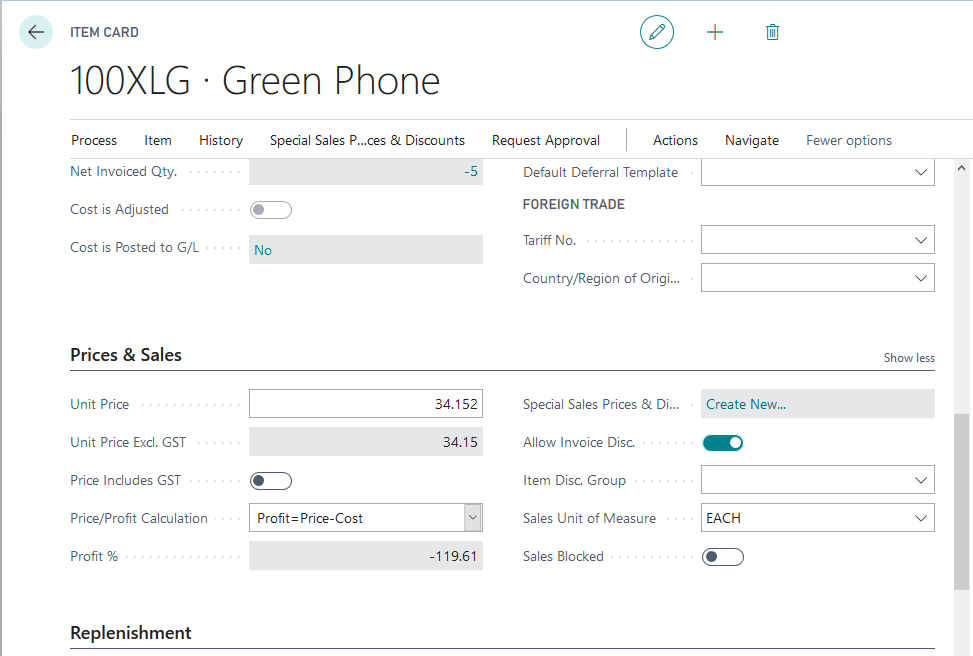
    ItemSetup.png

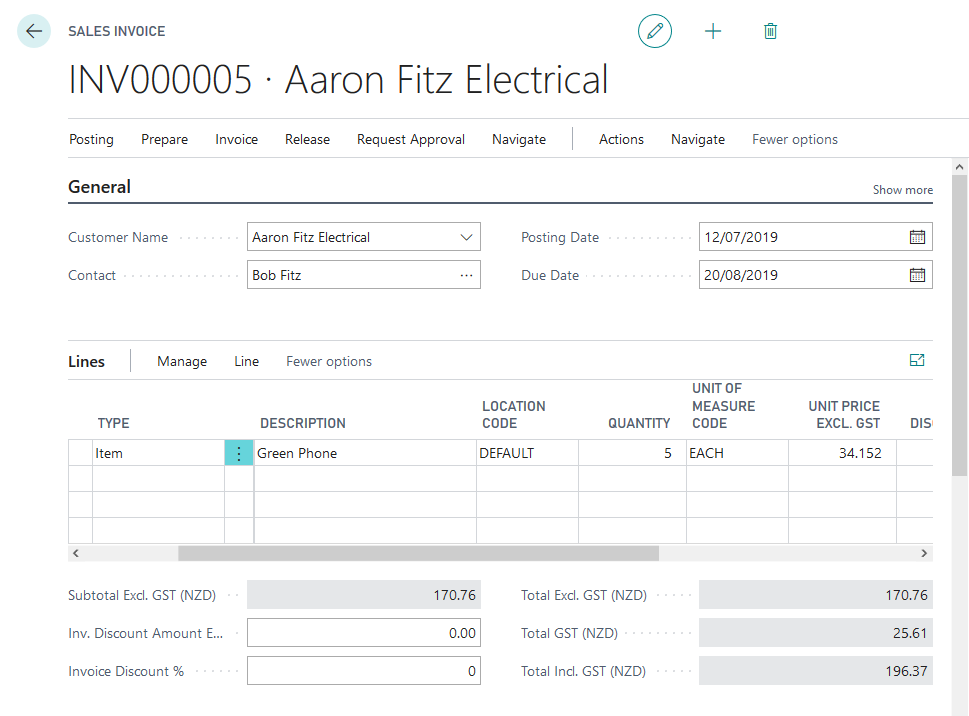
    Then invoice looks like this:

    Invoice.png

    I then tried adding an extra line with a G/L Account style entry and it treated it the same way.  I looked for specific settings against the GL Account and Sales & Receivables Setup, but couldn't see any setting that specifically drives that behaviour.

    But then I looked specifically at the Customer - and that does have an option about inclusive / exclusive pricing:
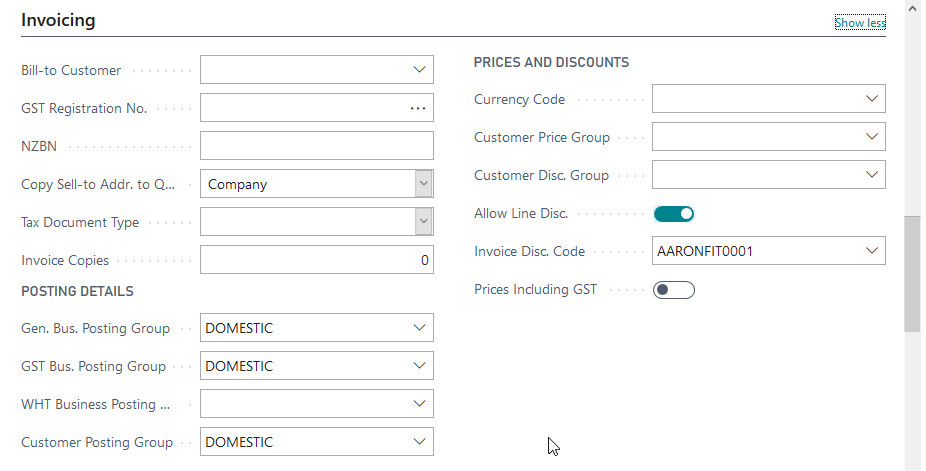
    CustomerSetup.png

    Hope something in all this helps :-)

    Cheers

    Heather

  • Heather Roggeveen Profile Picture
    9,150 on at

    Relooking at your question, I think you are doing this via Journal entry instead.  I think when doing it in the journal window, you do enter the GST Inclusive amount.  So to get your scenario, you would actually enter the value as 1050, and then the VAT would calculate correctly.

    That makes sense to me as you are just wanting to do a single line entry - so to ensure the VAT calculates correctly, you need to enter the VAT Inclusive amount.

  • Community Member Profile Picture
    on at

    Dear Heather,

    Firstly thanks for your response. The scenario is a bit different then what you described above. We have a sales invoice which we are directly recording against a customer and revenue account. The invoice value is 1000 AED and the VAT is supposed to be calculated upon the 1000 bringing the total to 1050 AED. But unfortunately the system is calculating the VAT inside 1000 AED which mean VAT Amount LCY is -47.62 AED and the revenue will be posted for 952.38 AED. I hope I was able to put the point across to you.

    And as far as the sales invoice is concerned, the VAT works perfectly fine whether the price includes or excludes VAT.

    P.S. We are using W1 version on premise.

  • Heather Roggeveen Profile Picture
    9,150 on at

    Can you post some screen shots of how you are entering?

    Cheers

    Heather

Under review

Thank you for your reply! To ensure a great experience for everyone, your content is awaiting approval by our Community Managers. Please check back later.

Helpful resources

Quick Links

November Spotlight Star - Khushbu Rajvi

Congratulations to a top community star!

Forum Structure Changes Coming on 11/8!

In our never-ending quest to help the Dynamics 365 Community members get answers faster …

Dynamics 365 Community Platform update – Oct 28

Welcome to the next edition of the Community Platform Update. This is a status …

Leaderboard > Business Central

Last 30 days Overall leaderboard

Featured topics

Product updates

Dynamics 365 release plans