web
You’re offline. This is a read only version of the page.
close
Skip to main content

Notifications

Announcements

No record found.

Community site session details

Community site session details

Session Id :
Microsoft Dynamics CRM (Archived)

Error/Warning every time a user tries to track an email from Dynamics 365 for Outlook

(0) ShareShare
ReportReport
Posted on by 120

Hey,

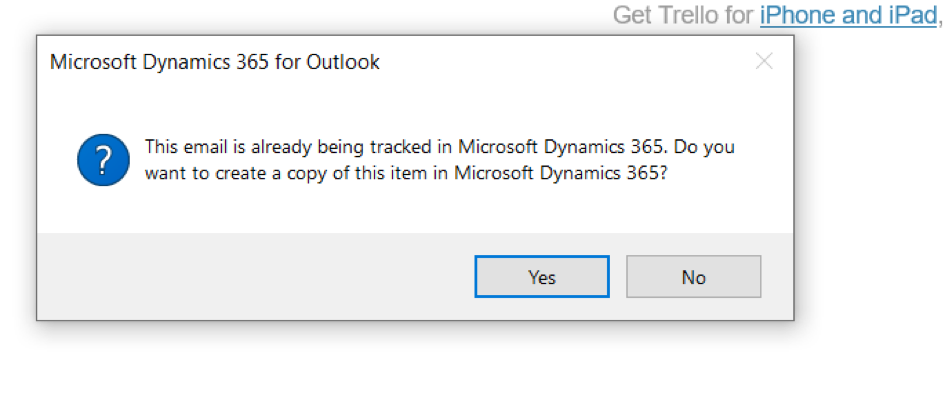
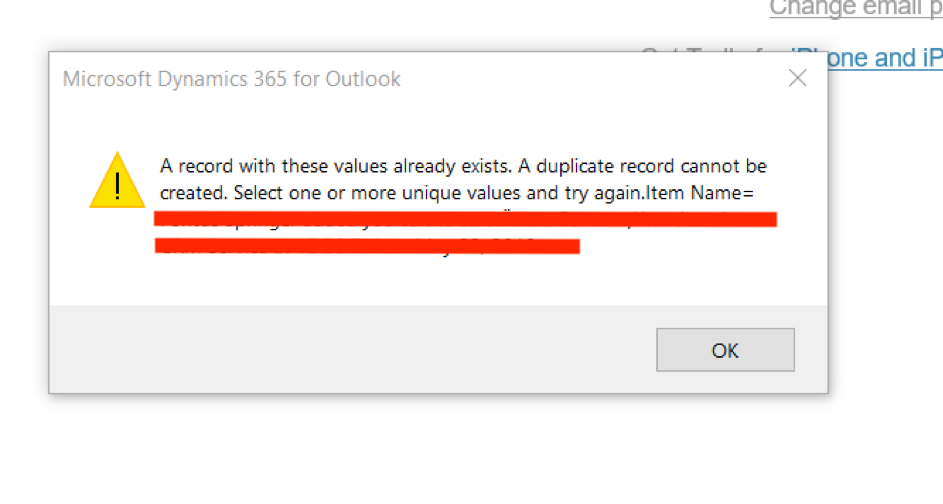
I have two users that always get two error messages when trying to track/set regarding a email from Dynamics 365 for outlook.
1616.Picture1.png

2772.Picture2.png

The email is still tracked to the correct record in CRM though. Any thoughts how to resolve this error or just hide the error messages?

*This post is locked for comments

I have the same question (0)
  • Suggested answer
    Andy Ran Profile Picture
    295 on at

    For the first message, actually it may show up as expected. If there are two CRM users A and B, A sent a email to B, or both A and B are recipients of a email from C. In these cases, if one of A/B tracked the email, a record will be created on the CRM server side. When the other person try to track the same email he/she received, since there is already one record on the server side, he/she will get this dialog saying "The email is already being tracked in Microsoft Dynamics 365 ...".

    To reduce the number of this message dialog showing up, you can turn on following setting. In the web client, go to Setting -> Administration -> System Settings,  click "Email" Tab, then click the option marked below:

    optiontocheck.png

    In this way, emails between CRM users will tracked as incoming/outcoming activities separately. Then you should have less error dialog than before. 

  • David123 Profile Picture
    120 on at

    Thank you for your answer. However that setting was already checked and this seem to be happening on every email regardless if both users are recipients or not...

    It is a very strange behaviour since it is only happening for some users and sometimes the email gets tracked in CRM anyways despite the error message and sometimes it does not.

    I tried to troubleshoot via Tracing but the log file only states the same "Error:A record with these values already exists. A duplicate record cannot be created. Select one or more unique values and try again."

    How can an email be a duplicate record?

    Very thankful for troubleshooting help since I cant find anything about this online!

  • pvmp19 Profile Picture
    10 on at

    Hi David, did you finally find out how to resolve this issue?

    I have the same problem and tried every possible solutions found in formus and MS recommendations with no luck :(

    Hope you had!

Under review

Thank you for your reply! To ensure a great experience for everyone, your content is awaiting approval by our Community Managers. Please check back later.

Helpful resources

Quick Links

Responsible AI policies

As AI tools become more common, we’re introducing a Responsible AI Use…

Neeraj Kumar – Community Spotlight

We are honored to recognize Neeraj Kumar as our Community Spotlight honoree for…

Leaderboard > 🔒一 Microsoft Dynamics CRM (Archived)

#1
SA-08121319-0 Profile Picture

SA-08121319-0 4

#1
Calum MacFarlane Profile Picture

Calum MacFarlane 4

#3
Alex Fun Wei Jie Profile Picture

Alex Fun Wei Jie 2

Last 30 days Overall leaderboard

Featured topics

Product updates

Dynamics 365 release plans



