web
You’re offline. This is a read only version of the page.
close
Skip to main content

Announcements

No record found.

News and Announcements icon
Community site session details

Community site session details

Session Id :
Microsoft Dynamics NAV (Archived)

Cannot Post Assembly Orders / Missing Items

(0) ShareShare
ReportReport
Posted on by

Hello,

I am having an issue with posting Assembly Orders.
I have included the step-by-step of how I ran into this problem - any help would be greatly appreciated!


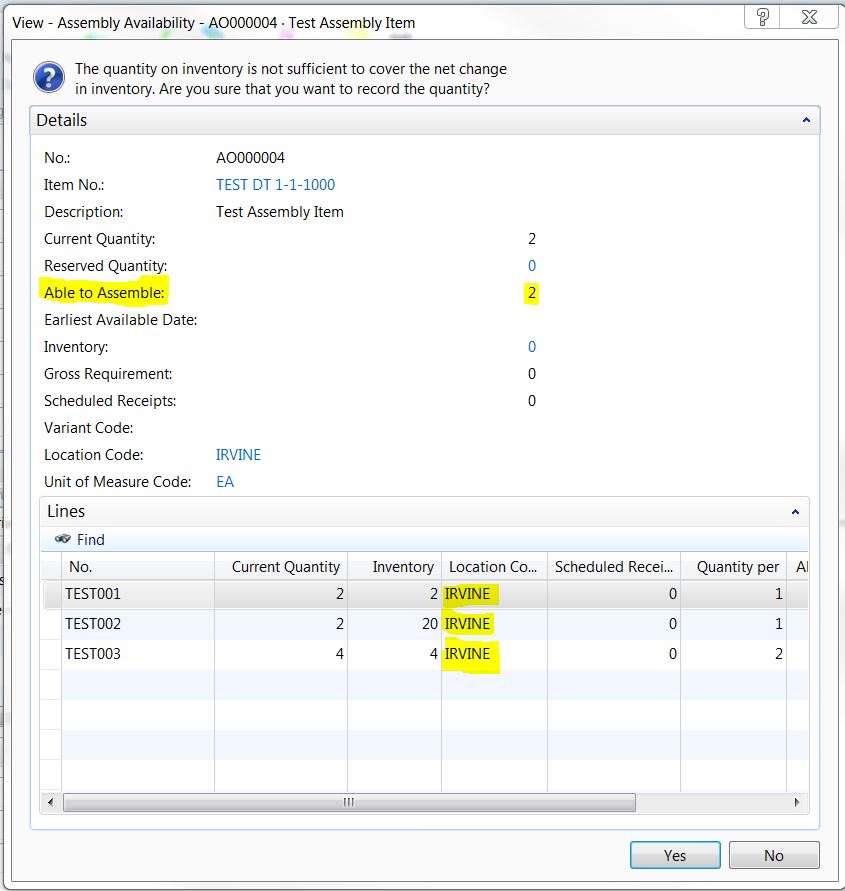
While processing the Assembly Order, I check the availability of the components needed for the Assembly. The report tells me that I have enough components on hand, and that I am able to assemble 2 of item TEST DT 1-1-1000. So far, so good
 1307.Capture1.JPG

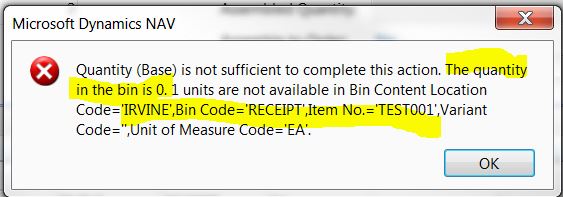
I try to post the Assembly Order, and I get this error message:
 3463.Capture2.JPG

So, I check the Bin Contents page and confirm that the bins are empty

1715.Capture3.JPG

This confuses me because in the Purchase Order, I had specified that the item should be placed in the RECEIPT bin

Capture4.JPG 

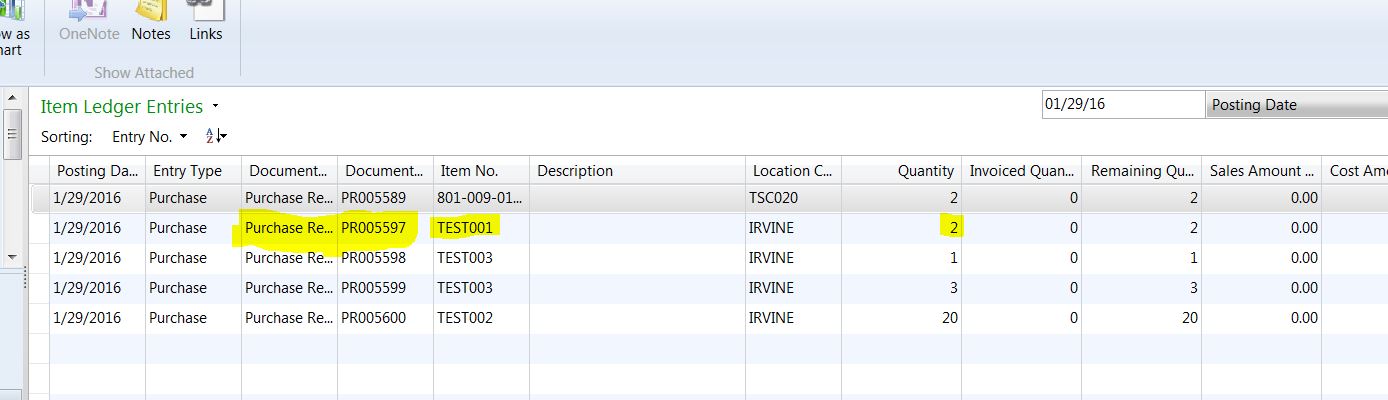
So I check the Item Ledger Entries to make sure the receipt went through, which it did
 0310.Capture5.JPG

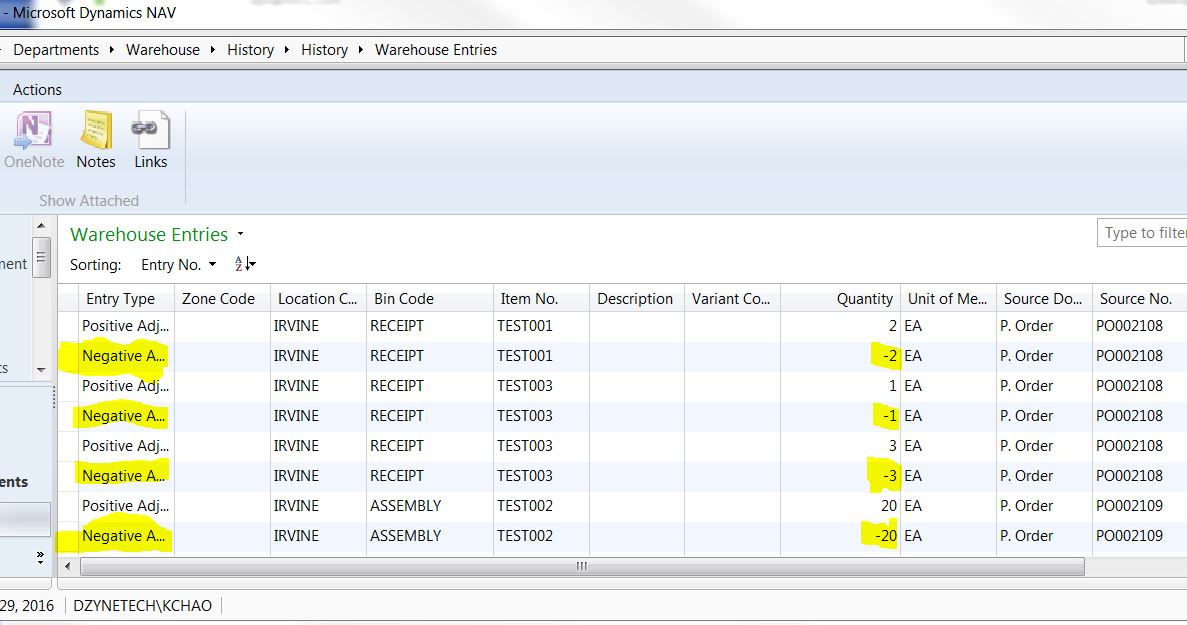
Then I check the Warehouse Entries to see where NAV put the items, and I'm surprised to see Negative Adjustment entries to all of the items I had purchased for this Assembly Order
 Capture6.JPG


Which brings me to my questions:

Where are my items/components?

Why were the Negative Adjustment entries automatically made?

How are the components marked as "available" in Assembly Availability report if

My location (IRVINE) is a bin mandatory location. How can the Item Ledger show that I have 2 of item TEST001 in location IRVINE, but the Bin Content page reports that I have nothing?


Thanks for taking the time to help!


*This post is locked for comments

I have the same question (0)
  • Community Member Profile Picture
    on at

    EDIT for the last question:

    If the Assembly Availability report mark the components as "available" in location IRVINE, why does the Bin Content page report that I have nothing in that location?

    (Location IRVINE is set as bin mandatory)

    Thanks!

  • Community Member Profile Picture
    on at

    Hi,

    Are you using "Directed Put-away and Pick" for IRVINE location?

    Regards,

    Vishal Salot

  • Community Member Profile Picture
    on at

    Hi Vishal,

    IRVINE is not set as Directed Put-away and Pick

    The only things I have set for this location is:

    Bin Mandatory: (checked)

    To-Assembly Bin Code :  "ASSEMBLY" bin

    Asm.-to-Order Shpt. Bin Code: "SHIP/COMPLETE" bin

    Any ideas?

    Thanks!

  • Suggested answer
    Community Member Profile Picture
    on at

    Hi,

    There could be two possibilities to this.

    1) You have selected "Job No" in Purchase Line

    or

    2) RevertWarehouseEntry function in codeunit 90 is creating some issue.

    Do you see, following lines in this function?

    IF PostJobConsumptionBeforePurch OR (JobNo = '') OR PositiveWhseEntrycreated THEN

     EXIT(FALSE);

    If above lines are already there in the RevertWarehouseEntry function, then try to search following lines in CU90, comment both the following lines and check the results.

    IF RevertWarehouseEntry(TempWhseJnlLine2,"Job No.",PostJobConsumptionBeforePurch) THEN

        WhseJnlPostLine.RUN(TempWhseJnlLine2);

    Please do the above changes in TEST ENVIRONMENT ONLY.

    Let me know, if this helps.

    Regards,

    Vishal Salot

  • Community Member Profile Picture
    on at

    Great! I did have a Job No. selected in the Purchase Line

    I now see the purchased items in the bin.

    However that brings a few more questions

    1)  If I do not designate the Job No., how do I charge the purchases against the Job I am buying them for?

    2) I have made a fair amount of purchases in the past with the Job No. selected in the purchase line, and the items ended up in the bin that I had designated. Why does this not occur in this case?

  • Community Member Profile Picture
    on at


    Hi,
    Actually, when you purchase the Items having JOB No. in purchase line , system would pass 2 Item Ledger Entries (one for Purchase & one for Negative Adjustments) and hence it is also reversing the Warehouse entries as well. 

    0755.1.jpg

    You can check your previous entries and you would find the negative adjustment ILE entries as well (If you have selected the JOB No.).


    Regards,

    Vishal Salot

  • Community Member Profile Picture
    on at

    Thanks for the response Vishal,

    The code makes sense, but can you explain the logic behind the Negative Adjustment? What is the point of it?

    The scenario is that I want to build an Assembly to be used in a particular Job (in this case TSC020, as shown in the screenshots).

    My logic is that I have to populate the Job No. field on the purchase line so I can charge & track the costs of building this Assembly to the correct Job.

    From what you are telling me, it sounds like I won't be able to use the components I purchased against a Job to complete an Assembly. Is this correct?

    Thanks again for your help!!

  • Verified answer
    Community Member Profile Picture
    on at

    Hi,

    I am not sure about the reason of this particular logic of creating Negative Adjustments when you have selected "Job No." in the Purchase Line. This functionality is there in place since long ago.

    It is assumed that, when you are buying this particular item, it should be used against that particular job only. This is very old logic in the system and they might not have consider the assembly scenario at that particular time.

    It would not be possible to change the scenario at our end, as it would require lot of thought behind this. You can always connect with Microsoft on the same and see if they can help you. I still have doubt that, you would get immediate help on the same.

    To overcome the situation,  let's consider the another scenario. Let us not select the Job No. in the Purchase Line and you keep on buying the required components.

    Later you can use the Assembly Journal to build the Assembly, which would further consume these components. This will load the various components cost to your Assembly Output Item.

    Further you can use this Assembly Item into your Job via Job Journal. This way, you can have accurate costing of the JOB.

    Later, you can build the report to get the exact details about Assembly Item > related components > related purchase order. This would help you to get the required details.

    Ideally, you really don't need to select the Job Number in the Purchase Order. At times, you might be buying certain items in single PO, which might be consumed against multiple Jobs or other way - you are consuming inventory of single item, which was bought via two different purchase orders.

    So let us not select the Job No. in your case and try to manage the situation, as it would be more suitable in your case rather selecting the Job No. in Purchase line, which would not help you to meet your requirements.

    Hope this helps you.  

    Best Regards,

    Vishal Salot

  • Community Member Profile Picture
    on at

    This was extremely helpful Vishal, thank you so much!

Under review

Thank you for your reply! To ensure a great experience for everyone, your content is awaiting approval by our Community Managers. Please check back later.

Helpful resources

Quick Links

Introducing the 2026 Season 1 community Super Users

Congratulations to our 2026 Super Stars!

Meet the Microsoft Dynamics 365 Contact Center Champions

We are thrilled to have these Champions in our Community!

Congratulations to the April Top 10 Community Leaders

These are the community rock stars!

Leaderboard > 🔒一 Microsoft Dynamics NAV (Archived)

Last 30 days Overall leaderboard

Featured topics

Product updates

Dynamics 365 release plans
