web
You’re offline. This is a read only version of the page.
close
Skip to main content

Announcements

No record found.

News and Announcements icon
Community site session details

Community site session details

Session Id :
Customer experience | Sales, Customer Insights,...
Suggested Answer

Getting error "Stage Failed" for Lead entity while migrating the data using Configuration Migration Tool (CMT)

(0) ShareShare
ReportReport
Posted on by 743

Hi All,

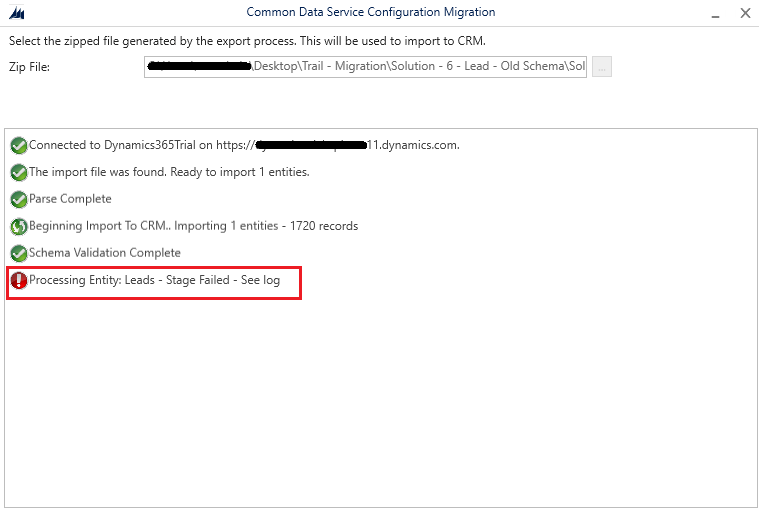
We are migrating the data from Dynamics 365 On-Premise to Dynamics 365 Online environment. However, for the Lead entity when we are trying to migrate the data using the Configuration Migration Tool (CMT), we are getting the error "Stage Failed". Can anyone please suggest / advice what could be the possible root cause of this issue?

Please refer the screen capture below
pastedimage1636617665134v1.png

We also checked the log, there is no information we can see in the log fiile.

Regards

I have the same question (0)
  • HeidiN Profile Picture
    4 on at

    Hi there! Can you share the log file details as well?

  • sharma.sandeep82 Profile Picture
    743 on at

    Hi Heidi,

    We checked the log, there is no information in the log file.

    --

    Regards

  • Kevin8787 Profile Picture
    45 on at

    Hi,

    You could try importing these through excel online feature. Also you could separate them by inactive/and active leads to see if the status is the cause of the issue. Alternatively you can try removing any duplicate detection rules you may have.

  • Suggested answer
    Stig De Feyter Profile Picture
    10 on at

    Hi,

    We had a similar error while importing data using the Package Deployment PowerShell Module (no logs, process hangs with message "Stage Failed"). The issue was caused by existing records in the target environment that had an empty value for their primary attribute. It was solved by removing these records or updating that primary attribute value in the target environment.

  • Tim Partridge2 Profile Picture
    38 on at

    This tip helped me. When trying to import the N:N relationships between Teams and Security Roles, I was missing the primary name attribute of security roles and it resulted in the same "Stage Failed" error with no additional details in the log file. Adding the primary name attribute fixed it. In short, I needed to include the Team fields teamid & name and the Security Role fields roleid & name.


Under review

Thank you for your reply! To ensure a great experience for everyone, your content is awaiting approval by our Community Managers. Please check back later.

Helpful resources

Quick Links

Introducing the 2026 Season 1 community Super Users

Congratulations to our 2026 Super Stars!

Congratulations to our 2025 Community Spotlights

Thanks to all of our 2025 Community Spotlight stars!

Leaderboard > Customer experience | Sales, Customer Insights, CRM

#1
ManoVerse Profile Picture

ManoVerse 180 Super User 2026 Season 1

#2
11manish Profile Picture

11manish 123

#3
CU11031447-0 Profile Picture

CU11031447-0 100

Last 30 days Overall leaderboard

Product updates

Dynamics 365 release plans
