web
You’re offline. This is a read only version of the page.
close
Skip to main content

Notifications

Announcements

No record found.

Community site session details

Community site session details

Session Id :
Small and medium business | Business Central, N...
Suggested Answer

New on the Table Relation LOOKUP page?

(0) ShareShare
ReportReport
Posted on by 358

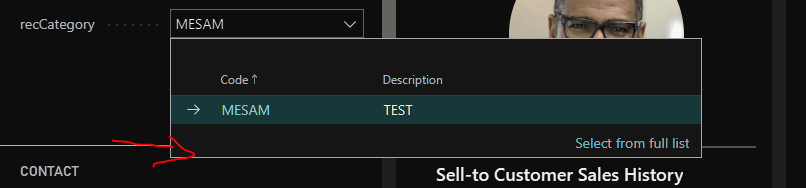
New.PNG

I created my own table, extended the Customer Table to give Table Relation to those fields. Then on Card and had my table's field there. However, how do I have the New button so that once this page is opened which is a list page, a user can create a new record. Right now clicking on 'Select from full List' opens it without the option to create new. There is no button of a list page at all. Here is my code;

table 50131 "Sector"
{
    DataClassification = ToBeClassified;

    fields
    {
        field(50000; "Code"; Code[20])
        {
            DataClassification = ToBeClassified;

        }
        field(50001; "Description"; Text[50])
        {
            DataClassification = ToBeClassified;
        }
    }

    keys
    {
        key(PK; Code)
        {
            Clustered = true;
        }
    }

    var
        myInt: Integer;

    trigger OnInsert()
    begin

    end;

    trigger OnModify()
    begin

    end;

    trigger OnDelete()
    begin

    end;

    trigger OnRename()
    begin

    end;

}

tableextension 50121 "Customer Table Ext" extends Customer
{
    fields
    {
        // Add changes to table fields here
        field(50001; "Customer Sector"; Code[20])
        {
            TableRelation = Sector;
        }
    }

    var
        myInt: Integer;
}

pageextension 50122 "Customer Card Ext" extends "Customer Card"
{
    layout
    {
        // Add changes to page layout here
        addafter("Disable Search by Name")
        {
            field(recCategory; recCategory.Code)
            {
                ApplicationArea = All;
                TableRelation = Sector;
            }
        }

    }

    actions
    {
        // Add changes to page actions here
    }

    var
        recCategory: Record Sector;
}

I have the same question (0)
  • Suggested answer
    Community Member Profile Picture
    on at

    Hii,

    For the above requirement

    1. First Create List Page of Sector Table.

    2. u have to fill LookupPageID(List page ID with same base table) Property of sector table.

    e.g.

    You have to define LookupPageID property After DataClassification property on sector table

    LookupPageID = "Sector List";

  • Suggested answer
    Olister Rumao Profile Picture
    3,967 on at

    Hi Mesam,

    You can use InsertAllowed property on the page to let you see the New button on the page.

    Although when your opening the page in Lookup mode it shouldn't allow you to insert any record.

    What you can try is create Table relation where I think you will get the New button.

    Hope this helps

  • Suggested answer
    patrickwantenaar Profile Picture
    45 on at

    This answer worked for me.

  • patrickwantenaar Profile Picture
    45 on at

    The reply below from Former Member worked for me.

    i.e. You have to define LookupPageID property After DataClassification property on sector table

    LookupPageID = "Sector List";

Under review

Thank you for your reply! To ensure a great experience for everyone, your content is awaiting approval by our Community Managers. Please check back later.

Helpful resources

Quick Links

Responsible AI policies

As AI tools become more common, we’re introducing a Responsible AI Use…

Neeraj Kumar – Community Spotlight

We are honored to recognize Neeraj Kumar as our Community Spotlight honoree for…

Leaderboard > Small and medium business | Business Central, NAV, RMS

#1
OussamaSabbouh Profile Picture

OussamaSabbouh 3,143

#2
Jainam M. Kothari Profile Picture

Jainam M. Kothari 1,694 Super User 2025 Season 2

#3
YUN ZHU Profile Picture

YUN ZHU 1,067 Super User 2025 Season 2

Last 30 days Overall leaderboard

Featured topics

Product updates

Dynamics 365 release plans
