web
You’re offline. This is a read only version of the page.
close
Skip to main content

Announcements

No record found.

News and Announcements icon
Community site session details

Community site session details

Session Id :
Microsoft Dynamics NAV (Archived)

Set filter on report requirement

(0) ShareShare
ReportReport
Posted on by

I have made a custom report which uses the item table. The last thing i need is when clicking the report button when standing on an item to take the item No. and put it in the "where No. is a value". So like on my screenshot, if i stand on AK-001 and press the button for the report it should fill the No. with AK-001.
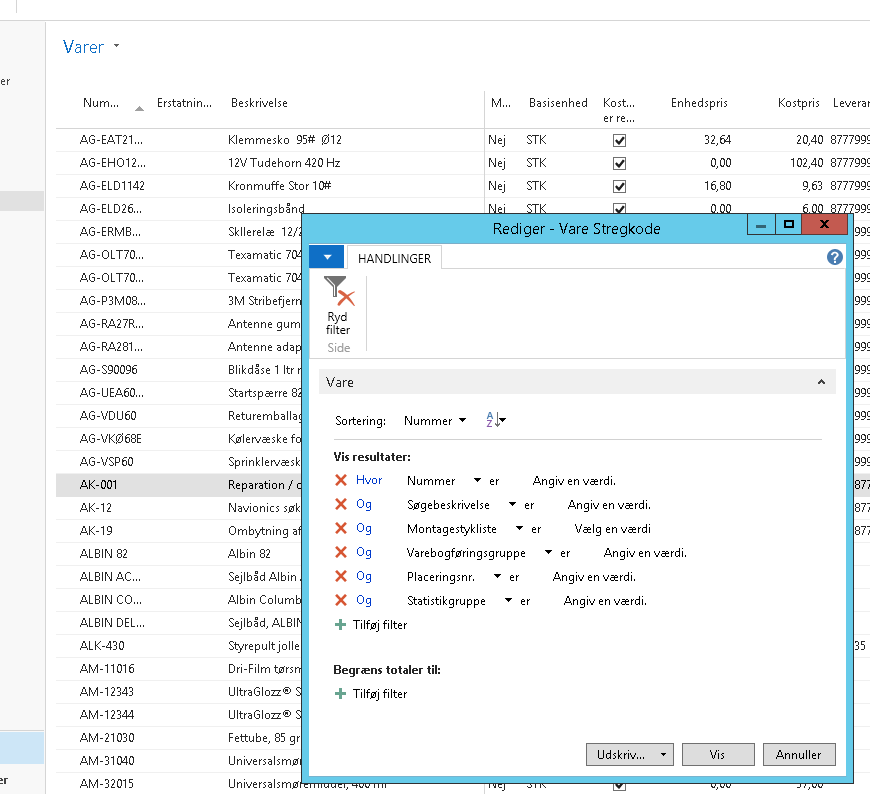
5824.Untitled.png

What i have tried to make it work:

In the item list page (31) -> page actions -> open C/AL editor for the report OnAction.

<Report Item Barcode> - OnAction()
Item.SETRANGE("No.","No.");
REPORT.RUNMODAL(REPORT::"Item Barcode DMC M PRIS2",TRUE,FALSE,Item);

Nothing is happening with the above i tried.

*This post is locked for comments

I have the same question (0)
  • mmv Profile Picture
    11,471 on at

    Hi,

    Is your report using Item table as the DataItem?

  • Community Member Profile Picture
    on at

    Yes, my report is using the Item table as DataItem.

    0268.Untitled1.png

  • Suggested answer
    Community Member Profile Picture
    on at

    Have you tried restarting the NAV application service and checked the output?

    Ideally, it should work.

  • RockwithNav Profile Picture
    9,113 Super User 2026 Season 1 on at

    Hey Christopher007,

    In the  list page (31) -> page actions -> open C/AL editor for the report OnAction.

    Write this Code.

    CurrPage.SETSELECTIONFILTER(REC);

    REPORT.RUNMODAL(Report,TRUE,FALSE,REC);

    It will work for sure.

  • Verified answer
    Community Member Profile Picture
    on at

    Thanks for the replys.

    I just found the problem I had.

    On the page action property I had put RunObject on which would overwrite the setfilter i set in the CAL code.

Under review

Thank you for your reply! To ensure a great experience for everyone, your content is awaiting approval by our Community Managers. Please check back later.

Helpful resources

Quick Links

Introducing the 2026 Season 1 community Super Users

Congratulations to our 2026 Super Stars!

Meet the Microsoft Dynamics 365 Contact Center Champions

We are thrilled to have these Champions in our Community!

Congratulations to the April Top 10 Community Leaders

These are the community rock stars!

Leaderboard > 🔒一 Microsoft Dynamics NAV (Archived)

Last 30 days Overall leaderboard

Featured topics

Product updates

Dynamics 365 release plans
