web
You’re offline. This is a read only version of the page.
close
Skip to main content

Notifications

Announcements

No record found.

Community site session details

Community site session details

Session Id :
Microsoft Dynamics CRM (Archived)

How to add condition component in true (THEN) section while defining business rule?

(1) ShareShare
ReportReport
Posted on by 515

Hello,

I have a scenario where I need to create business rule for condition : Field1='A' AND (Field1='B' OR Field1='C').

For this I need to prepare flow like below code.

IF (Field1='B' OR Field1='C')

IF (Field1='A')

// My action goes here

END IF

END IF

But, problem is I can't define nested condition in IF Area, see below Image for reference.
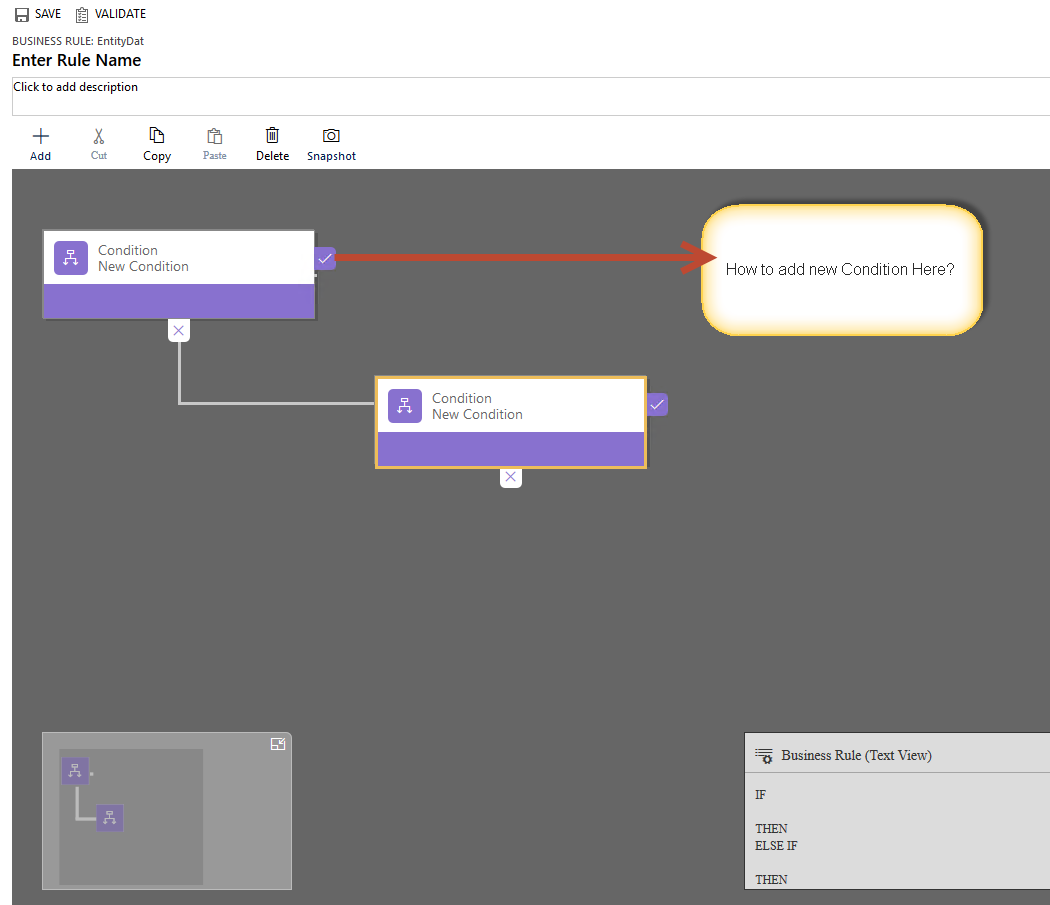
8030.logic.png

Any suggestion to implement it is hearty appreciated.

Thanks,

Ashish

*This post is locked for comments

I have the same question (0)
  • Suggested answer
    Siraj M Profile Picture
    on at

    there is an open idea item for this feature

    Regards,

    Siraj

  • Suggested answer
    Community Member Profile Picture
    on at

    Hello Ashish

    Unfortunately, CRM does not allow nesting conditions by the true branch. You would have to deny your initial proposition, so that you can leave the false branch with a value that works for you.

    This is very simple, applying a logical law called "De Morgan's laws"

    We take your initial condition and deny it:

    (Field1 = 'B' OR Field1 = 'C')

    ~ (Field1 = 'B' OR Field1 = 'C')

    Field 1! = "B" AND Field 1! = 'C'

    Then just place the second question in the else if, giving you as a result:

    IF (Field1!='B' AND Field1!='C')

                 // Nothing here

          ELSE IF (Field1='A')

                 // My action goes here

          END IF

    END IF

    I hope I have helped you, do not forget to mark the answer if it served you.

    Best Regards, Luciano

  • Ashish Moradiya Profile Picture
    515 on at

    Hello Luciano,

    Thank for your answer, I already tried the way you suggested. But it is problematic as IF part can't be left blank.  

    I am thinking there must be some proper way to achieve it.

  • Community Member Profile Picture
    on at

    Hi ashish

    As far as I know, using OOTB components, this is the best way to achive that. In the if condition you can use an obviously condition, for example if you are working on the contact entity, put an action that makes visible the "contact name", only to meet the crm logic requirement.

    Best Regards!

    Luciano

  • Community Member Profile Picture
    on at

    in this case it is easier to write java script code than to use business rule

  • Suggested answer
    tw0sh3ds Profile Picture
    5,600 on at

    Like was already suggested - don't use Business Rules which are features for business guys who choke on the word "programming". Use Javascript instead, Dynamics 365 SDK is great, I'm not sure why a developer (which I'm assuming you are based on your profile) is using some WYSIWYG logic configurators...

  • Community Member Profile Picture
    on at

    Its true, you can use Javascript for solve your problem. But a good practice always been use the most native components. Business rules are more easy to manage, beacuse you can activate/deactivate without get into the properties of a Form and its events.

    Business Rules make that customization more visible, and its easier to remember and see if any logic is affecting the natural behavior of a form. Also you can set a "Entity" scope, allowing the rule to run on the server side too, which is a limitation of Javascript that as we know, runs only on the client side

  • ashlega Profile Picture
    34,477 on at

    That's a good point, but you can always emulate a business rule through a combination of a javascript and a workflow(actually, I'm not sure if that's the case for editable grids, but for everything else it is).. Personally, I think SDK and XRM is there for a reason - it's quite native, after all:) Once you reach certain complexity(looks like it might be the case here), you have no choice but to start using low-level customizations (or give up on the requirement).

  • tw0sh3ds Profile Picture
    5,600 on at

    @Luciano what you say is true for project with low complexity and usually if they are handled by some in-house support team (usually singe System Administrator who is not a developer, just a Power User). As Alex already said - there is nothing more native than API - both for JavaScript and .NET. For complex systems it's much more useful to use JS and C# wherever possible, because it allows you to use all the Software Development technology stuff - like code repository, working in teams on single functionality, versioning of changes etc. etc. Using built-in configurable customizations you don't have this kind of flexibility. I could show you a system, where is so much client side logic, then if it would be made using Business Rules, the system would not be maintainable at all - thanks to JS it's simple as you can see all the logic in one place which is Visual Studio project (or wherever you keep your web resources). Again - if you know how to code, there is no reason for using Business Rules. I don't buy the argument that they are more visible - attached Javascript files are as much visible as them.

  • Community Member Profile Picture
    on at

    You're totally right, I also love programming when it's necessary. In fact, of the 10 customizations that appear in the CRM's of our clients, at least one needs JS or C #. But in my opinion, if a problem can be solved in a simple way, it's better, since as you said, that can be handled by a simple administrator user.

    Returning to the main subject, @Ashish your problem should be able to be solved with any of the tools that we are offering. Could you solve it?

Under review

Thank you for your reply! To ensure a great experience for everyone, your content is awaiting approval by our Community Managers. Please check back later.

Helpful resources

Quick Links

Responsible AI policies

As AI tools become more common, we’re introducing a Responsible AI Use…

Neeraj Kumar – Community Spotlight

We are honored to recognize Neeraj Kumar as our Community Spotlight honoree for…

Leaderboard > 🔒一 Microsoft Dynamics CRM (Archived)

#1
SA-08121319-0 Profile Picture

SA-08121319-0 4

#1
Calum MacFarlane Profile Picture

Calum MacFarlane 4

#3
Alex Fun Wei Jie Profile Picture

Alex Fun Wei Jie 2

Last 30 days Overall leaderboard

Featured topics

Product updates

Dynamics 365 release plans



