web
You’re offline. This is a read only version of the page.
close
Skip to main content

Notifications

Announcements

No record found.

Community site session details

Community site session details

Session Id :
Microsoft Dynamics 365 | Integration, Dataverse...
Answered

Dynamics 365 online - New users can't login / "An error has occured"

(1) ShareShare
ReportReport
Posted on by 25

Hello together,

we have a strange problem since mid December 2022 with new users who want to log in to our D365 Online.
We have already opened a support ticket with Microsoft about this, but unfortunately we haven't made any progress for weeks yet.

The users get the following error message when they try to log in:
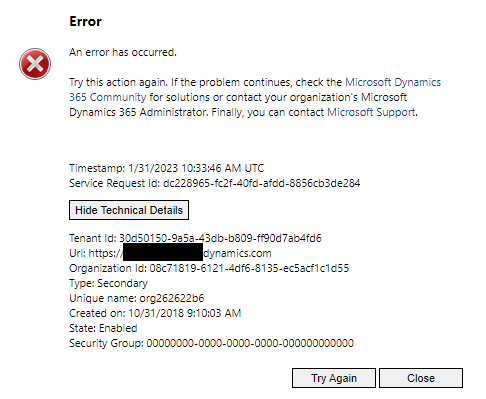
pastedimage1675340964919v1.png


The users have a valid D365 Customer agreement license in Azure AD and have the necessary roles in D365.
Compared to other users who can log in, they differ only minimally (mail, username...).

Since we don't have access to the server logs, we can't see why there is a login problem.

For D365 on prem there was a Microsoft article describing the error message and suggesting a solution, but the solution refers to the on premises version, but does not help us.
https://learn.microsoft.com/en-us/previous-versions/troubleshoot/dynamics/crm/error-logging-into-dynamics-crm


Have you also had this meaningless error message when logging into D365?
Do you have any ideas or experiences to solve this problem?

Thanks in advance

I have the same question (0)
  • Haig Liu Profile Picture
    Microsoft Employee on at

    Hi 

    Do you mean that all new users are unable to log in or only some of them?

    If only some of them, I suggest they try a different account.

    By the way, are the users who can't log in using Windows 11?

    Maybe it's a bug.

  • PerezAguiar Profile Picture
    Microsoft Employee on at

    hey.

    This is a custom error message. The best recomendations would be:

    a) get a network trace, and check the cookies.  There should be some cookies like

    pastedimage1675436453823v1.png
    b) You can test forcing the sync of the user on PowerPlatform Admin Center:  Basically, select the environment, click on "Users" on the right" and then you have a "Diagnose user":

    pastedimage1675436608305v2.png

  • Boolean1 Profile Picture
    60 on at

    Do you have an Azure AD Security Group associated with the environment? To check, go to admin.powerplatform.com and go to environments. Click on the environment in question, and -- in the "Details" area -- check to see if "Security Group" is populated. If so, make sure the user is in that Security Group.

  • Clemens Langner Profile Picture
    25 on at

    Hello Haig Liu, thank you for your answer.

    All new users have a problem and can't login, after getting a license and a role in D365.

    But we saw, that some new users can login directly after getting a license and role, but next day they are getting an error.

    They are all using Winows 10.

  • Clemens Langner Profile Picture
    25 on at

    Thanky you, but there where only cryptical cookies in developer tools available (only digits and random chars).

    Forcing to sync an affected user didn't help here too.

  • Verified answer
    Clemens Langner Profile Picture
    25 on at

    Hello all,

    at first, thank you all for your help.

    We were able to fix the problem ourselves in the meantime.

    The reason for the user not being able to log in was a missing configuration in the User Request Config.

    In the user attribute "Homepage" it was mandatory to enter "Sales", so that due users can log in.

    Greetings,

    Clemens

Under review

Thank you for your reply! To ensure a great experience for everyone, your content is awaiting approval by our Community Managers. Please check back later.

Helpful resources

Quick Links

Responsible AI policies

As AI tools become more common, we’re introducing a Responsible AI Use…

Neeraj Kumar – Community Spotlight

We are honored to recognize Neeraj Kumar as our Community Spotlight honoree for…

Leaderboard > Microsoft Dynamics 365 | Integration, Dataverse, and general topics

#1
Martin Dráb Profile Picture

Martin Dráb 60 Most Valuable Professional

#2
#ManoVerse Profile Picture

#ManoVerse 51

#3
Satyam Prakash Profile Picture

Satyam Prakash 42

Last 30 days Overall leaderboard

Product updates

Dynamics 365 release plans



