web
You’re offline. This is a read only version of the page.
close
Skip to main content

Notifications

Announcements

Community site session details

Community site session details

Session Id :
Customer experience | Sales, Customer Insights,...
Answered

Contoso Coffee Check-In Power Automate Flow error

(0) ShareShare
ReportReport
Posted on by

Hi,

I've been following the "Customer Insights In A Day" labs and am stuck at the Contoso Coffee Check-In Power Automate Flow. I'm getting an error saying "Resource not found for the segment [ID]":
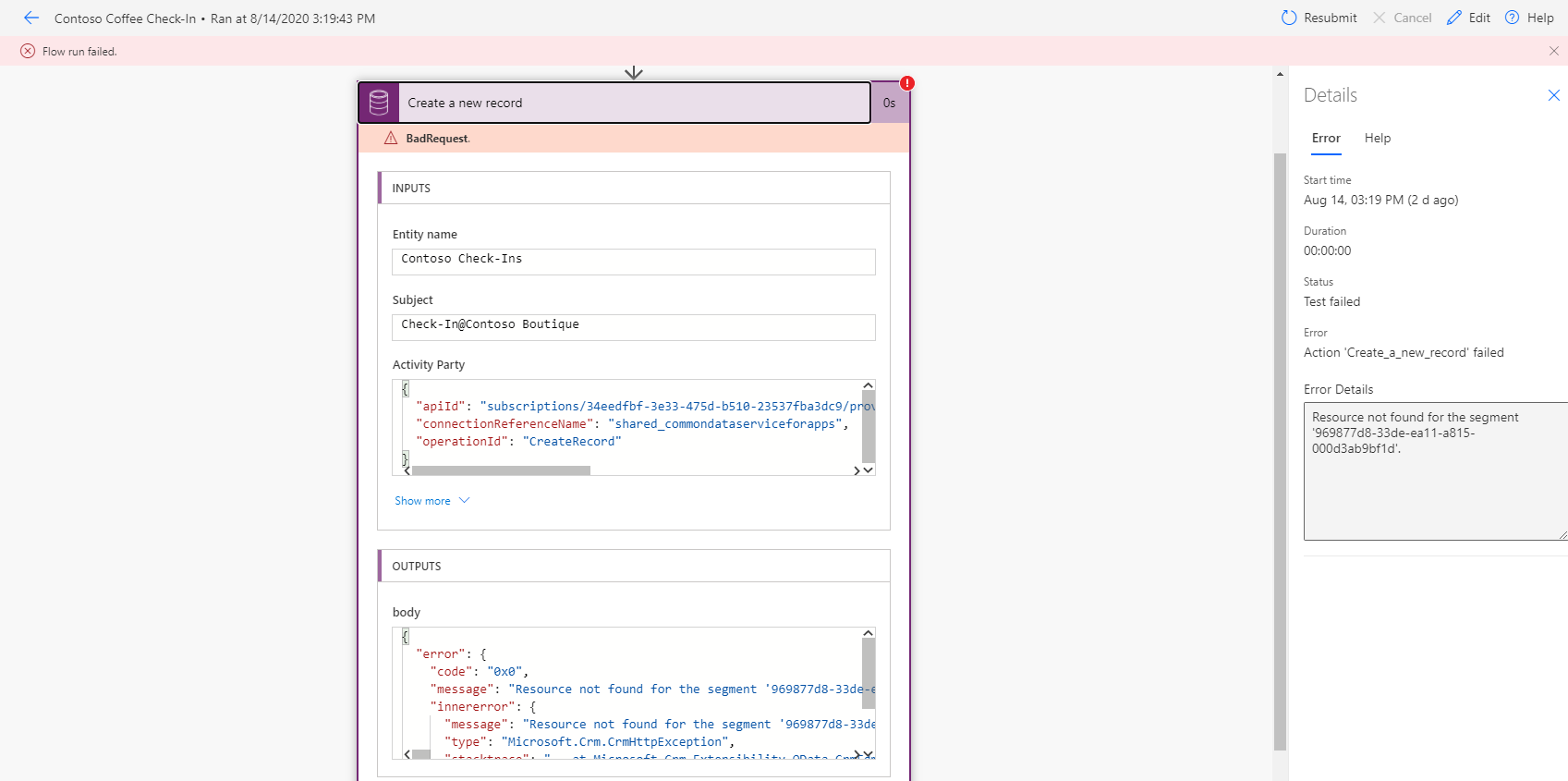
pastedimage1597599223562v2.png

When I checked the ID it gives me, it pointed towards the entity called "CDN Configuration" (msdyncrm_cdnconfiguration) but could not surface the record with the ID.

Does anyone know how to fix this?

Cheers, 

Annie

I have the same question (0)
  • Verified answer
    Community Member Profile Picture
    on at

    Came up with the following fix (I guess the labs are slightly outdated):

    because it's a lookup field, for "Regarding (Contacts)" the value should be "Contacts([Ask in PowerApps])

    pastedimage1597672013914v1.png

  • Suggested answer
    LuHao Profile Picture
    40,892 on at

    Hi Annie,

    When we “Create a new record ” action with Common Data Service(Current environment) connector based on some trigger, the format of the referenced attribute values is /EntityNameInPlural/(Record’sId/GUID).

    For example, If I would update the Account lookup field in the Contact “Create a new record ” action, the Account lookup field's value is /accounts/(Record’sId/GUID).

    Please refer to https://powerusers.microsoft.com/t5/Power-Automate-Community-Blog/Resource-not-found-for-the-segment-issue-in-Power-Automate/ba-p/552837

Under review

Thank you for your reply! To ensure a great experience for everyone, your content is awaiting approval by our Community Managers. Please check back later.

Helpful resources

News and Announcements

Season of Giving Solutions is Here!

Quick Links

Responsible AI policies

As AI tools become more common, we’re introducing a Responsible AI Use…

Neeraj Kumar – Community Spotlight

We are honored to recognize Neeraj Kumar as our Community Spotlight honoree for…

Leaderboard > Customer experience | Sales, Customer Insights, CRM

#1
Pallavi Phade Profile Picture

Pallavi Phade 94

#2
Tom_Gioielli Profile Picture

Tom_Gioielli 81 Super User 2025 Season 2

#3
TAHER Mehdi Profile Picture

TAHER Mehdi 58

Last 30 days Overall leaderboard

Product updates

Dynamics 365 release plans
