web
You’re offline. This is a read only version of the page.
close
Skip to main content

Announcements

No record found.

News and Announcements icon
Community site session details

Community site session details

Session Id :
Microsoft Dynamics AX (Archived)

Generate Invoice is greyed out on a confirmed\receipted PO

(0) ShareShare
ReportReport
Posted on by 245

Good Day

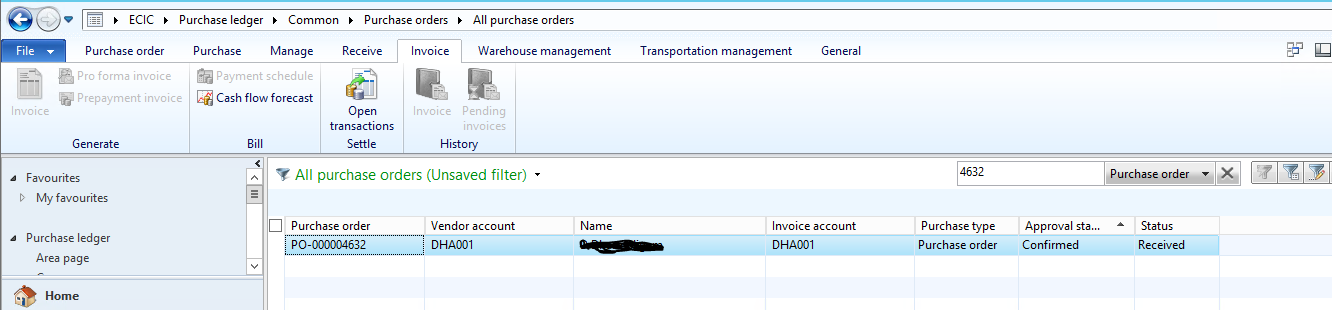
I have a PO that needs to be posted, but the generate invoice button is greyed out.

There's no pending invoice.

This does not happen to other confirmed\receipted 

See screenshot below
PO-receipted.PNG

Regards

Angel AX

*This post is locked for comments

I have the same question (0)
  • Suggested answer
    Ludwig Reinhard Profile Picture
    Microsoft Employee on at

    Hello Angel AX,

    Is it possible that you lack the proper user rights?

    Have you double checked with your colleagues whether they are able to see the button active?

    Is there possibly a workflow setup that needs to be completed?

    Is the PO or ordinary PO or linked to a journal type PO in the header?

    Best regards,

    Ludwig

  • Verified answer
    Galyna Fedorova Profile Picture
    3,566 on at

    Hi Angel AX,

    Can it be the case that your vendor is on hold?

    BR,

    Galyna

  • Suggested answer
    NaveenKumar S Profile Picture
    3,477 on at

    Does the user have the invoicing rights?

  • AngelAX Profile Picture
    245 on at

    Dear Galyna

    Indeed the vendor was on hold.

    Thank you very much

    Regards

    Angel AX

Under review

Thank you for your reply! To ensure a great experience for everyone, your content is awaiting approval by our Community Managers. Please check back later.

Helpful resources

Quick Links

Introducing the 2026 Season 1 community Super Users

Congratulations to our 2026 Super Stars!

Congratulations to our 2025 Community Spotlights

Thanks to all of our 2025 Community Spotlight stars!

Leaderboard > 🔒一 Microsoft Dynamics AX (Archived)

#1
Sagar Suman Profile Picture

Sagar Suman 2 Super User 2026 Season 1

#1
Alexey Lekanov Profile Picture

Alexey Lekanov 2

#1
Pratik Bhosle Profile Picture

Pratik Bhosle 2

Last 30 days Overall leaderboard

Featured topics

Product updates

Dynamics 365 release plans
