web
You’re offline. This is a read only version of the page.
close
Skip to main content

Announcements

No record found.

News and Announcements icon
Community site session details

Community site session details

Session Id :
Small and medium business | Business Central, N...
Active Discussion

Bug: Standard fields of type Code don't sort properly when you use number codes

(2) ShareShare
ReportReport
Posted on by 4

Seems that in BC SaaS v20.0.ES standard fields of type Code don't sort properly when you use number codes.

We have needed to cut the numbering of the Sales Orders "No." and this is the result now when sorting by the PK the Sales Orders List.
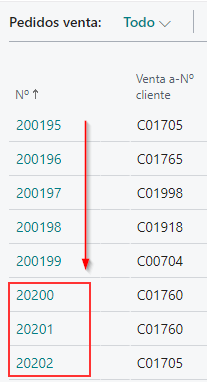
pastedimage1651914245563v1.png

I think this is a global standard Bug...

Could someone report it to Microsoft?


NOTE - The chosen numbering has not depended on me and it is too late to change it...

  • IB-29041624-0 Profile Picture
    1,191 Moderator on at

    Hi,

    This is not a bug. This is the designed behavior of a code field.

    A code field is basically a text field and numeric values entered into a code field is sorted as they would be text values.

    This is why you see this sorting behavior for a code field.

    Letters entered into a code field is always turned into capital letters. That is also a behavior of a code field.

  • JFuentes Profile Picture
    4 on at

    Hi NorthW ,

    I'm sorry to disagree with your opinion about this is not a Bug of standard BC...

    If you know old Navision versions running over "native" database engine, Code fields sort like numbers when all registers have numbers in this fields... by desing, not only convert to capital letters.

    When Navision started support running over MS SQL Server database engine, on migration projects this was an issue that MS solved adding the "SQL Data Type" property to fields and saying developers that we should set the Variant value to this property of all the standard and non-standard fields we needed...

    pastedimage1652006780792v1.png

    With Navison and (and BC OnPrem) developers can modify this property over standard fields, but with BC SaaS infraestructure this is not possible, so I think Microsoft should set "SQL Data Type" = Variant by default in all standard Code fields to retrieve the full native behaviour of Code datatype fields or allow customize this property in tableextension objects.

    pastedimage1652009124202v2.png

  • IB-29041624-0 Profile Picture
    1,191 Moderator on at

    I think you have two options.

    Either submit it as a product idea on https://experience.dynamics.com/ideas/ or if you really think it is a bug you should report it through your CSP partner.

  • YUN ZHU Profile Picture
    103,712 Super User 2026 Season 2 on at

    Hi, as Inge said, this is not a bug.

    But this is really a problem, I understand your idea very well. I have experienced that customer want to move line up and down before, because normal sorting cannot satisfy them..

    This may not be the same page, but in this case, you can create a new field and reorder by the new field.....Of course this is cumbersome, and developers are generally reluctant to do it.

    A simple example: https://yzhums.com/13671/

    Hope this helps.

    Thanks.

    ZHU

  • JFuentes Profile Picture
    4 on at

    Thanks yzhums ,

    I think your solution is very interesting, but is not valid for this scenario because every new sales order should be sorted before the existing ones that were created with one more digit in its primary key...

  • Assisted by AI
    Grigorios Mavrogeorgis Profile Picture
    3,708 Super User 2026 Season 2 on at

    Hi,  this is not a bug. The No. field is Code, and Code is text, so it sorts character by character, not as a number. 200195 lands before 20200 because on the third character you have 0 against 2. 

     As long as every number has the same amount of digits it sorts the way people expect, that's why the standard series keep a fixed pattern.

    For the ones already created there's not much, you can't renumber posted documents. If the sorting really hurts users, a small extension with an integer field filled from the No. and the list sorted on that would work. Not pretty, but it does the job.

    Glad to help - follow up if anything is unclear.   

    â–º  If this solved it, marking it verified helps others too.       

    Regards,
    Grigorios Mavrogeorgis
    Business Central Consultant & AL Developer

    Work: Gmsoft Limited
    Blog:  insidebusinesscentral
    LinkedIn: linkedin.com/in/gregorymavrogeorgis

Under review

Thank you for your reply! To ensure a great experience for everyone, your content is awaiting approval by our Community Managers. Please check back later.

Helpful resources

Quick Links

Season of Sharing Community Challenge Winners!

Congratulations to our community stars!

Women in Power Builds Momentum

Expanding mentorship, skilling, and AI innovation

Congratulations to the August Top 10 Community Leaders

These are the community rock stars!

Leaderboard > Small and medium business | Business Central, NAV, RMS

#1
OussamaSabbouh Profile Picture

OussamaSabbouh 676 Super User 2026 Season 2

#2
YUN ZHU Profile Picture

YUN ZHU 483 Super User 2026 Season 2

#3
AndrewThomas81 Profile Picture

AndrewThomas81 310 Super User 2026 Season 2

Last 30 days Overall leaderboard

Featured topics

Microsoft Training Manuals

Product updates

Dynamics 365 release plans



