web
You’re offline. This is a read only version of the page.
close
Skip to main content

Announcements

No record found.

News and Announcements icon
Community site session details

Community site session details

Session Id :
Microsoft Dynamics NAV (Archived)

Due Date on Report is Blank

(0) ShareShare
ReportReport
Posted on by

Hi

I am trying to add the "Due Date" field to my Word report and have done the following:

I have added the field Due Date to my design
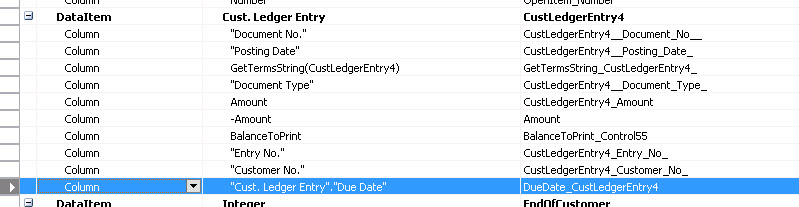
column_2D00_01.jpg


Then I went into the Word Report and added this field:
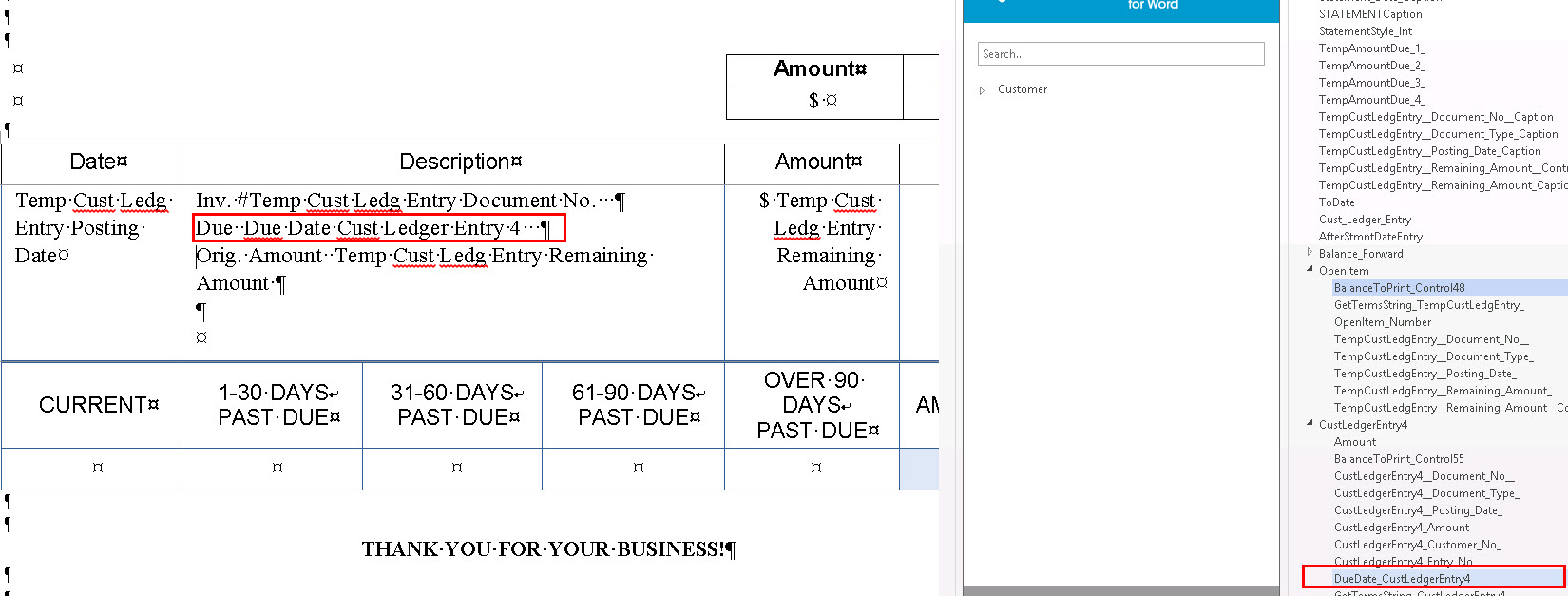
column_2D00_02.jpg


I save this and run the report and the field contents do not display.
I have verified that there is data in that field.

Not sure what I've done wrong.


*This post is locked for comments

I have the same question (0)
  • Suggested answer
    Mohana Yadav Profile Picture
    61,214 Super User 2026 Season 1 on at

    Did you select correct version of report in Report Layout Selection page for that report?

  • Suggested answer
    Suresh Kulla Profile Picture
    50,278 Super User 2026 Season 1 on at

    Add that in the above data item where TempCustLedgEntry is there in your screenshot under OpenItem and then add to the report.

  • Community Member Profile Picture
    on at

    Hi

    Yes I did

  • Community Member Profile Picture
    on at

    Hi

    I moved the field to where you suggested (I think), and then when I went to close it, I got
    the error shown below:

    issue_2D00_blank_2D00_due_2D00_date.jpg

  • Verified answer
    Suresh Kulla Profile Picture
    50,278 Super User 2026 Season 1 on at

    Use TempCustLedgEntry."Due Date" and regarding error i don't think it is causing because of adding that, get into code windows using View -> C/AL Code and try to compile F11 and it should take you the cursor where the error is.

  • Community Member Profile Picture
    on at

    Hi

    So I added in the field as you descibed above - what do I put for Name?
    I tried adding in "TheDueDate" and that didn't work.

    issue_2D00_blank_2D00_02.jpg

  • Suggested answer
    Suresh Kulla Profile Picture
    50,278 Super User 2026 Season 1 on at

    You can use any name you prefer, but i would suggest to be consistent use TempCustLedgEntry_DueDate, TheDueDate why it did not work did you get any error ?

  • Verified answer
    Community Member Profile Picture
    on at

    Hi

    So I have found the row that is giving the issue.
    I'm just new to this and don't know what I need to do to resolve this issue

    issue_2D00_due_2D00_date_2D00_error.jpg

  • Community Member Profile Picture
    on at

    Hi

    I got it working thanks for everything

  • Suresh Kulla Profile Picture
    50,278 Super User 2026 Season 1 on at

    Glad you resolved, adding as TempCustLedgEntry."Due Date" resolved the issue ? please mark the answer which helped so that next time people having same issue know which answer helped to resolve the issue

Under review

Thank you for your reply! To ensure a great experience for everyone, your content is awaiting approval by our Community Managers. Please check back later.

Helpful resources

Quick Links

Introducing the 2026 Season 1 community Super Users

Congratulations to our 2026 Super Stars!

Meet the Microsoft Dynamics 365 Contact Center Champions

We are thrilled to have these Champions in our Community!

Congratulations to the April Top 10 Community Leaders

These are the community rock stars!

Leaderboard > 🔒一 Microsoft Dynamics NAV (Archived)

#1
TAHER_El_Mehdi Profile Picture

TAHER_El_Mehdi 2

#1
sliderxb Profile Picture

sliderxb 2

#1
broberts Profile Picture

broberts 2

Last 30 days Overall leaderboard

Featured topics

Product updates

Dynamics 365 release plans
