web
You’re offline. This is a read only version of the page.
close
Skip to main content

Notifications

Announcements

No record found.

Community site session details

Community site session details

Session Id :
Microsoft Dynamics CRM (Archived)

How to Use Calendar Tool in CRM 2016

(0) ShareShare
ReportReport
Posted on by

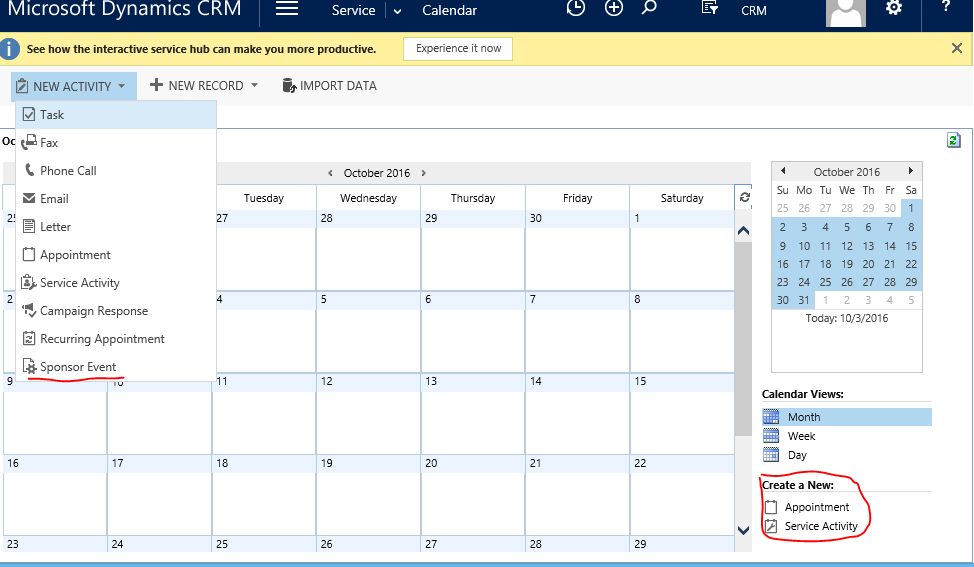
I'm trying to figure out how to use the Calendar feature in CRM 2016.  I'm not talking about the service calendar, but perhaps they're the same thing.  In the 'out of the box' installation there is a 'Calendar' option under 'Tools' in each of the 3 areas (Sales, Service & Marketing).  I want to be able to use that to schedule events we have where we invite clients.  My ideal would be to create an entity where I'd then have an invite list tied to the event.  My issue is that I can't figure out how to get my new entity to show up on the calendar.  I've created the entity as an activity and it shows up in the drop down in the top left under 'New Activity', but when it's created it doesn't show on the calendar.  I can get an 'Appointment' and a 'Service Activity' to show up when using the link on the far right under 'Create a New'.  What am I missing?
5141.Capture.PNG

*This post is locked for comments

I have the same question (0)
  • Verified answer
    Wayne Walton Profile Picture
    13,730 on at

    Custom activities don't show up on the Calendar, only Appointments and Service Calls.  As such, you'd do better extending Appointments to do what you want to do.

    Also, the Portal in CRM is going to be updated for Event Management some time in the next few months, if that would be a better fit for you.

  • Suggested answer
    Nikhitha_09 Profile Picture
    on at
    Is the CRM updated with the event management calender?

Under review

Thank you for your reply! To ensure a great experience for everyone, your content is awaiting approval by our Community Managers. Please check back later.

Helpful resources

Quick Links

Responsible AI policies

As AI tools become more common, we’re introducing a Responsible AI Use…

Neeraj Kumar – Community Spotlight

We are honored to recognize Neeraj Kumar as our Community Spotlight honoree for…

Leaderboard > 🔒一 Microsoft Dynamics CRM (Archived)

#1
SA-08121319-0 Profile Picture

SA-08121319-0 4

#1
Calum MacFarlane Profile Picture

Calum MacFarlane 4

#3
Alex Fun Wei Jie Profile Picture

Alex Fun Wei Jie 2

Last 30 days Overall leaderboard

Featured topics

Product updates

Dynamics 365 release plans
