web
You’re offline. This is a read only version of the page.
close
Skip to main content

Notifications

Announcements

No record found.

Community site session details

Community site session details

Session Id :
Microsoft Dynamics CRM (Archived)

Singleton Retrieve Query should not return more than 1 record When open form editor

(0) ShareShare
ReportReport
Posted on by 40

Hi all

i have a problem with opening form editor for a specific entity
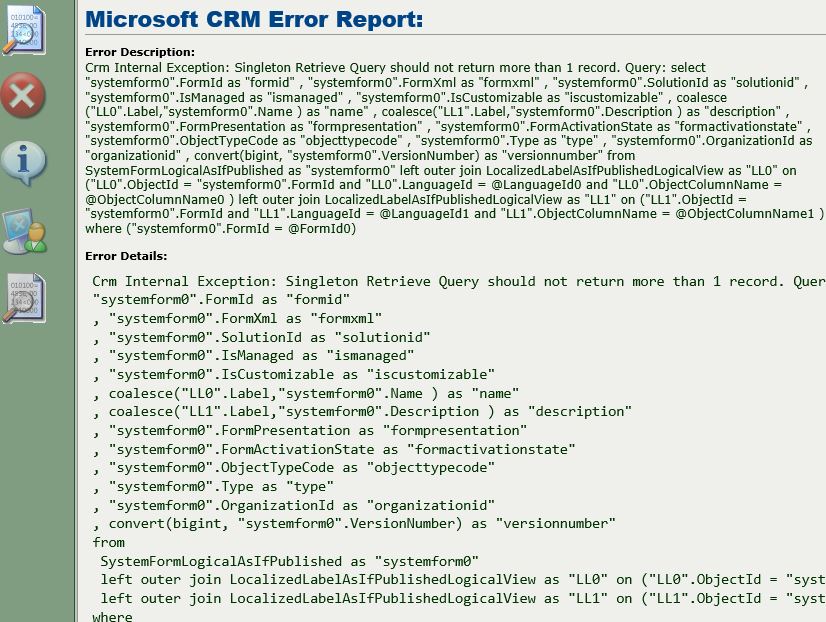
381375.1.JPG

I looking for the solution on the  web and i found this : https://community.dynamics.com/crm/b/passiondynamics/archive/2018/05/09/singleton-retrieve-query-should-not-return-more-than-1-record-manged-solution-import-error-onpremise

But when i executed these queries 

1. 

select ccdc.CustomControlDefaultConfigIdUnique, ccdc.CustomControlDefaultConfigId, ccdc.PrimaryEntityTypeCode, ccdc.OverwriteTime, dn.DependencyNodeId
from CustomControlDefaultConfigBase ccdc
left join DependencyNodeBase dn
ON ccdc.CustomControlDefaultConfigId = dn.ObjectId
where (
CustomControlDefaultConfigId in (
select CustomControlDefaultConfigId
from CustomControlDefaultConfigBase
group by CustomControlDefaultConfigId
having count(distinct PrimaryEntityTypeCode) > 1
)
or PrimaryEntityTypeCode in (
select PrimaryEntityTypeCode
from CustomControlDefaultConfigBase
group by PrimaryEntityTypeCode
having count(distinct CustomControlDefaultConfigId) > 1
)
)
and PrimaryEntityTypeCode >= 10000
and PrimaryEntityTypeCode in (select ObjectTypeCode from Entity)

And

2.

select ccdc.CustomControlDefaultConfigIdUnique, ccdc.CustomControlDefaultConfigId, ccdc.PrimaryEntityTypeCode, ccdc.OverwriteTime, dn.DependencyNodeId
from CustomControlDefaultConfigBase ccdc
left join DependencyNodeBase dn
on ccdc.CustomControlDefaultConfigId = dn.ObjectId
where ccdc.PrimaryEntityTypeCode not in(select ObjectTypeCode from Entity)

I couldn't find anything  and also i can not delete that form  or deactivate it ,any solution ?

Microsoft Dynamics CRM 2016 on-promise - update 8.1

thanks  

*This post is locked for comments

I have the same question (0)
  • Suggested answer
    a33ik Profile Picture
    84,331 Most Valuable Professional on at

    Hello,

    My strong recommendation is to open ticket with Microsoft if you're not sure where error comes from and you know how to fix it using T-SQL tricks.

    Alternatively - hire a seasoned developed/CRM Administrator who can do that.

  • Verified answer
    Aydin Profile Picture
    40 on at

    My problem solved !

    first of all i created new form like my damaged form

    then i open ssms and run  this query

    select *

    from SystemFormLogicalAsIfPublished

    where FormId = 'Damaged formid '

    and i updated FormActivationState to 0 and my damaged form deactivated

    finally when i open the new record of the entity it shows with my new form design !

    if you don't know how to get form id , you must open entity customization page and open damaged form for customizing and in the URL you can find it

    it is not supported solution but it can work

Under review

Thank you for your reply! To ensure a great experience for everyone, your content is awaiting approval by our Community Managers. Please check back later.

Helpful resources

Quick Links

Responsible AI policies

As AI tools become more common, we’re introducing a Responsible AI Use…

Neeraj Kumar – Community Spotlight

We are honored to recognize Neeraj Kumar as our Community Spotlight honoree for…

Leaderboard > 🔒一 Microsoft Dynamics CRM (Archived)

#1
SA-08121319-0 Profile Picture

SA-08121319-0 4

#1
Calum MacFarlane Profile Picture

Calum MacFarlane 4

#3
Alex Fun Wei Jie Profile Picture

Alex Fun Wei Jie 2

Last 30 days Overall leaderboard

Featured topics

Product updates

Dynamics 365 release plans



