web
You’re offline. This is a read only version of the page.
close
Skip to main content

Notifications

Announcements

No record found.

Community site session details

Community site session details

Session Id :
Customer experience | Sales, Customer Insights,...
Suggested Answer

Import Leads & Contacts At Once?

(0) ShareShare
ReportReport
Posted on by

I have a question about importing leads into Dynamics. It seems fairly straightforward to import leads from a CSV file, but how then do I automatically create the Contact records? 

I want to import leads and then have those individuals go into a nurture campaign via Customer Journey. However, only Contacts can be sent through Customer Journeys or sent mass emails.

So if I have a list of 300 individuals I want to add into the system, how do I import them so it creates both a Lead record and Contact record and pairs matches together?

Thanks

I have the same question (0)
  • cloflyMao Profile Picture
    25,210 on at

    Hi Burly,

    You could take following method as reference:

    1. I assume that you had a lead view and it had contained necessary fields as columns.

    Here is my view for import.

    pastedimage1579510028406v1.png

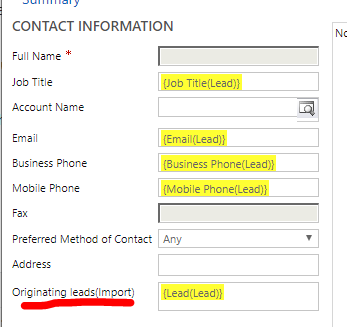
    2. Create a custom lookup field(lead) for Contact entity, and add it contact form so that we can check after import done.

    pastedimage1579510315220v2.png

    3. Create a temporary workflow at organization level:

    entity: lead,

    Starts when record is created(leads not exists before import)

    create contacts from leads fields.
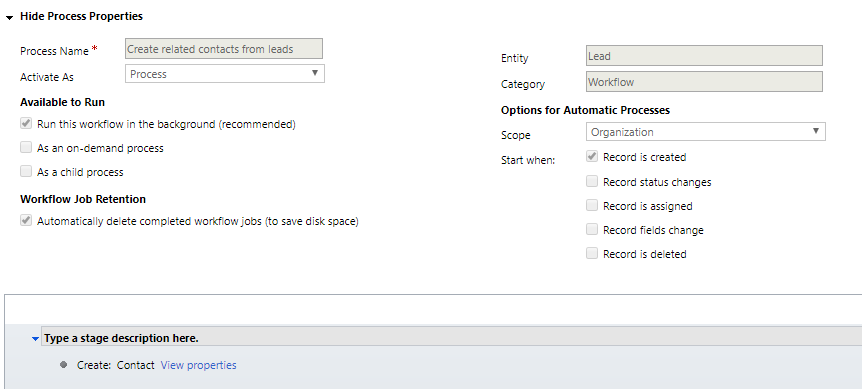
    pastedimage1579510385987v3.png

    set FIrstname and Lastname in Event information section.(because fullname field is not editable)
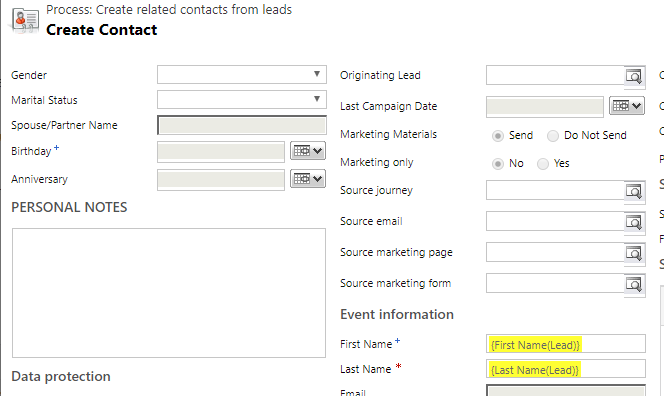
    pastedimage1579510484911v4.png

    set the custom field to Lead(Lead)

    pastedimage1579510527086v5.png

    4. After import work has been done, then check whether all related contacts have been created successfully.
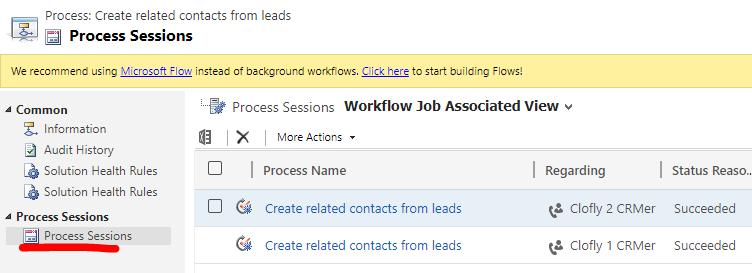
    pastedimage1579510598302v6.png

    If above steps go well, then delete or deactive the workflow.

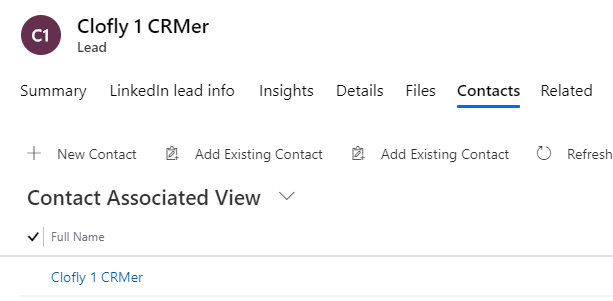
    Result 1:

    We can see associated contacts in lead form.
    pastedimage1579510699773v7.png

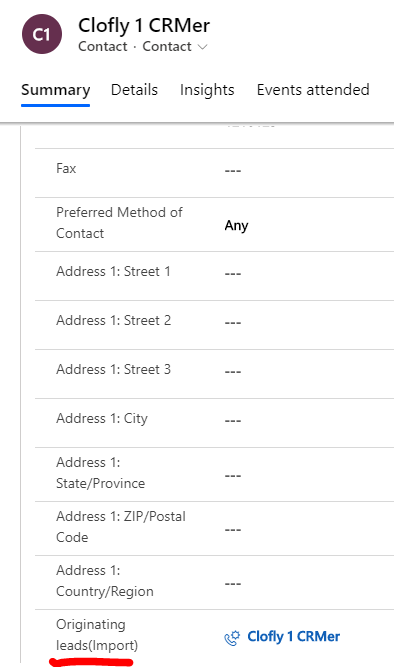
    Result 2:

    We can see originated lead in custom field of contact form.
    pastedimage1579510765182v8.png

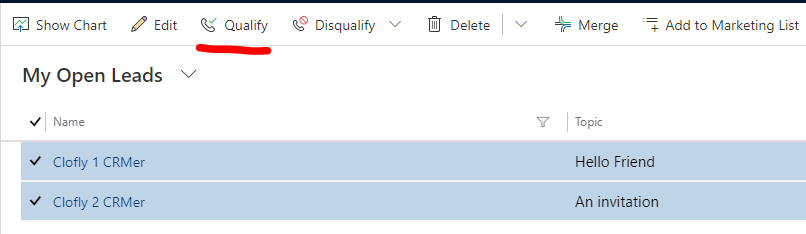
    In addition, you can also bulk qualify leads to contacts, it's an automatic process, but it'll also generate related opportunity records of leads, you may delete them manually.
    pastedimage1579586302602v1.png

    Regards,

    Clofly

  • Suggested answer
    BhaveshL Profile Picture
    60 on at

    Hello Burly,

    In a normal scenario, we create a lead and nurture the lead until we feel it is qualified. Once the lead is ‘Qualified’ the system creates an Opportunity, Company and a Contact record from the information captured during the lead nurturing process. The lead is closed (effectively archived).

    So, it may not be desirable to have a lead record and a contact record for the same person. They will be

    If I were you, I would import the CSV file to the Contact Entity. Probably categorize (Lead, Prospect, Customer, Vendor, Partner, etc).

Under review

Thank you for your reply! To ensure a great experience for everyone, your content is awaiting approval by our Community Managers. Please check back later.

Helpful resources

Quick Links

Responsible AI policies

As AI tools become more common, we’re introducing a Responsible AI Use…

Neeraj Kumar – Community Spotlight

We are honored to recognize Neeraj Kumar as our Community Spotlight honoree for…

Leaderboard > Customer experience | Sales, Customer Insights, CRM

#1
Tom_Gioielli Profile Picture

Tom_Gioielli 70 Super User 2025 Season 2

#2
Gerardo Rentería García Profile Picture

Gerardo Rentería Ga... 33 Most Valuable Professional

#3
Daniyal Khaleel Profile Picture

Daniyal Khaleel 32 Most Valuable Professional

Last 30 days Overall leaderboard

Product updates

Dynamics 365 release plans