web
You’re offline. This is a read only version of the page.
close
Skip to main content

Notifications

Announcements

Community site session details

Community site session details

Session Id :
Finance | Project Operations, Human Resources, ...
Suggested Answer

"A currency code must be specified for an amount field" error on Workflow

(0) ShareShare
ReportReport
Posted on by 5

Hello

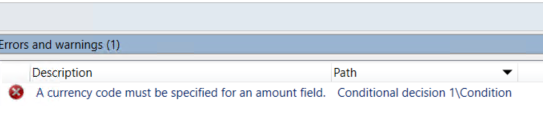
I am currently having an issue where the currency does not show when I add condition for new amount field I added to a Purchase Order Agreement workflow.
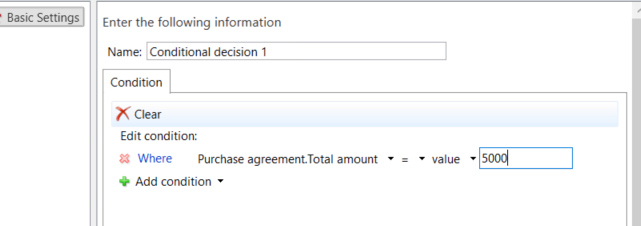
totalamountworkflow.PNGconditionerror.png

In the 'Agreement Header' table on the in the properties of amount field I added, i changed the Relation Context to "Currency", but it does still not fix the issue.
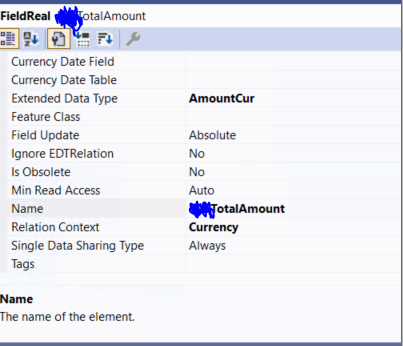
Totalamountfield.PNG

Could you please help me so that when i add a new condition for the workflow, a currency shows on the right, as followed.
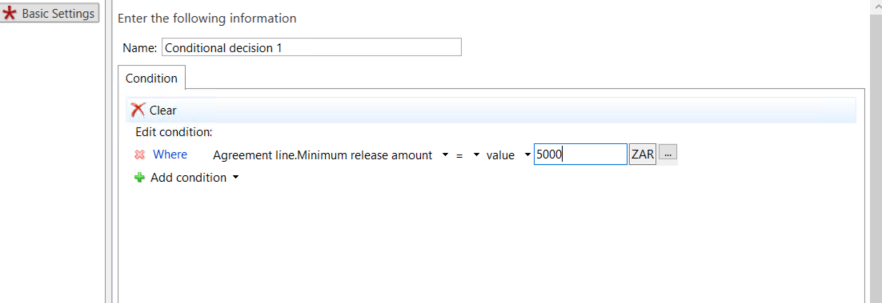
amountworkflowcorrect.PNG

I have the same question (0)
  • Suggested answer
    GirishS Profile Picture
    27,829 Moderator on at

    Hi Luvuyo,

    Please check the below url which will be helpful for you.

    Link talks about ax 2012 but you can try the suggestion given which is similar.

    dynamicsax4u.wordpress.com/.../

    I checked the URL you seem to be missing property like "CurrencyCodeTable,"CurrentCodeField" and "CurrencyCode".

    Fill that property and check again.

    Thanks,

    Girish S

  • Luvuyo Profile Picture
    5 on at

    Hi Girish

    I filled in the missing "CurrencyCodeTable,"CurrentCodeField" and "CurrencyCode", property fields and it still does not work.

    Did i mention that this is on D365F&O and i am using an extension of the Purchase Agreement Header table, maybe this affects the issue as

    well because see this blog post is for AX 2012.

    Thanks

  • GirishS Profile Picture
    27,829 Moderator on at

    I think the currency lookup will show in workflow configuration if your purchase agreement header table has a relation with Currency table. I don't think you have currency field in purchase agreement header table.

    That may be the issue I guess. Refer to standard table like "purch line".

    Thanks,

    Girish S.

  • Nirmal Raja Profile Picture
    4 on at
    Dear Team,
     
    Can you please help me how to fix this issue in D365F&O , i have tried the discussed option.

Under review

Thank you for your reply! To ensure a great experience for everyone, your content is awaiting approval by our Community Managers. Please check back later.

Helpful resources

News and Announcements

Season of Giving Solutions is Here!

Quick Links

Responsible AI policies

As AI tools become more common, we’re introducing a Responsible AI Use…

Neeraj Kumar – Community Spotlight

We are honored to recognize Neeraj Kumar as our Community Spotlight honoree for…

Leaderboard > Finance | Project Operations, Human Resources, AX, GP, SL

#1
Abhilash Warrier Profile Picture

Abhilash Warrier 732 Super User 2025 Season 2

#2
André Arnaud de Calavon Profile Picture

André Arnaud de Cal... 413 Super User 2025 Season 2

#3
Martin Dráb Profile Picture

Martin Dráb 289 Most Valuable Professional

Last 30 days Overall leaderboard

Product updates

Dynamics 365 release plans