web
You’re offline. This is a read only version of the page.
close
Skip to main content

Notifications

Announcements

No record found.

Community site session details

Community site session details

Session Id :
Finance | Project Operations, Human Resources, ...
Suggested Answer

SERVICE UPDATE 10.0.25 Fails at step 25

(0) ShareShare
ReportReport
Posted on by 1,264

Hello, 

I am trying to install the service update 10.0.25 on a developpement environement, 

however it fails at step 25: 
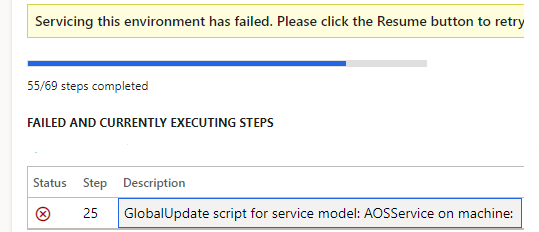
pastedimage1649428485216v1.png

The error log for this step shows the message below:

pastedimage1649429326720v3.png

It looks like it tries to read from the "C:\AOSService\PackagesLocalDirectory "

but in my machine the  AOSService\PackagesLocalDirectory is located on the K disk not the C disk

thank you in advance for your help, 

Kind regards,

Jihane

I have the same question (0)
  • Suggested answer
    André Arnaud de Calavon Profile Picture
    301,141 Super User 2025 Season 2 on at

    Hi Jihane,

    Can you check if there is enough disk space on your C-drive? I have never looked in details, but probably some files are stored temporary on the C-drive during the update. The error mentions "maybeFullPath" which might indicate a lack of available disk space.

  • jihane Profile Picture
    1,264 on at

    Hi André,

    Thank you for your answer,

    on the C Disk : there is 62.7GB free out of 126 GB? is it OK?

    On the K drive : There is 251GB free out of 306GB

    Are there any guidelines to respect when upgrading an environment?

    Kind regards,

    Jihane

  • André Arnaud de Calavon Profile Picture
    301,141 Super User 2025 Season 2 on at

    Hi Jihane,

    I don't know how much of diskspace is required, but I would think this should be sufficient. If you go for a new attempt and it fails again, you can create a support request for Microsoft Support. They might be able to check more details.

  • Horst Cantarutti Profile Picture
    15 on at

    Look if there is an Quality update and install it

  • Suggested answer
    jihane Profile Picture
    1,264 on at

    Hi Horst,

    I am installing the latest QU

    the solution ( suggested By MS) was to change the drive in the file path located in the "K:\AosService\WebRoot\bin\Microsoft.Dynamics.AX.Deployment.Setup.exe.config" file from C to K.

    pastedimage1649865067601v2.png

    pastedimage1649865161392v3.png

    Once the path modified, I was able to upgrade the environment,

    Kind regards, 

    Jihane

  • Horst Cantarutti Profile Picture
    15 on at

    Good Morning Jihane,

    service update is not quality update. 

    But it's good that MS support found another solution for that.

    They didn't mention why this sometimes happen ?


    Best regards Horst

  • MMK007 Profile Picture
    5 on at

    Thanks.. this was the issue for me

Under review

Thank you for your reply! To ensure a great experience for everyone, your content is awaiting approval by our Community Managers. Please check back later.

Helpful resources

Quick Links

Responsible AI policies

As AI tools become more common, we’re introducing a Responsible AI Use…

Neeraj Kumar – Community Spotlight

We are honored to recognize Neeraj Kumar as our Community Spotlight honoree for…

Leaderboard > Finance | Project Operations, Human Resources, AX, GP, SL

#1
André Arnaud de Calavon Profile Picture

André Arnaud de Cal... 456 Super User 2025 Season 2

#2
Martin Dráb Profile Picture

Martin Dráb 429 Most Valuable Professional

#3
BillurSamdancioglu Profile Picture

BillurSamdancioglu 239 Most Valuable Professional

Last 30 days Overall leaderboard

Product updates

Dynamics 365 release plans
