web
You’re offline. This is a read only version of the page.
close
Skip to main content

Notifications

Announcements

Community site session details

Community site session details

Session Id :
Business Central forum

Adding nodes with JsonTextWritter

(0) ShareShare
ReportReport
Posted on by 225

Hi everyone,
Probably is an easy question, but I can't find the way to do this. This is the structure of an XML
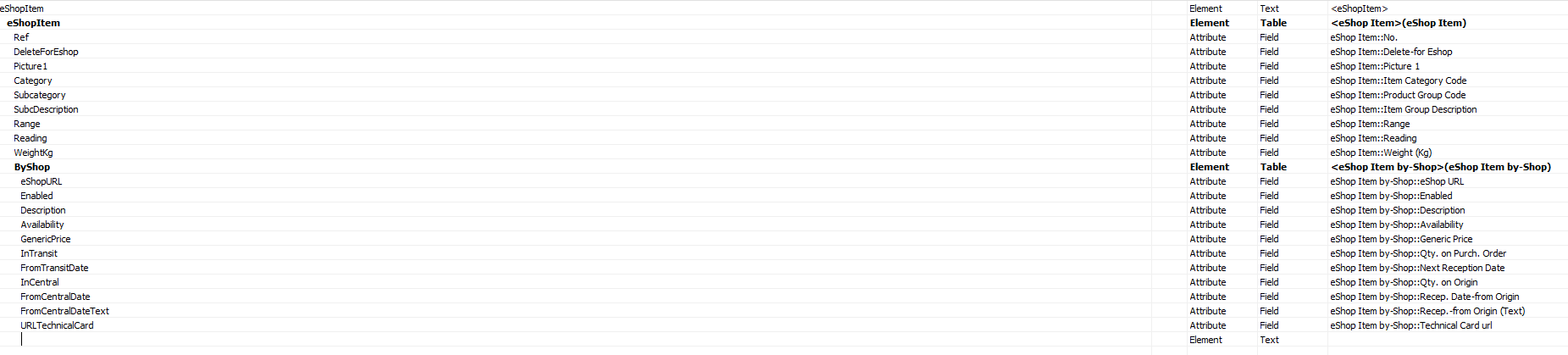
I need to generate a JSON with that structure, and I'm trying in this way:

LOCAL CreateSimpleJsonFile(VAR JSonResponse : DotNet "Newtonsoft.Json.Linq.JObject";peShopItem : Record "eShop Item")

  JSonResponse := JSonResponse.JObject();
  JsonTextWriter := JSonResponse.CreateWriter();
  JsonTextWriter.WritePropertyName('Ref');
  JsonTextWriter.WriteValue(peShopItem."No.");
  JsonTextWriter.WritePropertyName('DeleForEshop');
  JsonTextWriter.WriteValue(peShopItem."Delete-for Eshop");
  JsonTextWriter.WritePropertyName('Picture1');
  JsonTextWriter.WriteValue(peShopItem."Picture 1");
  JsonTextWriter.WritePropertyName('Category');
  JsonTextWriter.WriteValue(peShopItem."Item Category Code");
  JsonTextWriter.WritePropertyName('Subcategory');
  JsonTextWriter.WriteValue(peShopItem."Product Group Code");
  JsonTextWriter.WritePropertyName('SubcDescription');
  JsonTextWriter.WriteValue(peShopItem."Item Group Description");
  JsonTextWriter.WritePropertyName('Range');
  JsonTextWriter.WriteValue(peShopItem.Range);
  JsonTextWriter.WritePropertyName('Reading');
  JsonTextWriter.WriteValue(peShopItem.Reading);
  JsonTextWriter.WritePropertyName('WeightKg');
  JsonTextWriter.WriteValue(peShopItem."Weight (Kg)");
  leShopItembyShop.RESET;
  leShopItembyShop.SETRANGE("Item No.",peShopItem."No.");
  IF leShopItembyShop.FINDSET THEN REPEAT
    JsonTextWriter.WritePropertyName('eShopURL');
    JsonTextWriter.WriteValue(leShopItembyShop."eShop URL");
    JsonTextWriter.WritePropertyName('Enabled');
    JsonTextWriter.WriteValue(leShopItembyShop.Enabled);
    JsonTextWriter.WritePropertyName('Description');
    JsonTextWriter.WriteValue(leShopItembyShop.Description);
    JsonTextWriter.WritePropertyName('Availability');
    JsonTextWriter.WriteValue(leShopItembyShop.Availability);
    JsonTextWriter.WritePropertyName('GenericPrice');
    JsonTextWriter.WriteValue(leShopItembyShop."Generic Price");
    JsonTextWriter.WritePropertyName('InTransit');
    JsonTextWriter.WriteValue(leShopItembyShop."Qty. on Purch. Order");
    JsonTextWriter.WritePropertyName('FromTransitDate');
    JsonTextWriter.WriteValue(leShopItembyShop."Next Reception Date");
    JsonTextWriter.WritePropertyName('InCentral');
    JsonTextWriter.WriteValue(leShopItembyShop."Qty. on Origin");
    JsonTextWriter.WritePropertyName('FromCentralDate');
    JsonTextWriter.WriteValue(leShopItembyShop."Recep. Date-from Origin");
    JsonTextWriter.WritePropertyName('FromCentralDateText');
    JsonTextWriter.WriteValue(leShopItembyShop."Recep.-from Origin (Text)");
    JsonTextWriter.WritePropertyName('URLTechnicalCard');
    JsonTextWriter.WriteValue(leShopItembyShop."Technical Card url");
  UNTIL leShopItembyShop.NEXT = 0;

As you can imagine, after the findset I should create another deeper level of the json, but this is not working. What sentence should I use?

Thank you very much

Categories:
I have the same question (0)
  • Hannes Holst Profile Picture
    5,767 on at

    Hi,

    It depends, if your lines are a Json-Array or a Json-Object.

    If you could post the structure of the Json you are achieving to export?

    Why don't you use the built-in JsonArray, JsonObject, JsonToken and JsonValue?

  • jgaztanaga Profile Picture
    225 on at

    This is how the Json should be like:

    {  "@xmlns": "<urn:microsoft-dynamics-nav/xmlports/eShopItem",  
    "eShopItem": [    
    {      "@Ref": "4802-31",      
    		"@DeleteForEshop": "false",      
    		"@Picture1": "http://www.xxxxxx.com/epicture/xx/4802-31.jpg",      
    		"@Category": "Ixxxx",      
    		"@Subcategory": "",      
    		"@SubcDescription": "",      
    		"@Range": "24\"",      
    		"@Reading": "",      
    		"@WeightKg": "0.070",      
    		"ByShop": [        
    			{          "@eShopURL": "eShop1",          
    						"@Enabled": "true",          
    						"@Description": "RADIUS GAGE",          
    						"@Availability": "8",          
    						"@GenericPrice": "0.00",          
    						"@InTransit": "50",          
    						"@FromTransitDate": "2019-05-20",          
    						"@InCentral": "0",          
    						"@FromCentralDate": "",          
    						"@FromCentralDateText": "",          
    						"@URLTechnicalCard": "http://www.xxxx.com/pdf/xxx/4802.pdf"        },        
    			{          "@eShopURL": "eShop2",          
    						"@Enabled": "true",          
    						"@Description": "Medidor de Radios 25-40 mm",          
    						"@Availability": "8",          
    						"@GenericPrice": "0.00",          
    						"@InTransit": "50",          
    						"@FromTransitDate": "2019-05-20",          
    						"@InCentral": "0",          
    						"@FromCentralDate": "",          
    						"@FromCentralDateText": "",          
    						"@URLTechnicalCard": "http://www.xxxxxx.com/pdf/xxxxx/esp/4802.pdf"        }     
    				]    
    }


    About your las question, I don't know what to answer, it's my first time working with Json, and where are "time-trial",  so I've developed following an example I've found..

  • Hannes Holst Profile Picture
    5,767 on at

    Ok, that's a Json Array.

    You must instruct your Json builder to create an array (an array starts with "[").
    I don't use Newtonsoft for Json anymore, not sure which function will do the job.

    Below code is native AL and will create a structure like you posted above.

                    var
                        PayLoadLineArray: JsonArray;
                        PayLoadLineArray2: JsonArray;
                        PayloadObject: JsonObject;                    
                        PayloadLineObject: JsonObject;
                        PayloadLineObject2: JsonObject;
                        JsonResult: text;
                    begin
                        PayloadObject.Add('@xmlns', '<urn:microsoft-dynamics-nav/xmlports/eShopItem');
                        PayloadLineObject.Add('@Ref', '4802-31');
                        PayloadLineObject.Add('@DeleteForEshop', 'false');
                        // more fields here							
    
                        SalesLine.FindSet;
                        Repeat		
    			Clear(PayloadLineObject2);
    			PayloadLineObject2.Add('@eShopURL', 'eShop1');
    			PayloadLineObject2.Add('@Enabled', 'true');
    			PayloadLineObject2.Add('@Description', 'RADIUS GAGE');
    			// more fields here                   
    			PayLoadLineArray2.Add(PayloadLineObject2);
                        Until SalesLine.Next() = 0;
    
                        PayloadLineObject.Add('ByShop', PayLoadLineArray2);
    
                        PayLoadLineArray.Add(PayloadLineObject); // building the array (starts with "[")
    
                        PayloadObject.Add('eShopItem', PayLoadLineArray); // adding array to the object
    
                        PayloadObject.WriteTo(JsonResult);
                        Message(JsonResult);
                    end;

    Here you can find more information about the AL's native handling of json: https://www.kauffmann.nl/2017/06/24/al-support-for-rest-web-services/

  • jgaztanaga Profile Picture
    225 on at

    Thanks four your answer Hannes, really appreaciatted. I've read before that as you've said, in AL code the issue of Json is solved really easily. But my issue is that I'm developing in NAV2018....

  • Hannes Holst Profile Picture
    5,767 on at

    Yes, after I posted my answer, the thought came to my mind that you might be in the wrong forum :-)

    In this forum it's Business Central only.

  • jgaztanaga Profile Picture
    225 on at

    Sorry, my fault.... I'll open it in the appropiate forum

Under review

Thank you for your reply! To ensure a great experience for everyone, your content is awaiting approval by our Community Managers. Please check back later.

Helpful resources

News and Announcements

Season of Giving Solutions is Here!

Quick Links

November Spotlight Star - Khushbu Rajvi

Congratulations to a top community star!

Forum Structure Changes Coming on 11/8!

In our never-ending quest to help the Dynamics 365 Community members get answers faster …

Dynamics 365 Community Platform update – Oct 28

Welcome to the next edition of the Community Platform Update. This is a status …

Leaderboard > Business Central

Last 30 days Overall leaderboard

Featured topics

Product updates

Dynamics 365 release plans
