web
You’re offline. This is a read only version of the page.
close
Skip to main content

Announcements

No record found.

News and Announcements icon
Community site session details

Community site session details

Session Id :
Microsoft Dynamics AX (Archived)

Advanced Warehouse: Cannot receive item

(0) ShareShare
ReportReport
Posted on by 147

Hi,

I'm setting up Inbound Advanced Warehousing. I have completed all the setups. 

When I am trying to receive the Purchase Order through the AOT form, it's giving the following error. 

Does anyone have an idea about this?

Thanks. 
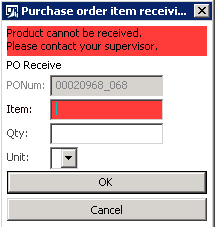
Warehouse-receiving.PNG

*This post is locked for comments

I have the same question (0)
  • Suggested answer
    Ivan (Vanya) Kashperuk Profile Picture
    Microsoft Employee on at

    Do you have Change Management enabled in Purchase Parameters? If yes, the PO needs to be approved before it can be received.

    It could also be that it could not find your item + dimension combination on the PO you entered.. Like for example if you have already registered the entered item. Is it based on a product master?

  • Ahmed Siddiqui Profile Picture
    147 on at

    Hi.

    I'm in the correct warehouse. I don't know where to find  'warehouse allows receipt' option.

  • Ahmed Siddiqui Profile Picture
    147 on at

    The PO is already confirmed.

    The dimension combination on the PO line is also correct.

  • Ivan (Vanya) Kashperuk Profile Picture
    Microsoft Employee on at

    I'm not talking about confirmation, but approval, as part of the change management workflow.

    In standard, those are the 2 reasons this message can be shown. So unless you customized, it means you did not answer correct on one of my questions.

    can you show me the pO line with all dimensions

  • Ahmed Siddiqui Profile Picture
    147 on at

    Hi,

    I haven't activated change management for this test.

  • Suggested answer
    Sagar Suman Profile Picture
    6,770 Super User 2026 Season 1 on at

    Hi Ahmed,

    This error come if you try to receive and item which has been already received.

    Kindly check the item in the purchase order line > update line > Registration > and check if the receipt status of the item is registered.

    If you have more than one item in this purchase order then try to receive the right item which is not earlier received.

    1667.Mobile-device-error.jpg

Under review

Thank you for your reply! To ensure a great experience for everyone, your content is awaiting approval by our Community Managers. Please check back later.

Helpful resources

Quick Links

Introducing the 2026 Season 1 community Super Users

Congratulations to our 2026 Super Stars!

Meet the Microsoft Dynamics 365 Contact Center Champions

We are thrilled to have these Champions in our Community!

Congratulations to the March Top 10 Community Leaders

These are the community rock stars!

Leaderboard > 🔒一 Microsoft Dynamics AX (Archived)

#1
CP04-islander Profile Picture

CP04-islander 39

#2
Michel ROY Profile Picture

Michel ROY 14

#3
imran ul haq Profile Picture

imran ul haq 8

Last 30 days Overall leaderboard

Featured topics

Product updates

Dynamics 365 release plans
