web
You’re offline. This is a read only version of the page.
close
Skip to main content

Notifications

Announcements

Community site session details

Community site session details

Session Id :
Finance | Project Operations, Human Resources, ...
Suggested Answer

Receiving "Forbidden" when trying to create a new workflow

(0) ShareShare
ReportReport
Posted on by 10

We are receiving an error message " Forbidden" When we try to create any new workflow. 

below are the steps that generates the issue, knowing that our client's environment is Production On-Premises. 

Knowing that the same is working fine on the UAT environment.

Ex.

1. Open General Ledger\Setup\Journal Setup

2. Select General Ledger Workflows

3. Click new

4. Select Ledger Daily Workflow (a clickOnce app will download)

5. enter user name and password. (authenticates successfully)

6. an error message "Forbidden" is received without any details.
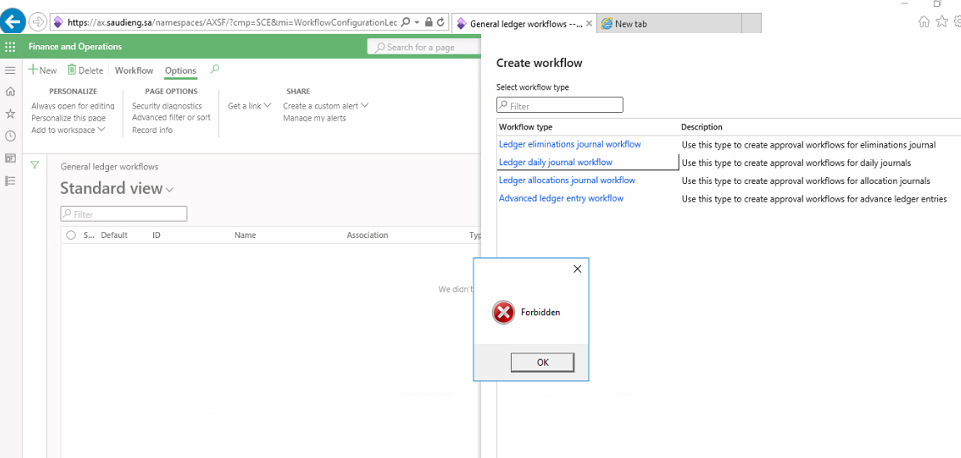
4478.Forbidden.png

I have the same question (0)
  • Suggested answer
    WillWU Profile Picture
    22,363 on at

    Hi partner,

    Please try to run the "rundll32 dfshim CleanOnlineAppCache" command in cmd as administrator.

    The Workflow Editor and Report Designer for Financial reporting are started as ClickOnce applications. They require a 64-bit-compatible operating system. Only Microsoft Edge and Internet Explorer (on a supported version of Microsoft Windows) support ClickOnce applications out of the box. If you're using Chrome, you must install a ClickOnce extension, such as Meta4 to use ClickOnce applications. If you use Chrome in incognito mode, make sure that the ClickOnce extension is also enabled for incognito mode.

    You could check MS document:

    docs.microsoft.com/.../system-requirements

  • fkhairalla Profile Picture
    10 on at

    Hi Will,

    I have tried this before from another post which was shared previously but did not solve the issue.

    Unfortunately, this probably solves the issue related to downloading the application, however in our case the app is downloaded and runs and authenticates successfully then we get the message.

    By the way we also have the same issue with Management reporter as you mentioned, although we are using Edge / IE.

  • MarkBoss Profile Picture
    5 on at

    Hi fkhairalla,

    did you get a solution for this issue?

  • Oualili Anas Profile Picture
    25 on at

    Hi fkhairalla

    did you get a solution for this issue?

  • Community member Profile Picture
    2 on at
    Make sure you are logging in with your admin account or update your user in admin provisioning. 

Under review

Thank you for your reply! To ensure a great experience for everyone, your content is awaiting approval by our Community Managers. Please check back later.

Helpful resources

Quick Links

Responsible AI policies

As AI tools become more common, we’re introducing a Responsible AI Use…

Congratulations to our 2025 Community Spotlights

Thanks to all of our 2025 Community Spotlight stars!

Leaderboard > Finance | Project Operations, Human Resources, AX, GP, SL

#1
André Arnaud de Calavon Profile Picture

André Arnaud de Cal... 584 Super User 2025 Season 2

#2
Abhilash Warrier Profile Picture

Abhilash Warrier 428 Super User 2025 Season 2

#3
Martin Dráb Profile Picture

Martin Dráb 331 Most Valuable Professional

Last 30 days Overall leaderboard

Product updates

Dynamics 365 release plans


