web
You’re offline. This is a read only version of the page.
close
Skip to main content

Announcements

No record found.

News and Announcements icon
Community site session details

Community site session details

Session Id :
Microsoft Dynamics NAV (Archived)

Comment Lines on Reports

(0) ShareShare
ReportReport
Posted on by

I'm trying to add Item comments to a Report however the results are coming back blank. 

This is my Data set Designer 
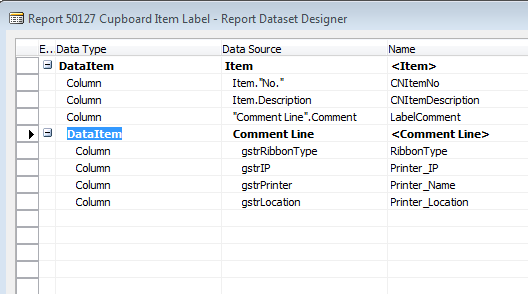
117.PNG

These are the properties between the Comment Line and Item. 
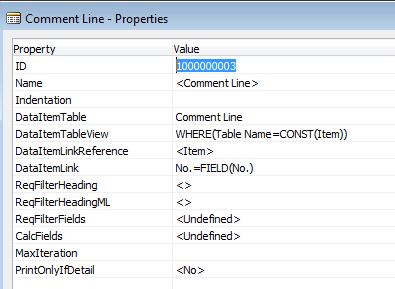
118.PNG

In my code the recCommentLine isn't returning anything it should.  RecCommentLine is referring to 'Comment Line' Table. 


recCommentLine.RESET;
recCommentLine.SETRANGE("Table Name",recCommentLine."Table Name"::Item);
recCommentLine.SETRANGE("No.", Item."No.");
recCommentLine.SETRANGE("Comment Type", recCommentLine."Comment Type"::LabelRibbon);
IF "Comment Line".FINDLAST THEN
gstrRibbonType := recCommentLine.Comment;

"Comment Line".RESET;
"Comment Line".SETRANGE("No.", Item."No.");
"Comment Line".SETRANGE("Comment Type", "Comment Line"."Comment Type"::LabelIP);
IF "Comment Line".FINDFIRST THEN
gstrIP := "Comment Line".Comment;

"Comment Line".RESET;
"Comment Line".SETRANGE("No.", Item."No.");
"Comment Line".SETRANGE("Comment Type","Comment Line"."Comment Type"::LabelPrinter);
IF "Comment Line".FINDFIRST THEN
gstrPrinter := "Comment Line".Comment;

"Comment Line".RESET;
"Comment Line".SETRANGE("No.", Item."No.");
"Comment Line".SETRANGE("Comment Type", "Comment Line"."Comment Type"::LabelLocation);
IF "Comment Line".FINDFIRST THEN
gstrLocation := "Comment Line".Comment;

*This post is locked for comments

I have the same question (0)
  • Verified answer
    Community Member Profile Picture
    on at

    I've tried both recCommetLine and "Comment Line", neither work correctly for now..

  • Suggested answer
    Mohana Yadav Profile Picture
    61,214 Super User 2026 Season 1 on at

    IF "Comment Line".FINDLAST THEN

    you are setting filters on recCommetLine  and checking FINDLAST on "Comment Line"?

    Did you get Item record before this code? check whether you have proper Item."No."

Under review

Thank you for your reply! To ensure a great experience for everyone, your content is awaiting approval by our Community Managers. Please check back later.

Helpful resources

Quick Links

Introducing the 2026 Season 1 community Super Users

Congratulations to our 2026 Super Stars!

Meet the Microsoft Dynamics 365 Contact Center Champions

We are thrilled to have these Champions in our Community!

Congratulations to the April Top 10 Community Leaders

These are the community rock stars!

Leaderboard > 🔒一 Microsoft Dynamics NAV (Archived)

Last 30 days Overall leaderboard

Featured topics

Product updates

Dynamics 365 release plans
